3.13 MoveIt Python API 实战
一、核心问题:如何用 Python 代码控制机械臂?
在第 12 章中,我们学会了通过 RViz 的可视化界面拖拽末端执行器、点击 Plan and Execute 来控制机械臂。这在调试阶段非常直观,但在实际应用中——比如视觉引导抓取、自动化流水线、人机协作——我们需要的是:用代码精确控制机械臂。
本章的核心答案是:MoveItPy。
它是 MoveIt2 官方提供的 Python API 入口,让你可以用几行代码完成:
- 运动规划:指定目标位姿或关节角度,自动规划无碰撞轨迹
- 轨迹执行:将规划好的轨迹发送给机械臂执行(通过第 12 章学过的 Action 通信)
- 场景管理:添加/移除障碍物,实现智能避障
- 状态查询:实时获取关节角度和末端位姿
- 运动约束:限制运动过程中的姿态(如搬运水杯时保持末端水平)
1.1 从 RViz GUI 到 Python 代码
| 操作方式 | 适用场景 | 底层原理 |
|---|---|---|
| RViz GUI(第 12 章) | 调试、手动测试 | RViz 的 MotionPlanning 插件内部调用 MoveIt API |
| Python API(本章) | 自动化、视觉引导、生产部署 | 直接调用 MoveItPy,与 MoveIt 核心节点交互 |
关键理解:无论用 RViz 还是 Python 代码,底层都是同一套通信机制——MoveIt 规划轨迹后,通过 FollowJointTrajectory Action 发送给控制器执行,通过 /joint_states Topic 接收机械臂反馈。
1.2 核心三件套
| 对象 | 获取方式 | 职责 | 类比 |
|---|---|---|---|
| MoveItPy | MoveItPy(config_dict=...) |
总入口,管理所有组件,执行轨迹 | 汽车本身 |
| PlanningComponent | robot.get_planning_component("episode_arm") |
设定目标、执行规划 | 导航仪 |
| PlanningSceneMonitor | robot.get_planning_scene_monitor() |
管理场景(障碍物、碰撞检测、状态查询) | 车载雷达 |
这三个对象贯穿本章所有演示,后续代码中会反复用到。
1.3 MoveItPy 架构概览
┌──────────────────────────────────────────────────────────┐
│ 你的 Python 代码 │
│ MoveItPy + PlanningComponent + PlanningSceneMonitor │
└──────────────────────────────────────────────────────────┘
│
▼
┌──────────────────────────────────────────────────────────┐
│ ROS2 通信层(与第 12 章一致) │
│ Action: /episode_arm_controller/follow_joint_trajectory │
│ Topic : /joint_states /robot_description │
└──────────────────────────────────────────────────────────┘
│
▼
┌──────────────────────────────────────────────────────────┐
│ 执行层(模拟或真实) │
│ Demo: mock_components 真实: robot_interface_node │
└──────────────────────────────────────────────────────────┘
与第 12 章的关系:MoveItPy 并不替代第 12 章的通信架构,而是在其之上提供了更方便的编程接口。底层仍然是
FollowJointTrajectoryAction(下行)和/joint_statesTopic(上行)。
二、MoveIt Python API 全景图
MoveIt Python API 官方文档地址:https://moveit.picknik.ai/main/doc/api/python_api/api.html
它提供了 10 个模块,覆盖从底层机器人模型到高层运动规划的完整功能:
2.1 模块总览表
| 模块 | 功能定位 | 关键类/函数 | 本章是否演示 |
|---|---|---|---|
moveit.planning |
顶层入口,提供 MoveItPy 和 PlanningComponent | MoveItPy、PlanningComponent、PlanningSceneMonitor |
是(核心) |
moveit.core.robot_state |
机器人运动学状态(关节位置/速度/加速度),支持 FK/IK | RobotState:.joint_positions、.set_from_ik()、.get_frame_transform()、.get_jacobian() |
是(大量使用) |
moveit.core.robot_model |
URDF+SRDF 定义的运动学模型(关节组、连杆、限位) | RobotModel:.get_joint_model_group()、JointModelGroup:.active_joint_model_names |
是(间接使用) |
moveit.core.planning_scene |
规划场景(碰撞物体 + 机器人状态),支持碰撞检测和路径验证 | PlanningScene:.apply_collision_object()、.is_state_colliding()、.is_path_valid() |
是(演示 4) |
moveit.core.planning_interface |
运动规划结果的封装 | MotionPlanResponse:.trajectory、.error_code、.planning_time |
是(plan() 返回值) |
moveit.core.robot_trajectory |
规划轨迹(路径点 + 时间参数化),支持平滑处理 | RobotTrajectory:.apply_totg_time_parameterization()、.apply_ruckig_smoothing() |
是(间接使用) |
moveit.core.kinematic_constraints |
构建运动约束消息(目标约束/路径约束的快捷函数) | construct_joint_constraint()、construct_link_constraint() |
是(演示 6-8) |
moveit.core.collision_detection |
底层碰撞检测原语(碰撞请求/结果/许可矩阵) | AllowedCollisionMatrix、CollisionRequest、CollisionResult |
否(间接通过 PlanningScene) |
moveit.core.controller_manager |
轨迹执行状态追踪 | ExecutionStatus:.status |
否(间接通过 execute()) |
moveit.servo_client |
实时遥操作客户端(手柄/VR 控制器 → 实时速度指令) | TeleopDevice、PS4DualShockTeleop |
否(进阶功能) |
2.2 模块层次关系
┌───────────────────────────────────────────────────────────────────┐
│ 你的代码直接使用 │
│ ┌─────────────────────────────────────────────────────────────┐ │
│ │ moveit.planning │ │
│ │ MoveItPy / PlanningComponent / PlanningSceneMonitor │ │
│ └──────────┬──────────────────┬──────────────────┬────────────┘ │
│ │ │ │ │
│ ▼ ▼ ▼ │
│ ┌──────────────┐ ┌────────────────────┐ ┌──────────────────┐ │
│ │ robot_state │ │ planning_interface │ │ planning_scene │ │
│ │ (关节状态 │ │ (规划结果) │ │ (碰撞物体/检测) │ │
│ │ FK/IK) │ │ │ │ │ │
│ └──────┬───────┘ └─────────┬──────────┘ └────────┬─────────┘ │
│ │ │ │ │
│ ▼ ▼ ▼ │
│ ┌──────────────┐ ┌────────────────────┐ ┌──────────────────┐ │
│ │ robot_model │ │ robot_trajectory │ │ collision_ │ │
│ │ (URDF/SRDF │ │ (轨迹点+时间参数) │ │ detection │ │
│ │ 运动学模型) │ │ │ │ (碰撞检测底层) │ │
│ └──────────────┘ └────────────────────┘ └──────────────────┘ │
│ │
│ ┌─────────────────────────────────────────────────────────────┐ │
│ │ 辅助模块 │ │
│ │ kinematic_constraints (约束构建) │ │
│ │ controller_manager (执行状态) │ │
│ │ servo_client (实时遥操作) │ │
│ └─────────────────────────────────────────────────────────────┘ │
└───────────────────────────────────────────────────────────────────┘
先跑代码,再学原理:每个模块的详细 API 和代码示例,我们放到第四节(代码部署运行之后)再逐一讲解。先把代码跑起来、看到机械臂动起来,再回头理解原理会更轻松。
三、代码部署与运行
先跑起来,再逐步理解:本节直接给出完整代码和运行方式。后续章节会逐一讲解每个功能的原理和实现细节——你可以边看讲解,边运行对应的演示来验证效果。
3.1 安装 MoveIt Python API
MoveItPy 需要单独安装(MoveIt2 默认只包含 C++ 接口):
sudo apt install ros-jazzy-moveit-py -y
3.2 创建代码文件
与第 12 章一样,我们直接将代码放到已有的 py_episode 包中,无需创建新包:
touch ~/ros2_ws/src/py_episode/py_episode/moveit_api_demo.py
将以下完整代码保存为 ~/ros2_ws/src/py_episode/py_episode/moveit_api_demo.py:
#!/usr/bin/env python3
"""
MoveIt Python API 演示节点
演示内容:
演示 1: 命名配置(move_to_target)
演示 2: 关节空间目标(move_to_degrees)
演示 3: 位姿目标(move_to_pose)
演示 4: 规划场景与避障
演示 5: 获取当前状态
演示 6: 关节约束目标(construct_joint_constraint)
演示 7: 链接约束目标(construct_link_constraint)
演示 8: 路径约束 — 搬水杯场景
"""
import rclpy
from rclpy.node import Node
from moveit.planning import MoveItPy, PlanningComponent
from moveit_configs_utils import MoveItConfigsBuilder
from moveit.core.robot_state import RobotState
from geometry_msgs.msg import PoseStamped, Pose
from moveit_msgs.msg import CollisionObject, Constraints, OrientationConstraint
from shape_msgs.msg import SolidPrimitive
import numpy as np
import time
import os
from typing import Dict, List
import tf_transformations
import random
class MoveItAPIDemo(Node):
"""MoveIt Python API 演示节点"""
def __init__(self):
"""初始化节点和 MoveIt 核心三件套"""
super().__init__('moveit_api_demo_node')
# ==================== 参数声明 ====================
self.declare_parameter('robot_name', 'episode1_urdf_1113')
self.declare_parameter('package_name', 'episode1_urdf_student_moveit')
self.declare_parameter('planning_group', 'episode_arm')
self.declare_parameter('planning_pipeline', 'ompl')
self.declare_parameter('planning_attempts', 3)
self.declare_parameter('max_velocity_scaling', 0.7)
self.declare_parameter('max_acceleration_scaling', 0.3)
self.declare_parameter('demo_group', 0) # 0=全部, 1-8=指定演示, 71=7a, 72=7b, 73=7c
# ==================== 获取参数 ====================
robot_name = self.get_parameter('robot_name').value
package_name = self.get_parameter('package_name').value
self.planning_group = self.get_parameter('planning_group').value
planning_pipeline = self.get_parameter('planning_pipeline').value
planning_attempts = self.get_parameter('planning_attempts').value
max_velocity_scaling = self.get_parameter('max_velocity_scaling').value
max_acceleration_scaling = self.get_parameter('max_acceleration_scaling').value
demo_group_int = self.get_parameter('demo_group').value
demo_map = {0: 'all', 71: '7a', 72: '7b', 73: '7c'}
self.demo_group = demo_map.get(demo_group_int, str(demo_group_int))
self.get_logger().info(f"正在初始化 {robot_name} 的 MoveIt API 演示")
# ==================== 构建配置 ====================
robot_config = self._build_moveit_config(
robot_name, package_name, planning_pipeline,
planning_attempts, max_velocity_scaling, max_acceleration_scaling
)
# ==================== 初始化 MoveIt 核心三件套 ====================
try:
self.robot = MoveItPy(node_name="moveit_py", config_dict=robot_config)
self.arm: PlanningComponent = self.robot.get_planning_component(self.planning_group)
self.planning_scene_monitor = self.robot.get_planning_scene_monitor()
self.get_logger().info("等待机器人状态...")
time.sleep(1.0)
self.get_logger().info("MoveIt 初始化成功")
except Exception as e:
self.get_logger().error(f"MoveIt 初始化失败: {e}")
raise
def _build_moveit_config(self, robot_name, package_name, planning_pipeline,
planning_attempts, max_velocity_scaling,
max_acceleration_scaling) -> Dict:
"""构建 MoveIt 配置字典"""
base_config = MoveItConfigsBuilder(
robot_name=robot_name, package_name=package_name
).robot_description_semantic(
"config/episode1_urdf_1113.srdf", {"name": robot_name}
).planning_pipelines(
default_planning_pipeline=planning_pipeline
).to_dict()
# 添加 per-group OMPL 覆盖(默认规划器、投影评估器)
if "ompl" in base_config:
base_config["ompl"][self.planning_group] = {
"default_planner_config": "RRTConnect",
"planner_configs": ["RRTConnect", "RRT", "PRM", "EST", "BiEST"],
"projection_evaluator": "joints(joint1,joint2,joint3)",
}
config = {
**base_config,
"planning_scene_monitor": {
"name": "planning_scene_monitor",
"robot_description": "robot_description",
"joint_state_topic": "/joint_states",
"attached_collision_object_topic": "/moveit_cpp/planning_scene_monitor",
"publish_planning_scene_topic": "/moveit_cpp/publish_planning_scene",
"monitored_planning_scene_topic": "/moveit_cpp/monitored_planning_scene",
"wait_for_initial_state_timeout": 10.0,
},
"planning_pipelines": {"pipeline_names": [planning_pipeline]},
"plan_request_params": {
"planning_attempts": planning_attempts,
"planning_pipeline": planning_pipeline,
"max_velocity_scaling_factor": max_velocity_scaling,
"max_acceleration_scaling_factor": max_acceleration_scaling,
},
"trajectory_execution": {"allowed_start_tolerance": 0.05},
}
return config
# ==================== 运动控制 ====================
def move_to_target(self, target_name: str) -> bool:
"""规划并执行到命名配置(如 "home"、"test1")"""
self.arm.set_start_state_to_current_state()
self.arm.set_goal_state(configuration_name=target_name)
plan_result = self.arm.plan()
if plan_result:
self.robot.execute(plan_result.trajectory, controllers=[])
time.sleep(0.5)
return True
self.get_logger().warn(f"规划到 '{target_name}' 失败")
return False
def move_to_degrees(self, angles_deg: List[float]) -> bool:
"""规划并执行到指定关节角度(电机角度,度)"""
offsets = [180, 90, 83, 30, 110, 30]
joint_angles_rad = [np.deg2rad(angles_deg[i] - offsets[i]) for i in range(6)]
joint_target = {f"joint{i+1}": joint_angles_rad[i] for i in range(6)}
robot_state = RobotState(self.robot.get_robot_model())
robot_state.joint_positions = joint_target
self.arm.set_start_state_to_current_state()
self.arm.set_goal_state(robot_state=robot_state)
plan_result = self.arm.plan()
if plan_result:
self.robot.execute(plan_result.trajectory, controllers=[])
time.sleep(0.5)
return True
self.get_logger().warn(f"规划到关节角度 {angles_deg} 失败")
return False
def move_to_pose(self, x, y, z, x_rot, y_rot, z_rot) -> bool:
"""规划并执行到指定位姿(位置:mm, 旋转:rad)"""
q_x, q_y, q_z, q_w = tf_transformations.quaternion_from_euler(
x_rot, y_rot, z_rot, axes='sxyz'
)
pose_goal = PoseStamped()
pose_goal.header.frame_id = "base_link"
pose_goal.pose.position.x = x / 1000.0
pose_goal.pose.position.y = y / 1000.0
pose_goal.pose.position.z = z / 1000.0
pose_goal.pose.orientation.x = q_x
pose_goal.pose.orientation.y = q_y
pose_goal.pose.orientation.z = q_z
pose_goal.pose.orientation.w = q_w
self.arm.set_start_state_to_current_state()
self.arm.set_goal_state(pose_stamped_msg=pose_goal, pose_link="link6")
plan_result = self.arm.plan()
if plan_result:
self.robot.execute(plan_result.trajectory, controllers=[])
time.sleep(0.5)
self.get_logger().info("位姿目标运动成功")
return True
self.get_logger().warn(f"位姿目标 [{x:.1f}, {y:.1f}, {z:.1f}]mm 规划失败")
return False
# ==================== 场景管理 ====================
def add_collision_box(self, box_id, position, dimensions):
"""向规划场景添加碰撞箱体(position/dimensions 单位: 米)"""
with self.planning_scene_monitor.read_write() as scene:
collision_object = CollisionObject()
collision_object.header.frame_id = "base_link"
collision_object.id = box_id
box_pose = Pose()
box_pose.position.x, box_pose.position.y, box_pose.position.z = position
box_pose.orientation.w = 1.0
box = SolidPrimitive()
box.type = SolidPrimitive.BOX
box.dimensions = dimensions
collision_object.primitives.append(box)
collision_object.primitive_poses.append(box_pose)
collision_object.operation = CollisionObject.ADD
scene.apply_collision_object(collision_object)
scene.current_state.update()
self.get_logger().info(f"已添加碰撞箱体 '{box_id}'")
def remove_collision_object(self, object_id):
"""移除所有碰撞物体"""
with self.planning_scene_monitor.read_write() as scene:
scene.remove_all_collision_objects()
scene.current_state.update()
self.get_logger().info("已移除所有碰撞物体")
def check_pose_collision(self, position, rotation) -> bool:
"""检查指定位姿是否碰撞(position:mm, rotation:rad)"""
with self.planning_scene_monitor.read_only() as scene:
robot_state = scene.current_state
original_joint_positions = robot_state.get_joint_group_positions(self.planning_group)
pose_goal = Pose()
pose_goal.position.x = position[0] / 1000.0
pose_goal.position.y = position[1] / 1000.0
pose_goal.position.z = position[2] / 1000.0
q_x, q_y, q_z, q_w = tf_transformations.quaternion_from_euler(*rotation, axes='sxyz')
pose_goal.orientation.x, pose_goal.orientation.y = q_x, q_y
pose_goal.orientation.z, pose_goal.orientation.w = q_z, q_w
robot_state.set_from_ik(self.planning_group, pose_goal, "link6")
robot_state.update()
is_colliding = scene.is_state_colliding(
robot_state=robot_state,
joint_model_group_name=self.planning_group,
verbose=True,
)
# 恢复原始状态
robot_state.set_joint_group_positions(self.planning_group, original_joint_positions)
robot_state.update()
return is_colliding
# ==================== 状态查询 ====================
def get_current_degrees(self) -> List[float]:
"""获取当前关节角度(电机角度,度)"""
with self.planning_scene_monitor.read_only() as scene:
robot_state = scene.current_state
joint_positions = robot_state.get_joint_group_positions(self.planning_group)
offsets = [180, 90, 83, 30, 110, 30]
return [np.rad2deg(joint_positions[i]) + offsets[i] for i in range(6)]
def get_current_pose(self) -> Dict:
"""获取当前 link6 位姿(位置:mm, 旋转:rad/deg)"""
with self.planning_scene_monitor.read_only() as scene:
robot_state = scene.current_state
robot_state.update()
transform_matrix = robot_state.get_frame_transform("link6")
position = [transform_matrix[i, 3] * 1000.0 for i in range(3)]
quaternion = tf_transformations.quaternion_from_matrix(transform_matrix)
euler_rad = tf_transformations.euler_from_quaternion(quaternion, axes='sxyz')
return {
'position': position,
'rotation_rad': list(euler_rad),
'rotation_deg': [np.rad2deg(a) for a in euler_rad],
}
# ==================== 演示 1-5(基础功能) ====================
def run_demo_1(self):
"""演示 1: 命名配置"""
self.get_logger().info("=== 演示 1: 命名配置 ===")
self.move_to_target("home")
time.sleep(1.0)
self.move_to_target("test1")
time.sleep(1.0)
self.move_to_target("home")
def run_demo_2(self):
"""演示 2: 关节空间目标"""
self.get_logger().info("=== 演示 2: 关节空间目标 ===")
self.move_to_target("home")
degree_list = [
[55.43, 137.77, 98.84, 73.26, 89.22, 86.58],
[137.22, 98.41, 108.23, 125.02, 39.80, 155.00],
[180.00, 90.00, 83.00, 30.00, 110.00, 30.00],
[252.12, 119.16, 58.00, 78.40, 176.26, 156.51],
[338.00, 143.12, 77.44, 154.99, 208.63, 154.99],
[180.00, 90.00, 83.00, 30.00, 110.00, 30.00],
]
for angles in degree_list:
self.move_to_degrees(angles)
time.sleep(0.5)
def run_demo_3(self):
"""演示 3: 位姿目标(随机位姿)"""
self.get_logger().info("=== 演示 3: 位姿目标 ===")
self.move_to_target("home")
for i in range(10):
position = [
260.0 + random.uniform(-100.0, 100.0),
0.0 + random.uniform(-150.0, 150.0),
300.0 + random.uniform(-100.0, 100.0),
]
rotation_deg = [
180.0 + random.uniform(-30.0, 30.0),
0.0 + random.uniform(-25.0, 25.0),
90.0 + random.uniform(-30.0, 30.0),
]
rotation_rad = [np.deg2rad(a) for a in rotation_deg]
self.get_logger().info(
f"尝试位姿 {i+1}: 位置=[{position[0]:.1f}, {position[1]:.1f}, {position[2]:.1f}]mm, "
f"旋转=[{rotation_deg[0]:.1f}, {rotation_deg[1]:.1f}, {rotation_deg[2]:.1f}]°"
)
success = self.move_to_pose(
position[0], position[1], position[2],
rotation_rad[0], rotation_rad[1], rotation_rad[2],
)
if success:
self.get_logger().info(f"位姿 {i+1} 运动成功")
time.sleep(1.0)
else:
self.get_logger().warn(f"位姿 {i+1} 运动失败,跳过")
time.sleep(0.5)
# move to home
self.move_to_target("home")
time.sleep(1.0)
def run_demo_4(self):
"""演示 4: 规划场景与避障"""
self.get_logger().info("=== 演示 4: 规划场景与避障 ===")
self.move_to_target("home")
self.move_to_pose(300.0, 200.0, 200.0, np.pi, 0.0, np.pi / 2)
time.sleep(1.0)
self.get_logger().info("添加碰撞箱体到规划场景...")
self.add_collision_box("obstacle_box", [0.4, 0.0, 0.2], [0.05, 0.05, 0.05])
time.sleep(1.0)
is_colliding = self.check_pose_collision(
[300.0, 200.0, 200.0], [np.pi, 0.0, np.pi / 2]
)
self.get_logger().info(f"当前位姿碰撞状态: {is_colliding}")
time.sleep(2.0)
self.get_logger().info("规划绕过障碍物的运动...")
success = self.move_to_pose(350.0, -200.0, 200.0, np.pi, 0.0, np.pi / 2)
if success:
self.get_logger().info("成功绕过障碍物到达目标位置")
time.sleep(2.0)
self.remove_collision_object("obstacle_box")
time.sleep(1.0)
def run_demo_5(self):
"""演示 5: 获取当前状态"""
self.get_logger().info("=== 演示 5: 获取当前状态 ===")
self.move_to_target("home")
test_positions = [
[180.00, 90.00, 83.00, 30.00, 110.00, 30.00],
[55.43, 137.77, 98.84, 73.26, 89.22, 86.58],
[137.22, 98.41, 108.23, 125.02, 39.80, 155.00],
]
for i, degrees in enumerate(test_positions, 1):
self.get_logger().info(f"\n--- 测试位置 {i} ---")
success = self.move_to_degrees(degrees)
if success:
time.sleep(0.5)
current_degrees = self.get_current_degrees()
self.get_logger().info("当前关节角度(度):")
for j, angle in enumerate(current_degrees, 1):
self.get_logger().info(f" 关节{j}: {angle:.2f}°")
current_pose = self.get_current_pose()
self.get_logger().info("当前末端位姿:")
self.get_logger().info(
f" 位置(mm): x={current_pose['position'][0]:.2f}, "
f"y={current_pose['position'][1]:.2f}, z={current_pose['position'][2]:.2f}"
)
self.get_logger().info(
f" 旋转(度): x={current_pose['rotation_deg'][0]:.2f}°, "
f"y={current_pose['rotation_deg'][1]:.2f}°, z={current_pose['rotation_deg'][2]:.2f}°"
)
time.sleep(2.0)
else:
self.get_logger().warn(f"测试位置 {i} 运动失败")
self.move_to_target("home")
# ==================== 演示 6-8(运动约束) ====================
def run_demo_6(self):
"""演示 6: 关节约束目标(三种容差对比)"""
from moveit.core.kinematic_constraints import construct_joint_constraint
self.get_logger().info("=== 演示 6: 关节约束目标(三种容差对比) ===")
joint_values = {
"joint1": 0.5, "joint2": -0.3, "joint3": 0.4,
"joint4": -0.5, "joint5": 0.2, "joint6": 0.0,
}
joint_model_group = self.robot.get_robot_model().get_joint_model_group(
self.planning_group
)
# 三种容差:严格 → 中等 → 宽松
tolerances = [0.01, 0.05, 0.1]
labels = ["严格(±0.57°)", "中等(±2.9°)", "宽松(±5.7°)"]
self.move_to_target("home")
time.sleep(1.0)
for tol, label in zip(tolerances, labels):
self.get_logger().info(f"\n--- 容差对比: {label}, tolerance={tol} rad ---")
robot_state = RobotState(self.robot.get_robot_model())
robot_state.joint_positions = joint_values
joint_constraint = construct_joint_constraint(
robot_state=robot_state,
joint_model_group=joint_model_group,
tolerance=tol,
)
self.arm.set_start_state_to_current_state()
self.arm.set_goal_state(motion_plan_constraints=[joint_constraint])
plan_result = self.arm.plan()
if plan_result:
self.robot.execute(plan_result.trajectory, controllers=[])
time.sleep(0.5)
current = self.get_current_degrees()
self.get_logger().info(f"容差 {label} 运动成功,当前关节角度: {[f'{a:.2f}°' for a in current]}")
else:
self.get_logger().warn(f"容差 {label} 规划失败")
time.sleep(1.5)
self.move_to_target("home")
def run_demo_7a(self):
"""演示 7a: 仅位置约束(三种容差对比)"""
from moveit.core.kinematic_constraints import construct_link_constraint
self.get_logger().info("=== 演示 7a: 仅位置约束(三种容差对比) ===")
self.move_to_target("home")
time.sleep(1.0)
pos_tolerances = [0.001, 0.01, 0.05]
pos_labels = ["严格(±1mm)", "中等(±10mm)", "宽松(±50mm)"]
for tol, label in zip(pos_tolerances, pos_labels):
self.get_logger().info(f"\n 7a-{label}: 目标 [0.25, 0.1, 0.3]m, 位置容差={tol}m")
position_only = construct_link_constraint(
link_name="link6", source_frame="base_link",
cartesian_position=[0.25, 0.1, 0.3],
cartesian_position_tolerance=tol,
)
self.arm.set_start_state_to_current_state()
self.arm.set_goal_state(motion_plan_constraints=[position_only])
plan_result = self.arm.plan()
if plan_result:
self.robot.execute(plan_result.trajectory, controllers=[])
time.sleep(0.5)
pose = self.get_current_pose()
self.get_logger().info(
f" {label} 成功 → 实际位置: [{pose['position'][0]:.1f}, "
f"{pose['position'][1]:.1f}, {pose['position'][2]:.1f}]mm"
)
else:
self.get_logger().warn(f" {label} 规划失败")
time.sleep(1.0)
self.move_to_target("home")
def run_demo_7b(self):
"""演示 7b: 仅姿态约束(三种容差对比)"""
from moveit.core.kinematic_constraints import construct_link_constraint
self.get_logger().info("=== 演示 7b: 仅姿态约束(三种容差对比) ===")
self.move_to_target("home")
time.sleep(1.0)
qx, qy, qz, qw = tf_transformations.quaternion_from_euler(
np.pi, 0.0, np.pi / 2, axes='sxyz'
)
ori_tolerances = [0.05, 0.1, 0.3]
ori_labels = ["严格(±2.9°)", "中等(±5.7°)", "宽松(±17.2°)"]
for tol, label in zip(ori_tolerances, ori_labels):
self.get_logger().info(f"\n 7b-{label}: 目标末端朝下, 姿态容差={tol}rad")
orientation_only = construct_link_constraint(
link_name="link6", source_frame="base_link",
orientation=[qx, qy, qz, qw],
orientation_tolerance=tol,
)
self.arm.set_start_state_to_current_state()
self.arm.set_goal_state(motion_plan_constraints=[orientation_only])
plan_result = self.arm.plan()
if plan_result:
self.robot.execute(plan_result.trajectory, controllers=[])
time.sleep(0.5)
pose = self.get_current_pose()
self.get_logger().info(
f" {label} 成功 → 实际旋转: [{pose['rotation_deg'][0]:.1f}°, "
f"{pose['rotation_deg'][1]:.1f}°, {pose['rotation_deg'][2]:.1f}°]"
)
else:
self.get_logger().warn(f" {label} 规划失败")
time.sleep(1.0)
self.move_to_target("home")
def run_demo_7c(self):
"""演示 7c: 位置+姿态约束(三种容差对比)"""
from moveit.core.kinematic_constraints import construct_link_constraint
self.get_logger().info("=== 演示 7c: 位置+姿态约束(三种容差对比) ===")
self.move_to_target("home")
time.sleep(1.0)
qx, qy, qz, qw = tf_transformations.quaternion_from_euler(
np.pi, 0.0, np.pi / 2, axes='sxyz'
)
combo_tolerances = [(0.001, 0.05), (0.01, 0.1), (0.05, 0.3)]
combo_labels = ["严格(±1mm,±2.9°)", "中等(±10mm,±5.7°)", "宽松(±50mm,±17.2°)"]
for (pos_tol, ori_tol), label in zip(combo_tolerances, combo_labels):
self.get_logger().info(
f"\n 7c-{label}: 目标 [0.3,-0.1,0.25]m+朝下, "
f"位置容差={pos_tol}m, 姿态容差={ori_tol}rad"
)
full_constraint = construct_link_constraint(
link_name="link6", source_frame="base_link",
cartesian_position=[0.3, -0.1, 0.25],
cartesian_position_tolerance=pos_tol,
orientation=[qx, qy, qz, qw],
orientation_tolerance=ori_tol,
)
self.arm.set_start_state_to_current_state()
self.arm.set_goal_state(motion_plan_constraints=[full_constraint])
plan_result = self.arm.plan()
if plan_result:
self.robot.execute(plan_result.trajectory, controllers=[])
time.sleep(0.5)
pose = self.get_current_pose()
self.get_logger().info(
f" {label} 成功 → 位置: [{pose['position'][0]:.1f}, "
f"{pose['position'][1]:.1f}, {pose['position'][2]:.1f}]mm, "
f"旋转: [{pose['rotation_deg'][0]:.1f}°, "
f"{pose['rotation_deg'][1]:.1f}°, {pose['rotation_deg'][2]:.1f}°]"
)
else:
self.get_logger().warn(f" {label} 规划失败")
time.sleep(1.0)
self.move_to_target("home")
def run_demo_7(self):
"""演示 7: 链接约束目标(位置/姿态/位置+姿态)"""
self.get_logger().info("=== 演示 7: 链接约束目标 ===")
self.run_demo_7a()
self.run_demo_7b()
self.run_demo_7c()
def _move_with_path_constraint(self, tilt, target_pos, from_pos, label=""):
"""先无约束调整当前位置姿态,再以路径约束运动到目标位置"""
tilt_deg = np.rad2deg(tilt)
rot = [np.pi, tilt, np.pi / 2]
# 1) 先在当前位置无约束调整到目标姿态(确保起始满足路径约束)
self.get_logger().info(f"{label}: 调整姿态到倾斜 {tilt_deg:.1f}°...")
self.move_to_pose(from_pos[0], from_pos[1], from_pos[2],
rot[0], rot[1], rot[2])
# time.sleep(0.5)
# 2) 构建路径姿态约束
qx, qy, qz, qw = tf_transformations.quaternion_from_euler(
np.pi, tilt, np.pi / 2, axes='sxyz'
)
path_constraints = Constraints()
path_constraints.name = f"keep_tilt_{tilt_deg:.0f}"
oc = OrientationConstraint()
oc.header.frame_id = "base_link"
oc.link_name = "link6"
oc.orientation.x, oc.orientation.y = qx, qy
oc.orientation.z, oc.orientation.w = qz, qw
oc.absolute_x_axis_tolerance = 0.26 # ±15°
oc.absolute_y_axis_tolerance = 0.26 # ±15°
oc.absolute_z_axis_tolerance = 3.14 # 自由旋转
oc.weight = 1.0
path_constraints.orientation_constraints.append(oc)
self.arm.set_path_constraints(path_constraints=path_constraints)
# 3) 构建目标位姿(同样的倾斜角)
qx_t, qy_t, qz_t, qw_t = tf_transformations.quaternion_from_euler(
rot[0], rot[1], rot[2], axes='sxyz'
)
pose_goal = PoseStamped()
pose_goal.header.frame_id = "base_link"
pose_goal.pose.position.x = target_pos[0] / 1000.0
pose_goal.pose.position.y = target_pos[1] / 1000.0
pose_goal.pose.position.z = target_pos[2] / 1000.0
pose_goal.pose.orientation.x = qx_t
pose_goal.pose.orientation.y = qy_t
pose_goal.pose.orientation.z = qz_t
pose_goal.pose.orientation.w = qw_t
self.arm.set_start_state_to_current_state()
self.arm.set_goal_state(pose_stamped_msg=pose_goal, pose_link="link6")
self.get_logger().info(f"{label}: 倾斜 {tilt_deg:.1f}° 带约束运动中...")
plan_result = self.arm.plan()
if plan_result:
self.robot.execute(plan_result.trajectory, controllers=[])
self.get_logger().info(f"{label} 成功")
else:
self.get_logger().warn(f"{label} 规划失败")
# 清除路径约束
self.arm.set_path_constraints(path_constraints=Constraints())
time.sleep(0.5)
def run_demo_8(self):
"""演示 8: 路径约束 — 搬水杯场景(3种姿态交替搬运 A↔B)"""
self.get_logger().info("=== 演示 8: 路径约束(3种姿态交替搬运) ===")
pos_a = [250.0, 150.0, 250.0]
pos_b = [250.0, -150.0, 250.0]
# 3种倾斜姿态(差异明显)
tilts = [0.0, 0.35, -0.35] # 0°, ~20°, ~-20°
labels = ["姿态1(竖直)", "姿态2(前倾20°)", "姿态3(后倾20°)"]
# 姿态1: A → B(从A出发,先调整到姿态1再带约束走到B)
self.get_logger().info(f"--- 第1段: {labels[0]} A→B ---")
self._move_with_path_constraint(tilts[0], pos_b, pos_a, f"{labels[0]} A→B")
# 姿态2: B → A(在B处调整到姿态2再带约束走到A)
self.get_logger().info(f"--- 第2段: {labels[1]} B→A ---")
self._move_with_path_constraint(tilts[1], pos_a, pos_b, f"{labels[1]} B→A")
# 姿态3: A → B(在A处调整到姿态3再带约束走到B)
self.get_logger().info(f"--- 第3段: {labels[2]} A→B ---")
self._move_with_path_constraint(tilts[2], pos_b, pos_a, f"{labels[2]} A→B")
self.move_to_target("home")
# ==================== 演示调度 ====================
def run_demo_sequence(self, demo_group: str = 'all'):
"""运行演示序列"""
self.get_logger().info(f"\n========== 开始运行演示组: {demo_group} ==========\n")
demos = {
'1': self.run_demo_1, '2': self.run_demo_2, '3': self.run_demo_3,
'4': self.run_demo_4, '5': self.run_demo_5, '6': self.run_demo_6,
'7': self.run_demo_7, '7a': self.run_demo_7a, '7b': self.run_demo_7b,
'7c': self.run_demo_7c, '8': self.run_demo_8,
}
if demo_group == 'all':
for demo_func in demos.values():
demo_func()
elif demo_group in demos:
demos[demo_group]()
else:
self.get_logger().error(
f"未知演示组: {demo_group}. 可用: 'all', '1'-'8', '7a', '7b', '7c'"
)
return
self.get_logger().info("\n演示序列完成")
def main(args=None):
"""入口函数"""
rclpy.init(args=args)
node = None
try:
node = MoveItAPIDemo()
node.get_logger().info(f"运行演示组: {node.demo_group}")
node.run_demo_sequence(node.demo_group)
node.get_logger().info("演示完成,正在退出...")
except KeyboardInterrupt:
pass
except Exception as e:
print(f"错误: {e}")
finally:
# MoveItPy C++ 析构存在已知 segfault 问题,
# 直接强制退出进程,跳过所有 Python/C++ 析构
os._exit(0)
if __name__ == '__main__':
main()
3.3 添加入口点
编辑 ~/ros2_ws/src/py_episode/setup.py,在 entry_points 中添加:
entry_points={
'console_scripts': [
# ... 之前的入口点 ...
'trajectory_printer = py_episode.trajectory_printer_node:main',
'robot_interface_full = py_episode.robot_interface_node_full:main',
'moveit_api_demo = py_episode.moveit_api_demo:main', # 新增
],
},
3.4 编译与安装
cd ~/ros2_ws
colcon build --packages-select py_episode --symlink-install
source install/setup.bash
3.5 运行方式
方式一:Demo 模式(模拟硬件,无需真实机械臂)
# 终端 1: 启动 MoveIt Demo(含模拟硬件)
ros2 launch episode1_urdf_student_moveit demo.launch.py
# 终端 2: 运行 API 演示
cd ~/ros2_ws && source install/setup.bash
ros2 run py_episode moveit_api_demo
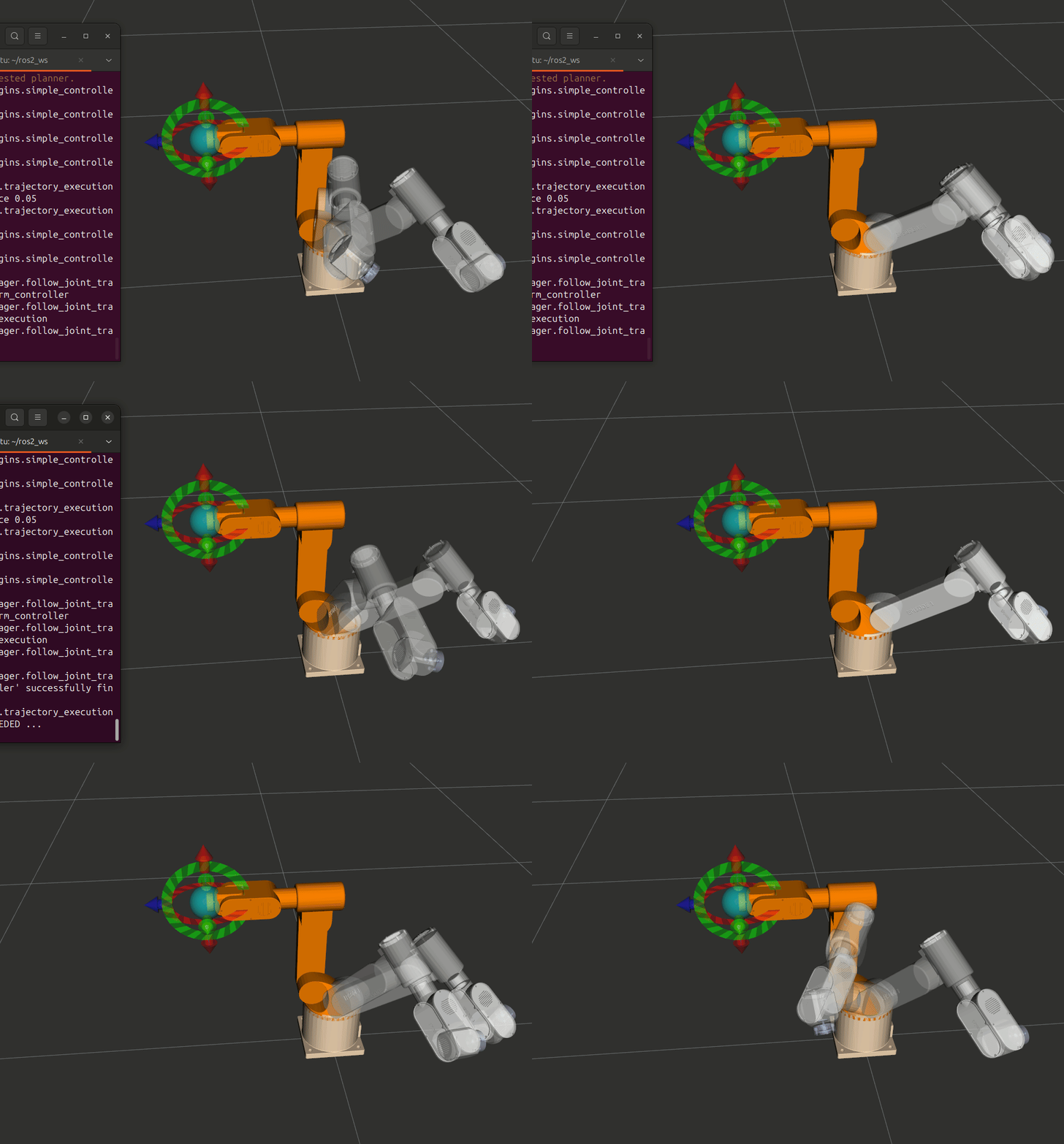
方式二:真实机械臂
# 终端 1: 启动 Robot State Publisher
ros2 launch episode1_urdf_student_moveit rsp.launch.py
# 终端 2: 启动机械臂接口节点(第 12 章)
ros2 run py_episode robot_interface_full
# 终端 3: 启动 MoveIt 核心节点
ros2 launch episode1_urdf_student_moveit move_group.launch.py
# 终端 4: 运行 API 演示
cd ~/ros2_ws && source install/setup.bash
ros2 run py_episode moveit_api_demo
# 终端 5(可选): 启动 RViz 可视化界面,实时观察机械臂运动效果
ros2 launch episode1_urdf_student_moveit moveit_rviz.launch.py
3.6 参数覆盖
# 只运行演示 1(命名配置)
ros2 run py_episode moveit_api_demo --ros-args -p demo_group:=1
# 只运行演示 8(路径约束)
ros2 run py_episode moveit_api_demo --ros-args -p demo_group:=8
# 低速运行(调试安全)
ros2 run py_episode moveit_api_demo --ros-args \
-p max_velocity_scaling:=0.3 \
-p max_acceleration_scaling:=0.3
# 路径约束规划增加尝试次数
ros2 run py_episode moveit_api_demo --ros-args \
-p demo_group:=8 \
-p planning_attempts:=10
3.7 Demo 模式 vs 真实机械臂对比
| 组件 | Demo 模式 | 真实机械臂 |
|---|---|---|
| 硬件 | mock_components 模拟 |
CAN 总线真实电机 |
/joint_states 来源 |
joint_state_broadcaster |
robot_interface_node |
| Action Server | episode_arm_controller |
robot_interface_node |
| MoveIt API 代码 | 完全相同 | 完全相同 |
| 启动方式 | 1 个终端 | 4 个终端 |
关键理解:MoveIt Python API 的代码不需要任何修改就能在 Demo 模式和真实机械臂之间切换。差异只在于底层通信对象(模拟 vs 真实),上层 API 完全透明。
3.8 参数说明表
| 参数名 | 类型 | 默认值 | 用途 |
|---|---|---|---|
robot_name |
string | episode1_urdf_1113 |
机器人名称(与 URDF 一致) |
package_name |
string | episode1_urdf_student_moveit |
MoveIt 配置包名 |
planning_group |
string | episode_arm |
规划组名(SRDF 中定义) |
planning_pipeline |
string | ompl |
规划管线 |
planning_attempts |
int | 3 |
规划尝试次数 |
max_velocity_scaling |
float | 1.0 |
速度缩放因子 |
max_acceleration_scaling |
float | 1.0 |
加速度缩放因子 |
demo_group |
int | 0 |
运行哪个演示(0=全部,1-8=指定) |
四、MoveIt 配置字典详解(config_dict)
这是 MoveItPy 初始化时最关键的参数。不同于 C++ MoveGroupInterface 从 Launch 文件自动加载配置,Python API 需要你手动构建配置字典:
def _build_moveit_config(self, robot_name, package_name, planning_pipeline,
planning_attempts, max_velocity_scaling,
max_acceleration_scaling) -> Dict:
"""构建 MoveIt 配置字典"""
# 第一步:从 MoveIt 配置包加载基础配置(URDF + SRDF + 规划管线)
base_config = MoveItConfigsBuilder(
robot_name=robot_name, # 机器人名称(与 URDF 一致)
package_name=package_name # MoveIt 配置包名
).robot_description_semantic(
"config/episode1_urdf_1113.srdf", # SRDF 文件路径
{"name": robot_name} # 模板变量替换
).planning_pipelines(
default_planning_pipeline=planning_pipeline # 加载规划管线配置
).to_dict()
# 第二步:添加 per-group OMPL 覆盖(默认规划器、投影评估器)
if "ompl" in base_config:
base_config["ompl"][self.planning_group] = {
"default_planner_config": "RRTConnect",
"planner_configs": ["RRTConnect", "RRT", "PRM", "EST", "BiEST"],
"projection_evaluator": "joints(joint1,joint2,joint3)",
}
# 第三步:扩展配置,添加运行时参数
config = {
**base_config, # 展开基础配置(含 OMPL 覆盖)
# ---- 场景监视器配置 ----
"planning_scene_monitor": {
"name": "planning_scene_monitor",
"robot_description": "robot_description",
"joint_state_topic": "/joint_states",
"attached_collision_object_topic": "/moveit_cpp/planning_scene_monitor",
"publish_planning_scene_topic": "/moveit_cpp/publish_planning_scene",
"monitored_planning_scene_topic": "/moveit_cpp/monitored_planning_scene",
"wait_for_initial_state_timeout": 10.0,
},
# ---- 规划管线配置 ----
"planning_pipelines": {
"pipeline_names": [planning_pipeline]
},
# ---- 规划请求参数 ----
"plan_request_params": {
"planning_attempts": planning_attempts,
"planning_pipeline": planning_pipeline,
"max_velocity_scaling_factor": max_velocity_scaling,
"max_acceleration_scaling_factor": max_acceleration_scaling,
},
# ---- 轨迹执行配置 ----
"trajectory_execution": {
"allowed_start_tolerance": 0.05
},
}
return config
逐项解读:
第一步:MoveItConfigsBuilder 链式调用
| 方法 | 含义 | 注意事项 |
|---|---|---|
MoveItConfigsBuilder(robot_name, package_name) |
从 MoveIt 配置包加载 URDF | robot_name 和 package_name 必须与第 11 章生成的配置包一致 |
.robot_description_semantic(...) |
加载 SRDF 文件(定义关节组、命名配置等) | 路径相对于 MoveIt 配置包根目录 |
.planning_pipelines(default_planning_pipeline=...) |
加载规划管线配置(OMPL 插件、适配器等) | 会自动从配置包的 config/ 目录读取 ompl_planning.yaml 等文件,包含 request_adapters、response_adapters 等配置 |
.to_dict() |
将所有配置转换为字典 | 返回值可直接传给 MoveItPy(config_dict=...) |
第二步:per-group OMPL 覆盖
if "ompl" in base_config:
base_config["ompl"][self.planning_group] = {
"default_planner_config": "RRTConnect",
"planner_configs": ["RRTConnect", "RRT", "PRM", "EST", "BiEST"],
"projection_evaluator": "joints(joint1,joint2,joint3)",
}
| 配置项 | 含义 | 注意事项 |
|---|---|---|
default_planner_config |
该关节组默认使用的规划算法 | RRTConnect 对 6 轴臂效果最好,双向搜索速度快 |
planner_configs |
该关节组可选的规划算法列表 | 可在运行时通过 planner_id 参数切换 |
projection_evaluator |
OMPL 状态空间投影维度 | 选择前 3 个关节通常足够,影响规划效率 |
第三步:运行时参数
| 配置项 | 含义 | 注意事项 |
|---|---|---|
joint_state_topic |
MoveItPy 订阅哪个 Topic 获取关节状态 | 必须与 robot_interface_node 发布的 Topic 名一致(/joint_states) |
wait_for_initial_state_timeout |
等待首次关节状态的超时时间(秒) | 如果超时,MoveItPy 初始化会失败。确保机械臂节点已启动 |
planning_pipelines |
使用的规划管线列表 | ompl 是最常用的。还支持 pilz(工业运动)、chomp(优化)等 |
planning_attempts |
每次规划的尝试次数 | OMPL 是概率规划器,多次尝试提高成功率。路径约束规划建议 5-10 次 |
max_velocity_scaling_factor |
速度缩放因子(0.0~1.0) | 与第 12 章 joint_limits.yaml 中的 max_velocity 配合使用 |
max_acceleration_scaling_factor |
加速度缩放因子(0.0~1.0) | 同上,影响轨迹的加减速过程 |
allowed_start_tolerance |
执行时允许的起始状态偏差(弧度) | 过小会导致 "Start state differs from current" 错误 |
重要提示:
.planning_pipelines()加载的配置中已自动包含request_adapters(含ResolveConstraintFrames)和response_adapters(含AddTimeOptimalParameterization)。这些适配器对后面的**运动约束演示(6-8)**必不可少——ResolveConstraintFrames负责解析约束的坐标系,AddTimeOptimalParameterization负责为轨迹添加时间参数化。如果你使用旧写法手动配置 OMPL,请确保包含这些适配器。
五、核心规划流程:4 步走
无论使用哪种目标类型,MoveIt 规划和执行的流程都遵循同一套 4 步模式:
┌────────────────────────────────────────────────────────────────────┐
│ MoveIt 规划执行 4 步流程 │
├────────────────────────────────────────────────────────────────────┤
│ │
│ 步骤 1: 设置起始状态 │
│ arm.set_start_state_to_current_state() │
│ "我现在在哪?" → 从 /joint_states 获取当前关节角度 │
│ │ │
│ ▼ │
│ 步骤 2: 设置目标状态 │
│ arm.set_goal_state(...) │
│ "我要去哪?" → 命名配置 / 关节角度 / 末端位姿 / 运动约束 │
│ │ │
│ ▼ │
│ 步骤 3: 规划 │
│ plan_result = arm.plan() │
│ "怎么走?" → OMPL 搜索无碰撞路径,时间参数化 │
│ │ │
│ ▼ │
│ 步骤 4: 执行 │
│ robot.execute(plan_result.trajectory, controllers=[]) │
│ "走!" → 通过 FollowJointTrajectory Action 发送给控制器 │
│ │
└────────────────────────────────────────────────────────────────────┘
代码模板:
# 所有运动都遵循这 4 步
self.arm.set_start_state_to_current_state() # 步骤 1
self.arm.set_goal_state(...) # 步骤 2(三种方式之一)
plan_result = self.arm.plan() # 步骤 3
if plan_result:
self.robot.execute(plan_result.trajectory, controllers=[]) # 步骤 4
4.1 三种目标设定方式
set_goal_state() 支持多种参数,对应不同的目标指定方式:
| 方式 | API 调用 | 适用场景 | 对应演示 |
|---|---|---|---|
| 命名配置 | set_goal_state(configuration_name="home") |
SRDF 中预定义的姿态 | 演示 1 |
| 关节角度 | set_goal_state(robot_state=state) |
精确关节空间控制 | 演示 2 |
| 末端位姿 | set_goal_state(pose_stamped_msg=pose, pose_link="link6") |
笛卡尔空间控制 | 演示 3 |
| 运动约束 | set_goal_state(motion_plan_constraints=[constraint]) |
带容差的约束目标 | 演示 6-7 |
controllers=[]的含义:空列表表示"使用配置文件中的默认控制器",不是"不使用控制器"。MoveIt 会根据moveit_controllers.yaml自动选择合适的控制器发送轨迹。
六、演示 1:移动到命名配置(Named Configuration)
涉及模块:
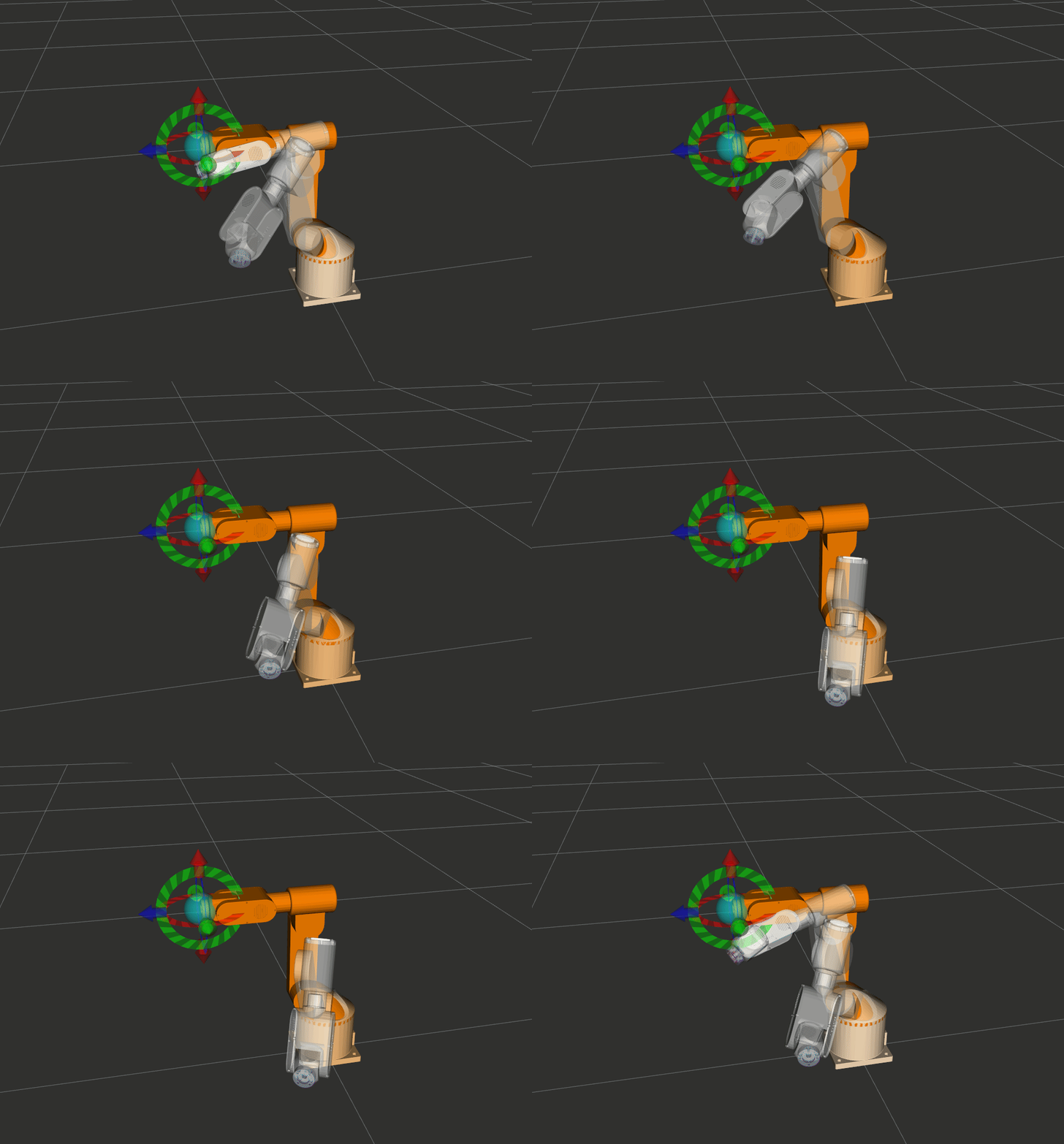
moveit.planning:通过PlanningComponent.set_goal_state(configuration_name=...)设置命名配置目标,plan()规划,MoveItPy.execute()执行moveit.core.planning_interface:plan()返回MotionPlanResponse,包含规划轨迹和错误码moveit.core.robot_trajectory:MotionPlanResponse.trajectory即RobotTrajectory对象,传给execute()执行
运行命令:
ros2 run py_episode moveit_api_demo --ros-args -p demo_group:=1
5.1 什么是命名配置?
命名配置是在 SRDF 文件中预定义的关节角度组合,使用 MoveIt Setup Assistant 时创建。例如:
<!-- episode1_urdf_1113.srdf 中的片段 -->
<group_state name="home" group="episode_arm">
<joint name="joint1" value="0" />
<joint name="joint2" value="0" />
<joint name="joint3" value="0" />
<joint name="joint4" value="0" />
<joint name="joint5" value="0" />
<joint name="joint6" value="0" />
</group_state>
<group_state name="test1" group="episode_arm">
<joint name="joint1" value="0.5" />
<joint name="joint2" value="-0.3" />
<!-- ... -->
</group_state>
5.2 代码实现
def move_to_target(self, target_name: str) -> bool:
"""
规划并执行到命名目标配置。
参数:
target_name: SRDF 中定义的配置名称(如 "home"、"test1")
返回:
规划和执行是否成功
"""
self.arm.set_start_state_to_current_state() # 步骤 1
self.arm.set_goal_state(configuration_name=target_name) # 步骤 2
plan_result = self.arm.plan() # 步骤 3
if plan_result:
self.robot.execute(plan_result.trajectory, controllers=[]) # 步骤 4
time.sleep(0.5) # 等待状态更新
return True
else:
self.get_logger().warn(f"规划到 '{target_name}' 失败")
return False
5.3 演示运行
def run_demo_1(self):
"""演示 1: 命名配置"""
self.get_logger().info("=== 演示 1: 命名配置 ===")
self.move_to_target("home") # 回到初始位置
time.sleep(1.0)
self.move_to_target("test1") # 移动到测试位置
time.sleep(1.0)
5.4 API 调用流程
set_goal_state(configuration_name="home")
│
▼
SRDF 查找 "home" 对应的关节值: [0, 0, 0, 0, 0, 0]
│
▼
OMPL 规划: 当前状态 → [0, 0, 0, 0, 0, 0]
│
▼
execute() → FollowJointTrajectory Action → 控制器执行
预期输出:
[INFO] [moveit_api_demo_node]: === 演示 1: 命名配置 ===
[INFO] [moveit_py]: Planning succeeded
[INFO] [moveit_py]: Execution completed successfully
七、演示 2:移动到关节角度(Joint Space Goal)
涉及模块:
moveit.planning:PlanningComponent设置目标、规划、执行moveit.core.robot_state:创建RobotState并设置joint_positions,作为关节空间目标传给set_goal_state(robot_state=...)moveit.core.robot_model:RobotState构造需要RobotModel(通过robot.get_robot_model()获取)moveit.core.planning_interface:plan()返回MotionPlanResponsemoveit.core.robot_trajectory:执行规划轨迹
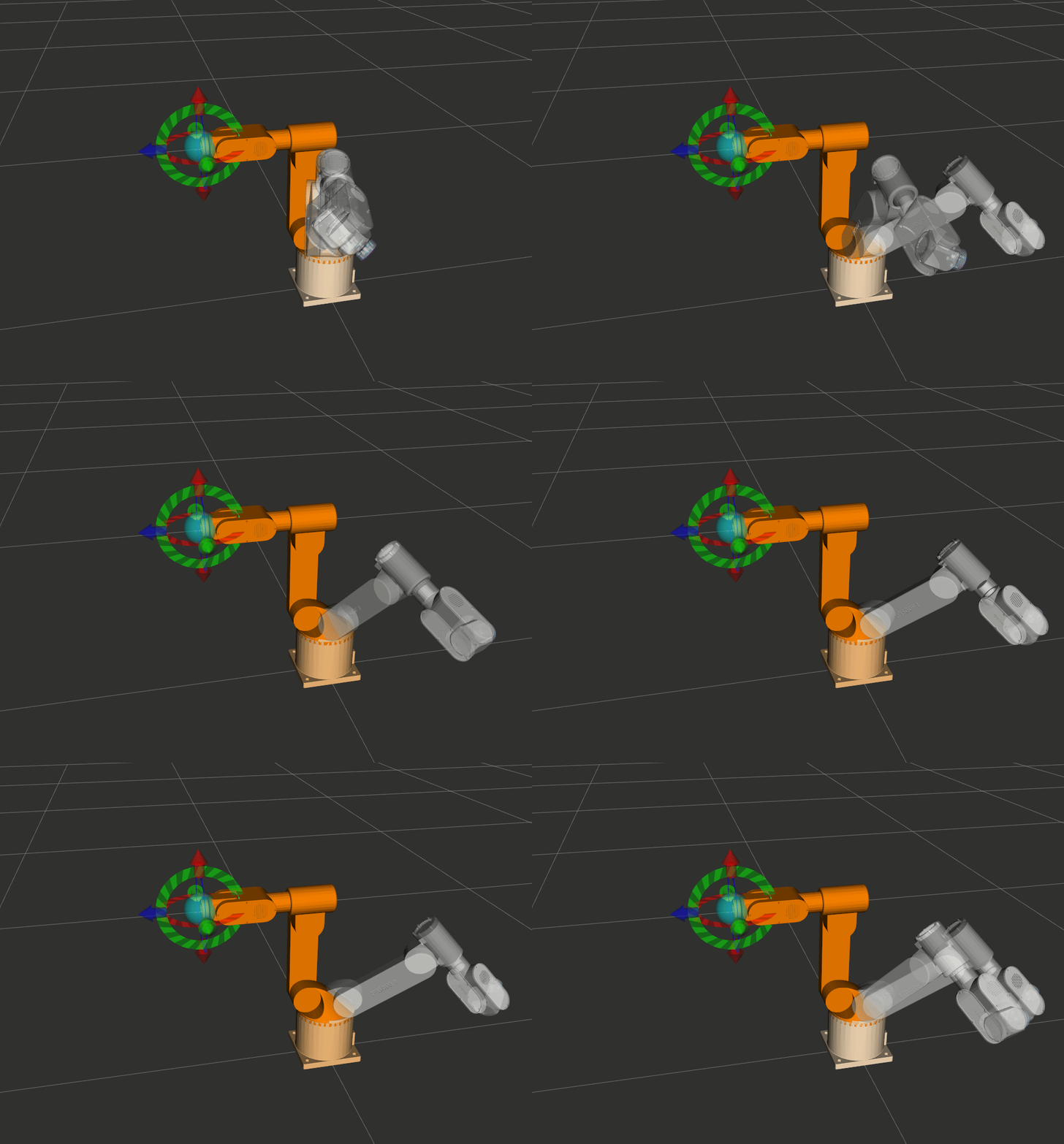
运行命令:
ros2 run py_episode moveit_api_demo --ros-args -p demo_group:=2
6.1 电机角度 vs URDF 关节角度
电机驱动上读取的角度(度)和 MoveIt 中 URDF 定义的关节角度(弧度)之间存在偏移量。
电机角度(度) ─── 减去偏移量 ─── URDF 角度(度) ─── deg2rad ─── MoveIt 角度(弧度)
180.0° - 180 offset = 0.0° × π/180 = 0.0 rad
270.0° - 180 offset = 90.0° × π/180 = 1.5708 rad
各关节偏移量:
| 关节 | joint1 | joint2 | joint3 | joint4 | joint5 | joint6 |
|---|---|---|---|---|---|---|
| 偏移量(度) | 180 | 90 | 83 | 30 | 110 | 30 |
为什么有这些偏移量?
因为电机驱动的零位(编码器零点)和 URDF 中定义的零位通常不同。例如:
- 电机驱动认为 180° 是"中间位置"
- URDF 中 0 rad 是"中间位置"
- 所以需要减去 180° 的偏移
6.2 代码实现
def move_to_degrees(self, angles_deg: List[float]) -> bool:
"""
规划并执行到指定关节角度(电机角度,度)。
参数:
angles_deg: 6 个关节的电机角度(度),例如 [180, 90, 83, 30, 110, 30]
返回:
规划和执行是否成功
"""
# 偏移量:电机角度 → URDF 角度
offsets = [180, 90, 83, 30, 110, 30]
joint_angles_rad = [np.deg2rad(angles_deg[i] - offsets[i]) for i in range(6)]
# 构建关节目标字典
joint_target = {f"joint{i+1}": joint_angles_rad[i] for i in range(6)}
# 创建 RobotState 并设置目标关节值
robot_state = RobotState(self.robot.get_robot_model())
robot_state.joint_positions = joint_target
# 4 步流程
self.arm.set_start_state_to_current_state()
self.arm.set_goal_state(robot_state=robot_state)
plan_result = self.arm.plan()
if plan_result:
self.robot.execute(plan_result.trajectory, controllers=[])
time.sleep(0.5)
return True
else:
self.get_logger().warn(f"规划到关节角度 {angles_deg} 失败")
return False
6.3 RobotState 详解
RobotState 是 MoveIt 中表示机器人"姿态快照"的核心类:
# 创建方式:必须传入 RobotModel
robot_state = RobotState(self.robot.get_robot_model())
# 设置关节位置:接受字典(关节名 → 弧度值)
robot_state.joint_positions = {
"joint1": 0.0,
"joint2": -0.3,
"joint3": 0.4,
"joint4": -0.8,
"joint5": 0.2,
"joint6": 0.0,
}
| RobotState 属性/方法 | 类型 | 用途 |
|---|---|---|
.joint_positions |
dict 属性 | 读写关节位置(弧度) |
.set_from_ik(group, pose, link) |
方法 | 逆运动学:从位姿计算关节角度 |
.get_frame_transform(link) |
方法 | 正运动学:获取连杆变换矩阵 |
.get_joint_group_positions(group) |
方法 | 获取指定组的关节位置(numpy 数组) |
.set_joint_group_positions(group, values) |
方法 | 设置指定组的关节位置 |
.update() |
方法 | 更新内部 FK 变换(修改关节值后必须调用) |
6.4 演示运行
def run_demo_2(self):
"""演示 2: 关节空间目标"""
self.get_logger().info("=== 演示 2: 关节空间目标 ===")
self.move_to_target("home")
# 6 组电机角度(度)
degree_list = [
[55.43, 137.77, 98.84, 73.26, 89.22, 86.58],
[137.22, 98.41, 108.23, 125.02, 39.80, 155.00],
[180.00, 90.00, 83.00, 30.00, 110.00, 30.00], # home
[252.12, 119.16, 58.00, 78.40, 176.26, 156.51],
[340.00, 143.12, 77.44, 154.99, 208.63, 154.99],
[180.00, 90.00, 83.00, 30.00, 110.00, 30.00], # home
]
for angles in degree_list:
self.move_to_degrees(angles)
time.sleep(0.5)
预期效果:机械臂依次移动到 6 个关节位置,最后回到 home 位置。
八、演示 3:移动到末端位姿(Pose Goal)
涉及模块:
moveit.planning:PlanningComponent.set_goal_state(pose_stamped_msg=..., pose_link=...)设置末端位姿目标moveit.core.planning_interface:plan()返回MotionPlanResponsemoveit.core.robot_trajectory:执行规划轨迹
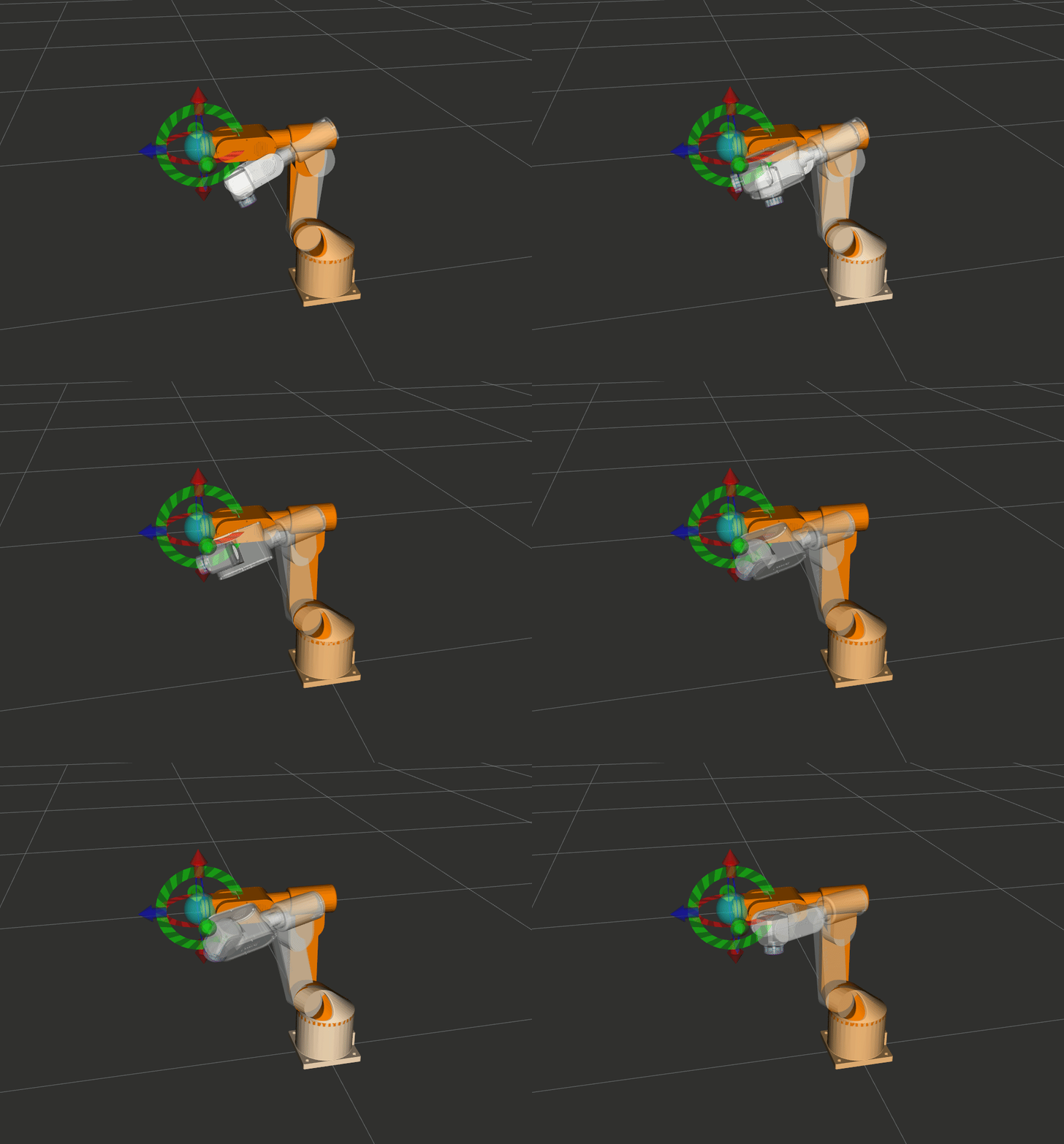
运行命令:
ros2 run py_episode moveit_api_demo --ros-args -p demo_group:=3
7.1 位姿的组成
末端位姿由两部分组成:
| 组成 | 参数 | 单位 | 说明 |
|---|---|---|---|
| 位置 | x, y, z | 毫米(代码中)→ 米(MoveIt 内部) | 末端在 base_link 坐标系下的位置 |
| 姿态 | x_rot, y_rot, z_rot | 弧度 | 欧拉角(sxyz 顺序),代码中转为四元数 |
7.2 坐标系与单位转换
用户输入 MoveIt 内部
───────────────── ──────────────────
位置: [260, 0, 300] mm → [0.26, 0.0, 0.3] m (÷ 1000)
旋转: [180, 0, 90] 度 → [π, 0, π/2] 弧度 (× π/180)
欧拉角 [π, 0, π/2] → 四元数 [qx, qy, qz, qw] (tf_transformations 转换)
为什么用四元数而不是欧拉角?
| 表示方式 | 优点 | 缺点 |
|---|---|---|
| 欧拉角 | 直观,人类容易理解 | 有万向锁问题(Gimbal Lock) |
| 四元数 | 无万向锁,插值平滑 | 不直观,需要转换工具 |
MoveIt 内部使用四元数,我们用 tf_transformations 库做转换。
7.3 代码实现
def move_to_pose(self, x, y, z, x_rot, y_rot, z_rot) -> bool:
"""
规划并执行到指定位姿。
参数:
x, y, z: 位置(毫米)
x_rot, y_rot, z_rot: 欧拉角旋转(弧度)
返回:
规划和执行是否成功
"""
# 欧拉角 → 四元数
q_x, q_y, q_z, q_w = tf_transformations.quaternion_from_euler(
x_rot, y_rot, z_rot, axes='sxyz'
)
# 构建 PoseStamped 消息
pose_goal = PoseStamped()
pose_goal.header.frame_id = "base_link" # 参考坐标系
pose_goal.pose.position.x = x / 1000.0 # mm → m
pose_goal.pose.position.y = y / 1000.0
pose_goal.pose.position.z = z / 1000.0
pose_goal.pose.orientation.x = q_x
pose_goal.pose.orientation.y = q_y
pose_goal.pose.orientation.z = q_z
pose_goal.pose.orientation.w = q_w
# 4 步流程
self.arm.set_start_state_to_current_state()
self.arm.set_goal_state(pose_stamped_msg=pose_goal, pose_link="link6")
plan_result = self.arm.plan()
if plan_result:
self.robot.execute(plan_result.trajectory, controllers=[])
time.sleep(0.5)
self.get_logger().info("位姿目标运动成功")
return True
else:
self.get_logger().warn(f"位姿目标 [{x:.1f}, {y:.1f}, {z:.1f}]mm 规划失败")
return False
7.4 PoseStamped 消息结构
PoseStamped
├── header
│ ├── stamp ← 时间戳(通常不需要手动设置)
│ └── frame_id ← "base_link"(参考坐标系)
└── pose
├── position
│ ├── x ← 单位:米
│ ├── y ← 单位:米
│ └── z ← 单位:米
└── orientation
├── x ← 四元数 x 分量
├── y ← 四元数 y 分量
├── z ← 四元数 z 分量
└── w ← 四元数 w 分量
重要:
pose_link="link6"告诉 MoveIt "我希望 link6 到达这个位姿"。如果你的末端执行器是夹爪(如gripper_link),需要改为对应的连杆名。
7.5 演示运行
def run_demo_3(self):
"""演示 3: 位姿目标(在工作空间内随机运动)"""
self.get_logger().info("=== 演示 3: 位姿目标 ===")
self.move_to_target("home")
for i in range(10):
# 基准位姿 [260, 0, 300]mm,随机偏移
position = [
260.0 + random.uniform(-100.0, 100.0),
0.0 + random.uniform(-150.0, 150.0),
300.0 + random.uniform(-100.0, 100.0),
]
rotation_deg = [180.0, 0.0, 90.0]
rotation_rad = [np.deg2rad(a) for a in rotation_deg]
self.get_logger().info(
f"尝试位姿 {i+1}: 位置=[{position[0]:.1f}, {position[1]:.1f}, {position[2]:.1f}]mm"
)
success = self.move_to_pose(
position[0], position[1], position[2],
rotation_rad[0], rotation_rad[1], rotation_rad[2]
)
if success:
self.get_logger().info(f"位姿 {i+1} 运动成功")
time.sleep(1.0)
else:
self.get_logger().warn(f"位姿 {i+1} 运动失败,跳过")
time.sleep(0.5)
注意:随机位姿可能超出工作空间范围,导致 IK 求解失败——这是正常的。MoveIt 会返回规划失败,代码跳过该点继续下一个。
九、演示 4:规划场景与避障(Planning Scene)
涉及模块:
moveit.planning:PlanningSceneMonitor提供场景读写锁(read_write()/read_only()),PlanningComponent规划避障路径moveit.core.planning_scene:PlanningScene.apply_collision_object()添加障碍物,is_state_colliding()碰撞检测moveit.core.robot_state:碰撞检测时通过set_from_ik()将目标位姿转为关节角度,再检测碰撞moveit.core.planning_interface:plan()返回MotionPlanResponsemoveit.core.robot_trajectory:执行规划轨迹
运行命令:
ros2 run py_episode moveit_api_demo --ros-args -p demo_group:=4
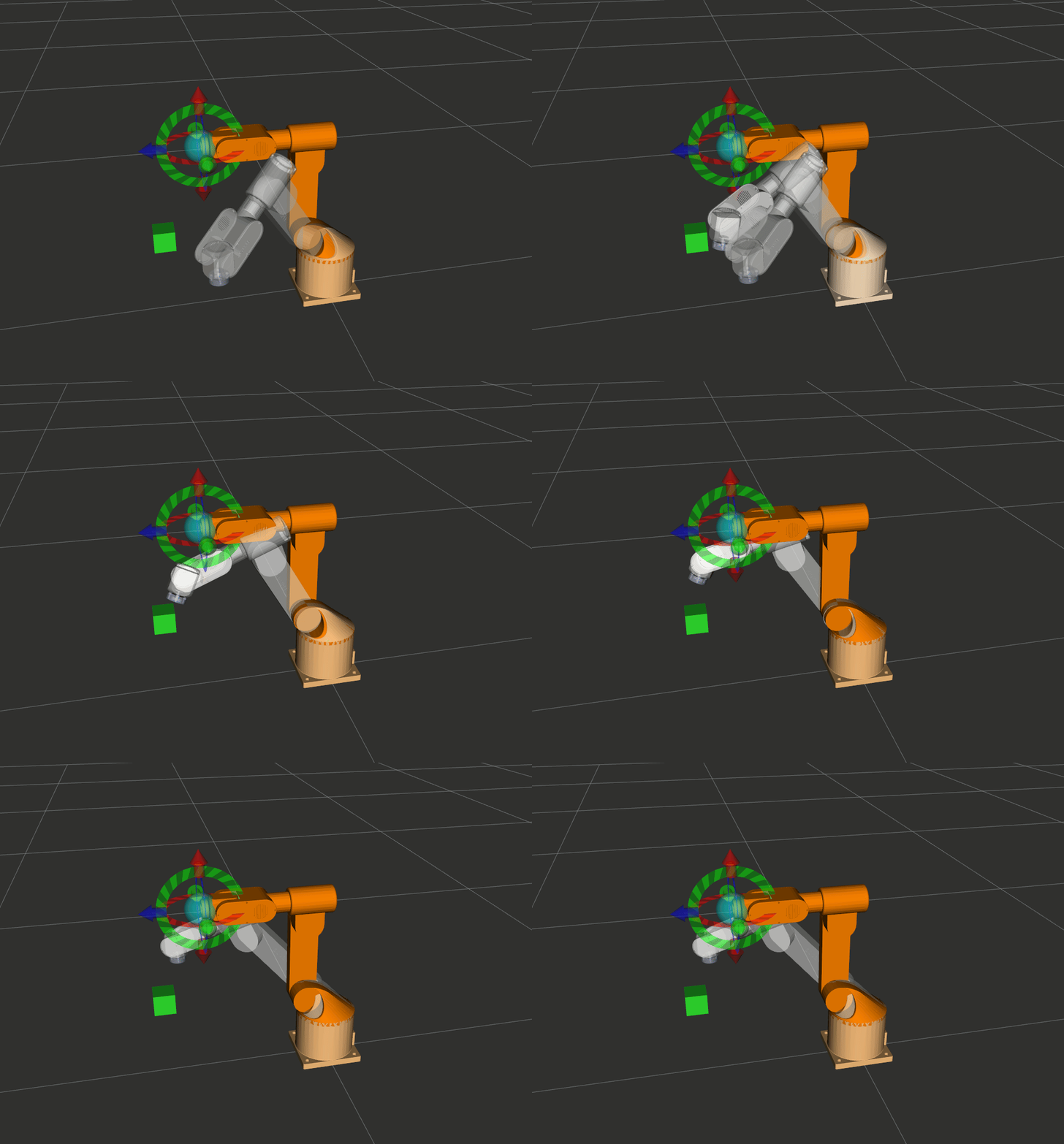
8.1 PlanningSceneMonitor 的两种锁
PlanningSceneMonitor 使用读写锁保证线程安全:
| 上下文管理器 | 锁类型 | 用途 | 示例 |
|---|---|---|---|
psm.read_write() |
写锁 | 修改场景(添加/删除障碍物) | scene.apply_collision_object(...) |
psm.read_only() |
读锁 | 查询场景(碰撞检测、获取状态) | scene.is_state_colliding(...) |
# 正确用法:用 with 语句管理锁
with self.planning_scene_monitor.read_write() as scene:
scene.apply_collision_object(collision_object)
scene.current_state.update()
# 错误用法:不要在 read_only() 中修改场景
with self.planning_scene_monitor.read_only() as scene:
scene.apply_collision_object(...) # 这会导致错误!
8.2 添加碰撞物体
def add_collision_box(self, box_id, position, dimensions):
"""
向规划场景添加碰撞箱体。
参数:
box_id: 碰撞物体的唯一标识符(如 "obstacle_box")
position: 箱体中心位置 [x, y, z](米)
dimensions: 箱体尺寸 [长, 宽, 高](米)
"""
with self.planning_scene_monitor.read_write() as scene:
collision_object = CollisionObject()
collision_object.header.frame_id = "base_link"
collision_object.id = box_id
# 设置箱体位姿
box_pose = Pose()
box_pose.position.x, box_pose.position.y, box_pose.position.z = position
box_pose.orientation.w = 1.0
# 设置箱体几何形状
box = SolidPrimitive()
box.type = SolidPrimitive.BOX
box.dimensions = dimensions # [长, 宽, 高](米)
collision_object.primitives.append(box)
collision_object.primitive_poses.append(box_pose)
collision_object.operation = CollisionObject.ADD
scene.apply_collision_object(collision_object)
scene.current_state.update() # 必须调用,更新内部变换
self.get_logger().info(f"已添加碰撞箱体 '{box_id}'")
CollisionObject 支持的几何类型:
| 类型 | SolidPrimitive 常量 | dimensions 含义 |
|---|---|---|
| 箱体 | SolidPrimitive.BOX |
[长, 宽, 高](米) |
| 球体 | SolidPrimitive.SPHERE |
[半径](米) |
| 圆柱体 | SolidPrimitive.CYLINDER |
[高, 半径](米) |
| 圆锥体 | SolidPrimitive.CONE |
[高, 半径](米) |
8.3 碰撞检测
def check_pose_collision(self, position, rotation) -> bool:
"""
检查指定位姿是否与场景中的障碍物碰撞。
内部流程:
1. 用 IK 将位姿转换为关节角度
2. 将关节角度设置到 RobotState
3. 检查该状态是否碰撞
4. 恢复原始状态(避免影响后续操作)
参数:
position: [x, y, z](毫米)
rotation: [x_rot, y_rot, z_rot](弧度)
返回:
True = 碰撞,False = 安全
"""
with self.planning_scene_monitor.read_only() as scene:
robot_state = scene.current_state
# 保存原始状态(后面要恢复)
original_joint_positions = robot_state.get_joint_group_positions(self.planning_group)
# 构建位姿
pose_goal = Pose()
pose_goal.position.x = position[0] / 1000.0
pose_goal.position.y = position[1] / 1000.0
pose_goal.position.z = position[2] / 1000.0
q_x, q_y, q_z, q_w = tf_transformations.quaternion_from_euler(*rotation, axes='sxyz')
pose_goal.orientation.x, pose_goal.orientation.y = q_x, q_y
pose_goal.orientation.z, pose_goal.orientation.w = q_z, q_w
# IK 求解 → 碰撞检测
robot_state.set_from_ik(self.planning_group, pose_goal, "link6")
robot_state.update()
is_colliding = scene.is_state_colliding(
robot_state=robot_state,
joint_model_group_name=self.planning_group,
verbose=True # 打印碰撞的具体连杆对
)
# 必须恢复原始状态,否则当前状态被污染
robot_state.set_joint_group_positions(self.planning_group, original_joint_positions)
robot_state.update()
return is_colliding
关键提醒:碰撞检测时修改了
robot_state的关节值(通过set_from_ik),用完后必须恢复,否则 MoveIt 会认为机械臂在错误的位置,导致后续规划异常。
8.4 移除碰撞物体
def remove_collision_object(self, object_id):
"""从规划场景中移除碰撞物体"""
with self.planning_scene_monitor.read_write() as scene:
scene.remove_all_collision_objects()
scene.current_state.update()
self.get_logger().info("已移除所有碰撞物体")
8.5 演示运行
def run_demo_4(self):
"""演示 4: 规划场景与避障"""
self.get_logger().info("=== 演示 4: 规划场景与避障 ===")
self.move_to_target("home")
# 先移动到起始位置
self.move_to_pose(300.0, 200.0, 200.0, np.pi, 0.0, np.pi/2)
time.sleep(1.0)
# 添加障碍物
self.get_logger().info("添加碰撞箱体到规划场景...")
self.add_collision_box(
box_id="obstacle_box",
position=[0.4, 0.0, 0.2], # 0.4m, 0m, 0.2m
dimensions=[0.05, 0.05, 0.05] # 5cm × 5cm × 5cm
)
time.sleep(1.0)
# 碰撞检测
is_colliding = self.check_pose_collision(
position=[300.0, 200.0, 200.0],
rotation=[np.pi, 0.0, np.pi/2]
)
self.get_logger().info(f"当前位姿碰撞状态: {is_colliding}")
# MoveIt 自动避障规划
self.get_logger().info("规划绕过障碍物的运动...")
success = self.move_to_pose(350.0, -200.0, 200.0, np.pi, 0.0, np.pi/2)
if success:
self.get_logger().info("成功绕过障碍物到达目标位置!")
# 清理
self.remove_collision_object("obstacle_box")
time.sleep(1.0)
避障原理图:
┌─────────────────────────────────────────────────────────────────┐
│ 规划场景 (base_link 坐标系, 俯视图) │
│ │
│ ■ 障碍物 [0.4, 0, 0.2]m │
│ │
│ 起始位置 ●─ ─ ─ ─ ╳ ─ ─ ─ ─● 目标位置 │
│ [300, 200, 200]mm 碰撞! [350, -200, 200]mm │
│ │
│ 起始位置 ●─ ─ ─ ─ ─ ─ ─ ─ ─● 目标位置 │
│ ╲ ╱ ← MoveIt 自动规划绕行路径 │
│ ╲ ╱ │
│ ╲ ╱ │
│ ╲ ╱ │
│ ○ │
│ │
└─────────────────────────────────────────────────────────────────┘
理解:你不需要自己计算如何绕过障碍物!只要把障碍物添加到规划场景,MoveIt 的 OMPL 规划器会自动搜索无碰撞路径。这就是 MoveIt 最强大的地方。
十、演示 5:获取当前状态(State Query)
涉及模块:
moveit.planning:PlanningSceneMonitor.read_only()获取当前场景状态moveit.core.robot_state:RobotState.get_joint_group_positions()读取关节角度,get_frame_transform()正运动学(FK)计算末端位姿moveit.core.robot_model:RobotState内部依赖RobotModel完成 FK 计算
运行命令:
ros2 run py_episode moveit_api_demo --ros-args -p demo_group:=5
9.1 获取当前关节角度
def get_current_degrees(self) -> List[float]:
"""
获取当前关节角度(电机角度,度)。
流程: 读取 MoveIt 关节值(弧度) → 转换为度 → 加上偏移量 → 电机角度
返回:
6 个关节的电机角度(度)
"""
with self.planning_scene_monitor.read_only() as scene:
robot_state = scene.current_state
joint_positions = robot_state.get_joint_group_positions(self.planning_group)
offsets = [180, 90, 83, 30, 110, 30]
angles_deg = [np.rad2deg(joint_positions[i]) + offsets[i] for i in range(6)]
return angles_deg
9.2 获取当前末端位姿
def get_current_pose(self) -> Dict:
"""
获取当前 link6 的位姿(正运动学)。
流程: 读取关节值 → FK 计算 → 4×4 变换矩阵 → 提取位置和旋转
返回:
{'position': [x,y,z](mm), 'rotation_rad': [rx,ry,rz], 'rotation_deg': [rx,ry,rz]}
"""
with self.planning_scene_monitor.read_only() as scene:
robot_state = scene.current_state
robot_state.update() # 必须调用,确保 FK 变换是最新的
# 获取 4×4 齐次变换矩阵
transform_matrix = robot_state.get_frame_transform("link6")
# 提取位置(变换矩阵第 4 列前 3 行,单位:米 → 毫米)
position = [transform_matrix[i, 3] * 1000.0 for i in range(3)]
# 提取旋转(变换矩阵 → 四元数 → 欧拉角)
quaternion = tf_transformations.quaternion_from_matrix(transform_matrix)
euler_rad = tf_transformations.euler_from_quaternion(quaternion, axes='sxyz')
return {
'position': position,
'rotation_rad': list(euler_rad),
'rotation_deg': [np.rad2deg(a) for a in euler_rad]
}
9.3 4×4 齐次变换矩阵详解
get_frame_transform("link6") 返回的是一个 4×4 numpy 矩阵:
┌ ┐
│ R[0,0] R[0,1] R[0,2] │ tx (x 位置,米) │
│ R[1,0] R[1,1] R[1,2] │ ty (y 位置,米) │
│ R[2,0] R[2,1] R[2,2] │ tz (z 位置,米) │
│─────────────────────────────────────────────│
│ 0 0 0 │ 1 │
└ ┘
╰────── 3×3 旋转矩阵 ──────╯ ╰─ 平移向量 ─╯
| 矩阵区域 | 位置 | 含义 |
|---|---|---|
| 左上 3×3 | transform[:3, :3] |
旋转矩阵 |
| 右上 3×1 | transform[:3, 3] |
平移向量(x, y, z,单位:米) |
| 最后一行 | [0, 0, 0, 1] |
齐次坐标(固定值) |
9.4 正运动学 vs 逆运动学
正运动学 (FK): 关节角度 → 末端位姿
已知: joint1=0.5, joint2=-0.3, ..., joint6=0.1 (弧度)
计算: link6 在 base_link 下的 [x, y, z, rx, ry, rz]
API: robot_state.get_frame_transform("link6")
逆运动学 (IK): 末端位姿 → 关节角度
已知: link6 目标位姿 [x, y, z, qx, qy, qz, qw]
计算: joint1~joint6 的弧度值
API: robot_state.set_from_ik("episode_arm", pose, "link6")
注意:FK 总是有唯一解(给定关节角度 → 唯一位姿),但 IK 可能有多解或无解(目标位姿超出工作空间)。
9.5 演示运行
def run_demo_5(self):
"""演示 5: 获取当前状态"""
self.get_logger().info("=== 演示 5: 获取当前状态 ===")
self.move_to_target("home")
test_positions = [
[180.00, 90.00, 83.00, 30.00, 110.00, 30.00], # home
[55.43, 137.77, 98.84, 73.26, 89.22, 86.58],
[137.22, 98.41, 108.23, 125.02, 39.80, 155.00],
]
for i, degrees in enumerate(test_positions, 1):
self.get_logger().info(f"\n--- 测试位置 {i} ---")
success = self.move_to_degrees(degrees)
if success:
time.sleep(0.5)
# 读取关节角度
current_degrees = self.get_current_degrees()
self.get_logger().info("当前关节角度(度):")
for j, angle in enumerate(current_degrees, 1):
self.get_logger().info(f" 关节{j}: {angle:.2f}°")
# 读取末端位姿
current_pose = self.get_current_pose()
self.get_logger().info("当前末端位姿:")
self.get_logger().info(
f" 位置(mm): x={current_pose['position'][0]:.2f}, "
f"y={current_pose['position'][1]:.2f}, z={current_pose['position'][2]:.2f}"
)
self.get_logger().info(
f" 旋转(度): x={current_pose['rotation_deg'][0]:.2f}°, "
f"y={current_pose['rotation_deg'][1]:.2f}°, z={current_pose['rotation_deg'][2]:.2f}°"
)
time.sleep(2.0)
self.move_to_target("home")
预期输出示例:
[INFO] --- 测试位置 1 ---
[INFO] 当前关节角度(度):
[INFO] 关节1: 180.00°
[INFO] 关节2: 90.00°
[INFO] 关节3: 83.00°
[INFO] 关节4: 30.00°
[INFO] 关节5: 110.00°
[INFO] 关节6: 30.00°
[INFO] 当前末端位姿:
[INFO] 位置(mm): x=260.12, y=0.05, z=410.33
[INFO] 旋转(度): x=180.00°, y=0.00°, z=90.00°
十一、演示 6:关节约束目标(Joint Constraint Goal)
涉及模块:
moveit.planning:PlanningComponent.set_goal_state(motion_plan_constraints=...)设置约束目标moveit.core.kinematic_constraints:construct_joint_constraint()为每个关节构建带容差的约束消息moveit.core.robot_state:创建RobotState并设置目标关节值,传给约束构建函数moveit.core.robot_model:get_joint_model_group()获取关节组对象,传给约束构建函数moveit.core.planning_interface:plan()返回MotionPlanResponse
运行命令:
ros2 run py_episode moveit_api_demo --ros-args -p demo_group:=6
从这一节开始,我们进入 kinematic_constraints 模块的专属演示。
10.1 目标约束 vs 路径约束
在使用约束之前,必须理解两个完全独立的概念:
| 概念 | 含义 | API | 类比 |
|---|---|---|---|
| 目标约束(Goal Constraint) | 定义"去哪里" | arm.set_goal_state(motion_plan_constraints=[...]) |
导航的目的地 |
| 路径约束(Path Constraint) | 定义"怎么走" | arm.set_path_constraints(path_constraints=...) |
导航的行驶规则(如只走高速) |
┌────────────────────────────────────────────────────────────────────┐
│ 目标约束 vs 路径约束 │
│ │
│ ● 起点 │
│ │ │
│ │ 路径约束: "全程保持末端朝下" │
│ │ ┌───────────────────────────────────────┐ │
│ │ │ ↓ ↓ ↓ ↓ ↓ ↓ ↓ ↓ ↓ ↓ ↓ ↓ ↓ ↓ ↓ │ ← 末端始终朝下 │
│ │ └───────────────────────────────────────┘ │
│ │ │
│ ● 终点 ← 目标约束: "到达 [0.3, 0, 0.25]m ± 0.01m" │
│ │
└────────────────────────────────────────────────────────────────────┘
本节(演示 6-7)讲目标约束,下一节(演示 8)讲路径约束。
10.2 construct_joint_constraint() 详解
from moveit.core.kinematic_constraints import construct_joint_constraint
constraint = construct_joint_constraint(
robot_state, # 包含目标关节值的 RobotState
joint_model_group, # 关节组对象
tolerance=0.01 # 容差(弧度),默认 ±0.01 rad ≈ ±0.57°
)
它做了什么? 为关节组中的每个关节创建一个 JointConstraint 消息,约束关节值在 目标值 ± tolerance 范围内。
与 set_goal_state(robot_state=...) 的区别:
| 方式 | 容差控制 | 灵活性 |
|---|---|---|
set_goal_state(robot_state=state) |
使用默认容差 | 简单直接 |
set_goal_state(motion_plan_constraints=[constraint]) |
自定义容差 | 更精细控制 |
10.3 代码实现
def run_demo_6(self):
"""演示 6: 关节约束目标(三种容差对比)"""
from moveit.core.kinematic_constraints import construct_joint_constraint
self.get_logger().info("=== 演示 6: 关节约束目标(三种容差对比) ===")
# 目标关节值(URDF 弧度)
joint_values = {
"joint1": 0.5, # ~28.6° 底座向左旋转
"joint2": -0.3, # ~-17.2° 肩部向后倾
"joint3": 0.4, # ~22.9° 肘部向前弯
"joint4": -0.5, # ~-28.6° 前臂反方向旋转
"joint5": 0.2, # ~11.5° 腕部轻微偏转
"joint6": 0.0, # 0° 末端不旋转
}
joint_model_group = self.robot.get_robot_model().get_joint_model_group(self.planning_group)
# 三种容差:严格 → 中等 → 宽松,同一个目标跑三次
tolerances = [0.01, 0.05, 0.1]
labels = ["严格(±0.57°)", "中等(±2.9°)", "宽松(±5.7°)"]
self.move_to_target("home") # 每次从 home 出发,保证起点一致
time.sleep(1.0)
for tol, label in zip(tolerances, labels):
self.get_logger().info(f"\n--- 容差对比: {label}, tolerance={tol} rad ---")
robot_state = RobotState(self.robot.get_robot_model())
robot_state.joint_positions = joint_values
joint_constraint = construct_joint_constraint(
robot_state=robot_state,
joint_model_group=joint_model_group,
tolerance=tol, # 每轮不同的容差
)
self.arm.set_start_state_to_current_state()
self.arm.set_goal_state(motion_plan_constraints=[joint_constraint])
plan_result = self.arm.plan()
if plan_result:
self.robot.execute(plan_result.trajectory, controllers=[])
# 读取实际到达的关节值,方便对比
time.sleep(0.5)
current = self.get_current_degrees()
self.get_logger().info(f"容差 {label} 运动成功,当前关节角度: {[f'{a:.2f}°' for a in current]}")
else:
self.get_logger().warn(f"容差 {label} 规划失败")
time.sleep(1.5)
self.move_to_target("home")
这段代码做了什么? 同一个目标姿态,分别用三种容差各跑一次,直观对比差异:
关节目标值解读:这些是 URDF 关节角度(弧度),表示从 home 位(全零)出发,各关节偏转多少:
| 关节 | 目标值 (rad) | 约等于 | 物理动作 |
|---|---|---|---|
| joint1 | 0.5 | 28.6° | 底座向左旋转约 29° |
| joint2 | -0.3 | -17.2° | 肩部向后倾约 17° |
| joint3 | 0.4 | 22.9° | 肘部向前弯约 23° |
| joint4 | -0.5 | -28.6° | 前臂反方向旋转约 29° |
| joint5 | 0.2 | 11.5° | 腕部轻微偏转约 12° |
| joint6 | 0.0 | 0° | 末端不旋转 |
运行效果:机械臂从 home 出发,连续执行三轮"去目标 → 回 home"的动作。三轮目标相同、容差不同,你可以在终端日志中观察:
| 轮次 | 容差 | 你会看到的现象 |
|---|---|---|
| 第 1 轮 | 0.01 rad(±0.57°) |
机械臂精确到达目标,但规划可能偶尔失败(约束太严格,搜索空间小) |
| 第 2 轮 | 0.05 rad(±2.9°) |
到达的位置和第 1 轮肉眼几乎一样,但规划基本不会失败 |
| 第 3 轮 | 0.1 rad(±5.7°) |
细看可能略有偏差(最多差 5.7°),规划一定成功 |
实用场景:当你需要机械臂到达"大概这个位置就行"(比如预备位),可以放大容差让规划更容易成功。当需要精确定位(比如焊接),就用小容差。
| 容差设置 | 适用场景 | 规划难度 |
|---|---|---|
0.01 rad(默认) |
精确定位、焊接、装配 | 高(可能规划失败) |
0.05 rad(~2.9°) |
预备位、过渡位置 | 中等 |
0.1 rad(~5.7°) |
大范围运动 | 低(容易成功) |
十二、演示 7:链接约束目标(Link Constraint Goal)
涉及模块:
moveit.planning:PlanningComponent.set_goal_state(motion_plan_constraints=...)设置约束目标moveit.core.kinematic_constraints:construct_link_constraint()构建链接约束(支持仅位置、仅姿态、位置 + 姿态三种模式)moveit.core.planning_interface:plan()返回MotionPlanResponsemoveit.core.robot_trajectory:执行规划轨迹
运行命令:
ros2 run py_episode moveit_api_demo --ros-args -p demo_group:=7(也可单独运行子演示:-p demo_group:=71/72/73分别对应 7a / 7b / 7c)
11.1 construct_link_constraint() 详解
from moveit.core.kinematic_constraints import construct_link_constraint
constraint = construct_link_constraint(
link_name="link6", # 约束哪个连杆
source_frame="base_link", # 参考坐标系
cartesian_position=[0.25, 0.1, 0.3], # 目标位置(米),可选
cartesian_position_tolerance=0.01, # 位置容差(米),可选
orientation=[qx, qy, qz, qw], # 目标姿态(四元数),可选
orientation_tolerance=0.1, # 姿态容差(弧度),可选
)
它的灵活之处:你可以选择约束位置、姿态、或两者都约束:
| 提供的参数 | 生成的约束 | 效果 |
|---|---|---|
仅 cartesian_position |
PositionConstraint |
到达某点,姿态随意 |
仅 orientation |
OrientationConstraint |
达到某朝向,位置随意 |
| 两者都提供 | PositionConstraint + OrientationConstraint |
位置和姿态都约束 |
注意:
orientation必须是四元数格式[qx, qy, qz, qw],不是欧拉角!需要用tf_transformations.quaternion_from_euler()转换。
11.2 代码实现
def run_demo_7(self):
"""演示 7: 链接约束目标(三种约束类型 × 三种容差对比)"""
from moveit.core.kinematic_constraints import construct_link_constraint
self.get_logger().info("=== 演示 7: 链接约束目标 ===")
self.move_to_target("home")
time.sleep(1.0)
# 末端朝下的四元数(后面 7b、7c 都会用到)
qx, qy, qz, qw = tf_transformations.quaternion_from_euler(
np.pi, 0.0, np.pi / 2, axes='sxyz'
)
# ============================================================
# 7a: 仅位置约束 — 三种容差对比
# ============================================================
self.get_logger().info("--- 7a: 仅位置约束(三种容差对比) ---")
pos_tolerances = [0.001, 0.01, 0.05] # 1mm, 10mm, 50mm
pos_labels = ["严格(±1mm)", "中等(±10mm)", "宽松(±50mm)"]
for tol, label in zip(pos_tolerances, pos_labels):
self.get_logger().info(f"\n 7a-{label}: 目标 [0.25, 0.1, 0.3]m, 位置容差={tol}m")
position_only = construct_link_constraint(
link_name="link6", source_frame="base_link",
cartesian_position=[0.25, 0.1, 0.3],
cartesian_position_tolerance=tol,
)
self.arm.set_start_state_to_current_state()
self.arm.set_goal_state(motion_plan_constraints=[position_only])
plan_result = self.arm.plan()
if plan_result:
self.robot.execute(plan_result.trajectory, controllers=[])
time.sleep(0.5)
pose = self.get_current_pose()
self.get_logger().info(
f" {label} 成功 → 实际位置: [{pose['position'][0]:.1f}, "
f"{pose['position'][1]:.1f}, {pose['position'][2]:.1f}]mm"
)
else:
self.get_logger().warn(f" {label} 规划失败")
time.sleep(1.0)
# ============================================================
# 7b: 仅姿态约束 — 三种容差对比
# ============================================================
self.get_logger().info("--- 7b: 仅姿态约束(三种容差对比) ---")
ori_tolerances = [0.05, 0.1, 0.3] # ±2.9°, ±5.7°, ±17.2°
ori_labels = ["严格(±2.9°)", "中等(±5.7°)", "宽松(±17.2°)"]
for tol, label in zip(ori_tolerances, ori_labels):
self.get_logger().info(f"\n 7b-{label}: 目标末端朝下, 姿态容差={tol}rad")
orientation_only = construct_link_constraint(
link_name="link6", source_frame="base_link",
orientation=[qx, qy, qz, qw],
orientation_tolerance=tol,
)
self.arm.set_start_state_to_current_state()
self.arm.set_goal_state(motion_plan_constraints=[orientation_only])
plan_result = self.arm.plan()
if plan_result:
self.robot.execute(plan_result.trajectory, controllers=[])
time.sleep(0.5)
pose = self.get_current_pose()
self.get_logger().info(
f" {label} 成功 → 实际旋转: [{pose['rotation_deg'][0]:.1f}°, "
f"{pose['rotation_deg'][1]:.1f}°, {pose['rotation_deg'][2]:.1f}°]"
)
else:
self.get_logger().warn(f" {label} 规划失败")
time.sleep(1.0)
# ============================================================
# 7c: 位置 + 姿态约束 — 三种容差对比
# ============================================================
self.get_logger().info("--- 7c: 位置+姿态约束(三种容差对比) ---")
combo_tolerances = [(0.001, 0.05), (0.01, 0.1), (0.05, 0.3)]
combo_labels = ["严格(±1mm,±2.9°)", "中等(±10mm,±5.7°)", "宽松(±50mm,±17.2°)"]
for (pos_tol, ori_tol), label in zip(combo_tolerances, combo_labels):
self.get_logger().info(
f"\n 7c-{label}: 目标 [0.3,-0.1,0.25]m+朝下, "
f"位置容差={pos_tol}m, 姿态容差={ori_tol}rad"
)
full_constraint = construct_link_constraint(
link_name="link6", source_frame="base_link",
cartesian_position=[0.3, -0.1, 0.25],
cartesian_position_tolerance=pos_tol,
orientation=[qx, qy, qz, qw],
orientation_tolerance=ori_tol,
)
self.arm.set_start_state_to_current_state()
self.arm.set_goal_state(motion_plan_constraints=[full_constraint])
plan_result = self.arm.plan()
if plan_result:
self.robot.execute(plan_result.trajectory, controllers=[])
time.sleep(0.5)
pose = self.get_current_pose()
self.get_logger().info(
f" {label} 成功 → 位置: [{pose['position'][0]:.1f}, "
f"{pose['position'][1]:.1f}, {pose['position'][2]:.1f}]mm, "
f"旋转: [{pose['rotation_deg'][0]:.1f}°, "
f"{pose['rotation_deg'][1]:.1f}°, {pose['rotation_deg'][2]:.1f}°]"
)
else:
self.get_logger().warn(f" {label} 规划失败")
time.sleep(1.0)
self.move_to_target("home")
运行效果:演示 7 现在共执行 9 次运动(3 种约束类型 × 3 种容差),不回 home,连续运行方便直接对比:
7a 仅位置约束 — 你会观察到:
| 容差 | 现象 |
|---|---|
| ±1mm(严格) | 精确到达目标点,但姿态每次可能不同(因为姿态自由);规划可能失败 |
| ±10mm(中等) | 位置偏差肉眼看不出,姿态随机;规划基本成功 |
| ±50mm(宽松) | 位置可能偏差几厘米,姿态随机;一定成功 |
关键观察:三次到达的位置越来越不精确,但姿态每次都不一样——因为没有姿态约束,规划器自由选择。
7b 仅姿态约束 — 你会观察到:
| 容差 | 现象 |
|---|---|
| ±2.9°(严格) | 末端精确朝下,但位置每次可能不同(因为位置自由);规划可能失败 |
| ±5.7°(中等) | 末端基本朝下,位置随机;规划基本成功 |
| ±17.2°(宽松) | 末端大致朝下但略有歪斜,位置随机;一定成功 |
关键观察:三次的姿态越来越不精确,但位置完全随机——因为没有位置约束。
7c 位置 + 姿态约束 — 你会观察到:
| 容差 | 现象 |
|---|---|
| ±1mm, ±2.9°(严格) | 位置和姿态都很精确;最容易规划失败(两个约束同时严格) |
| ±10mm, ±5.7°(中等) | 效果和严格差不多,肉眼几乎看不出区别;成功率高 |
| ±50mm, ±17.2°(宽松) | 位置可能偏几厘米、末端可能略歪;一定成功 |
11.3 三种约束方式对比图
┌────────────────────────────────────────────────────────────────────┐
│ 7a: 仅位置约束(3 种容差) │
│ │
│ "到达这个点,姿态随意" │
│ │
│ ±1mm → ● 精确命中 │
│ ±10mm → ● 几乎一样 link6 到达此位置 │
│ ±50mm → ● 可能偏几厘米 但可以任意朝向 │
│ │
├────────────────────────────────────────────────────────────────────┤
│ 7b: 仅姿态约束(3 种容差) │
│ │
│ "保持朝下,位置随意" │
│ │
│ ±2.9° → ↓ 精确朝下 link6 可在任意位置 │
│ ±5.7° → ↓ 基本朝下 但必须满足姿态约束 │
│ ±17.2° → ↘ 大致朝下 │
│ │
├────────────────────────────────────────────────────────────────────┤
│ 7c: 位置 + 姿态约束(3 种容差) │
│ │
│ "到达这个点,并且朝下" │
│ │
│ 严格 → ↓● 精确到位、精确朝下 但最容易规划失败 │
│ 中等 → ↓● 肉眼几乎一样 成功率高 │
│ 宽松 → ↘● 可能偏几厘米、略歪 一定成功 │
│ │
└────────────────────────────────────────────────────────────────────┘
实用场景:仅位置约束适合"只要末端到那里就行"的粗定位;仅姿态约束适合"保持工具竖直,位置不重要"的准备动作;两者结合适合精确的抓取/放置。通过三组容差对比,你可以直观感受到:容差越小越精确但越难规划,容差越大越容易成功但精度下降。
十三、演示 8:路径约束 — 搬水杯场景(Path Constraint)
涉及模块:
moveit.planning:PlanningComponent.set_path_constraints()设置路径约束(约束整条轨迹),set_goal_state(pose_stamped_msg=...)设置位姿目标moveit.core.planning_interface:plan()返回MotionPlanResponsemoveit.core.robot_trajectory:执行规划轨迹- 直接使用
moveit_msgs.msg.OrientationConstraint构建姿态路径约束(比快捷函数construct_link_constraint更灵活,可分别控制 3 轴容差)
运行命令:
ros2 run py_episode moveit_api_demo --ros-args -p demo_group:=8
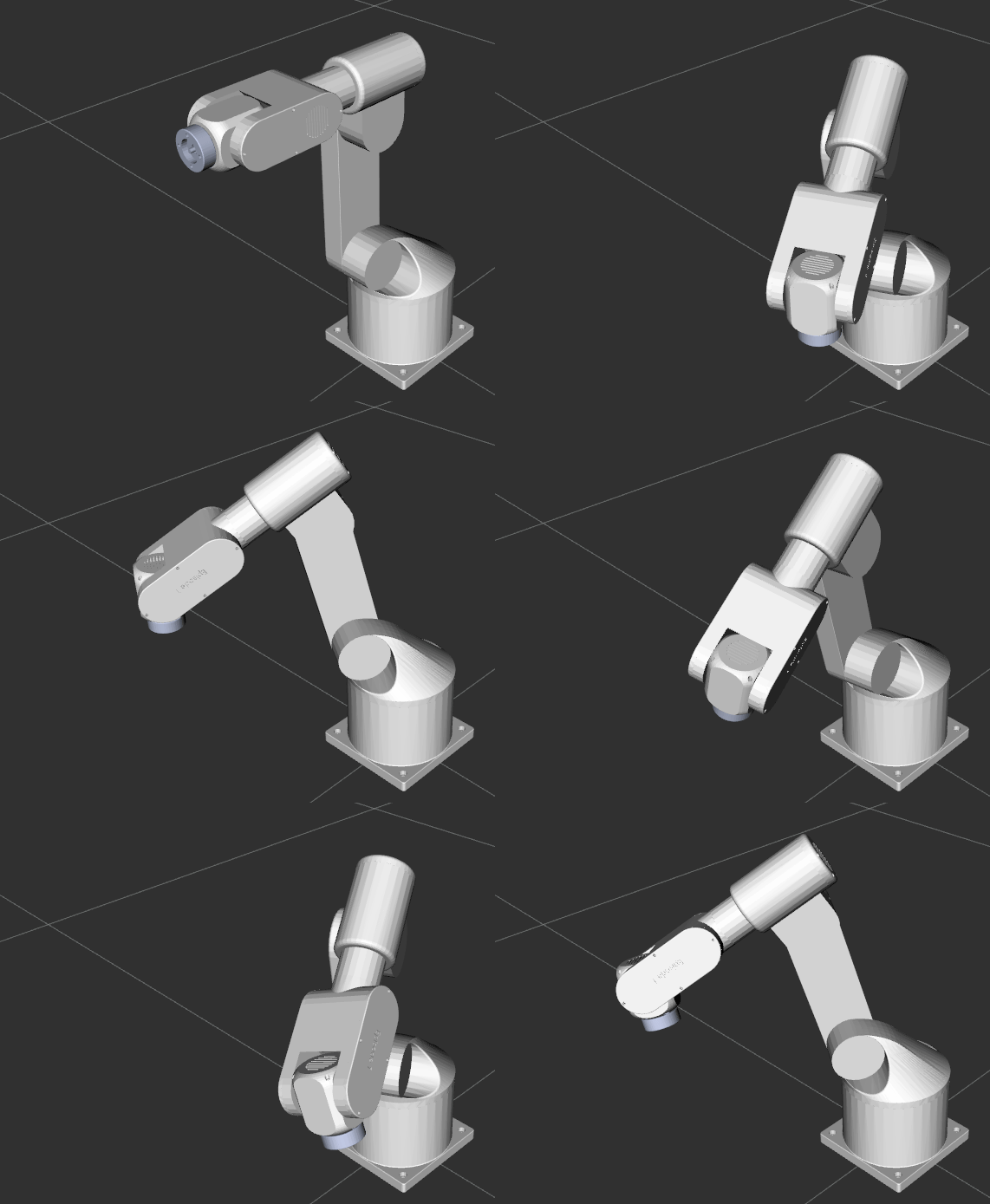
12.1 场景描述
这是 kinematic_constraints 最实用的功能:运动过程中保持末端执行器姿态不变。
想象你要搬运一杯水:
- 杯子必须全程保持固定姿态,否则水会洒出来
- 起点和终点位置不同,但末端朝向在运动过程中必须一致
- 这就是路径约束的典型应用
本演示使用三种不同倾斜角度在 A、B 两点之间交替搬运,让你直观感受路径约束的效果:
┌───────────────────────────────────────────────────────────────────────┐
│ 三种姿态交替搬运 A ↔ B │
│ │
│ A [250, 150, 250]mm B [250, -150, 250]mm │
│ │
│ 第1段: 姿态1(竖直 0°) A ──→ B ↓ 全程保持竖直 │
│ 第2段: 姿态2(前倾 20°) B ──→ A ↘ 全程保持前倾 │
│ 第3段: 姿态3(后倾 -20°) A ──→ B ↗ 全程保持后倾 │
│ │
│ 每段运动前先在起点调整到目标姿态(无约束), │
│ 然后带路径约束运动到终点 → 全程保持该姿态 │
│ │
│ 对比效果:3段运动路径相同但姿态截然不同 → 直观感受路径约束的作用 │
└───────────────────────────────────────────────────────────────────────┘
12.2 路径约束 API:set_path_constraints()
# 设置路径约束(与 set_goal_state 独立)
arm.set_path_constraints(path_constraints=constraints_msg)
# 用完必须清除!否则后续所有规划都会受影响
arm.set_path_constraints(path_constraints=Constraints()) # 传空约束 = 清除
关键区别对比:
| 目标约束(Goal) | 路径约束(Path) | |
|---|---|---|
| 作用范围 | 只约束终点 | 约束整条轨迹的每个点 |
| API | set_goal_state(motion_plan_constraints=[...]) |
set_path_constraints(...) |
| 是否自动清除 | 是,每次 plan() 后重置 |
否,必须手动清除 |
| 规划难度 | 与普通规划相同 | 显著更难,建议增加 planning_attempts |
| 典型用途 | 定义目标位姿 | 搬运约束、工具朝向约束 |
12.3 OrientationConstraint 消息结构
路径约束使用原始 ROS 消息(不使用快捷函数),因为需要更精细的控制:
from moveit_msgs.msg import Constraints, OrientationConstraint
# 将倾斜角 tilt 转为四元数
qx, qy, qz, qw = tf_transformations.quaternion_from_euler(
np.pi, tilt, np.pi / 2, axes='sxyz' # tilt 控制绕 Y 轴的倾斜
)
oc = OrientationConstraint()
oc.header.frame_id = "base_link" # 参考坐标系
oc.link_name = "link6" # 约束哪个连杆
oc.orientation.x, oc.orientation.y = qx, qy # 目标姿态(四元数)
oc.orientation.z, oc.orientation.w = qz, qw
# 3 个轴的容差(弧度)
oc.absolute_x_axis_tolerance = 0.26 # ±15°
oc.absolute_y_axis_tolerance = 0.26 # ±15°
oc.absolute_z_axis_tolerance = 3.14 # ±180°(Z 轴自由旋转)
oc.weight = 1.0
tilt 参数 — 3 种倾斜角度:
| tilt 值 | 含义 | 实际效果 |
|---|---|---|
0.0 |
竖直(0°) | 末端正对地面,标准搬水杯姿态 |
0.35 |
前倾(~20°) | 末端向前倾斜,像倒水的动作 |
-0.35 |
后倾(~-20°) | 末端向后倾斜,反方向倾倒 |
3 轴容差详解:
| 轴 | 含义 | 本例设值 | 效果 |
|---|---|---|---|
| X 轴 | 绕 X 轴的允许偏差 | 0.26(±15°) | 严格约束,防止侧翻 |
| Y 轴 | 绕 Y 轴的允许偏差 | 0.26(±15°) | 严格约束,防止前后倾斜超标 |
| Z 轴 | 绕 Z 轴的允许偏差 | 3.14(±180°) | 自由旋转(杯子绕竖直轴转不影响水面) |
搬水杯场景:X 和 Y 轴需要严格约束(防止倾斜洒水),Z 轴可以自由旋转。三种 tilt 值让你对比:竖直搬运 vs 倾斜搬运的路径差异。
12.4 代码实现
实际代码将路径约束逻辑封装为辅助方法 _move_with_path_constraint,run_demo_8 调用它 3 次完成 3 种姿态的交替搬运。
辅助方法:_move_with_path_constraint
def _move_with_path_constraint(self, tilt, target_pos, from_pos, label=""):
"""先无约束调整当前位置姿态,再以路径约束运动到目标位置"""
tilt_deg = np.rad2deg(tilt)
rot = [np.pi, tilt, np.pi / 2]
# 1) 先在当前位置无约束调整到目标姿态(确保起始满足路径约束)
self.get_logger().info(f"{label}: 调整姿态到倾斜 {tilt_deg:.1f}°...")
self.move_to_pose(from_pos[0], from_pos[1], from_pos[2],
rot[0], rot[1], rot[2])
# 2) 构建路径姿态约束
qx, qy, qz, qw = tf_transformations.quaternion_from_euler(
np.pi, tilt, np.pi / 2, axes='sxyz'
)
path_constraints = Constraints()
path_constraints.name = f"keep_tilt_{tilt_deg:.0f}"
oc = OrientationConstraint()
oc.header.frame_id = "base_link"
oc.link_name = "link6"
oc.orientation.x, oc.orientation.y = qx, qy
oc.orientation.z, oc.orientation.w = qz, qw
oc.absolute_x_axis_tolerance = 0.26 # ±15°
oc.absolute_y_axis_tolerance = 0.26 # ±15°
oc.absolute_z_axis_tolerance = 3.14 # 自由旋转
oc.weight = 1.0
path_constraints.orientation_constraints.append(oc)
self.arm.set_path_constraints(path_constraints=path_constraints)
# 3) 构建目标位姿(同样的倾斜角)
qx_t, qy_t, qz_t, qw_t = tf_transformations.quaternion_from_euler(
rot[0], rot[1], rot[2], axes='sxyz'
)
pose_goal = PoseStamped()
pose_goal.header.frame_id = "base_link"
pose_goal.pose.position.x = target_pos[0] / 1000.0
pose_goal.pose.position.y = target_pos[1] / 1000.0
pose_goal.pose.position.z = target_pos[2] / 1000.0
pose_goal.pose.orientation.x = qx_t
pose_goal.pose.orientation.y = qy_t
pose_goal.pose.orientation.z = qz_t
pose_goal.pose.orientation.w = qw_t
self.arm.set_start_state_to_current_state()
self.arm.set_goal_state(pose_stamped_msg=pose_goal, pose_link="link6")
self.get_logger().info(f"{label}: 倾斜 {tilt_deg:.1f}° 带约束运动中...")
plan_result = self.arm.plan()
if plan_result:
self.robot.execute(plan_result.trajectory, controllers=[])
self.get_logger().info(f"{label} 成功")
else:
self.get_logger().warn(f"{label} 规划失败")
# 清除路径约束(每段运动后立即清除,避免影响下一段)
self.arm.set_path_constraints(path_constraints=Constraints())
time.sleep(0.5)
辅助方法流程(每段搬运):
| 步骤 | 操作 | 说明 |
|---|---|---|
| ① 调整姿态 | move_to_pose(from_pos, rot) |
无约束移到起点并调到目标倾斜角,确保起始满足路径约束 |
| ② 构建约束 | OrientationConstraint → set_path_constraints |
将目标倾斜角转为四元数,设为路径约束 |
| ③ 带约束运动 | set_goal_state → plan() → execute |
全程保持该倾斜角移动到终点 |
| ④ 清除约束 | set_path_constraints(Constraints()) |
必须清除,否则影响下一段 |
主函数:run_demo_8
def run_demo_8(self):
"""演示 8: 路径约束 — 搬水杯场景(3种姿态交替搬运 A↔B)"""
self.get_logger().info("=== 演示 8: 路径约束(3种姿态交替搬运) ===")
pos_a = [250.0, 150.0, 250.0]
pos_b = [250.0, -150.0, 250.0]
# 3种倾斜姿态(差异明显)
tilts = [0.0, 0.35, -0.35] # 0°, ~20°, ~-20°
labels = ["姿态1(竖直)", "姿态2(前倾20°)", "姿态3(后倾20°)"]
# 姿态1: A → B(从A出发,先调整到姿态1再带约束走到B)
self.get_logger().info(f"--- 第1段: {labels[0]} A→B ---")
self._move_with_path_constraint(tilts[0], pos_b, pos_a, f"{labels[0]} A→B")
# 姿态2: B → A(在B处调整到姿态2再带约束走到A)
self.get_logger().info(f"--- 第2段: {labels[1]} B→A ---")
self._move_with_path_constraint(tilts[1], pos_a, pos_b, f"{labels[1]} B→A")
# 姿态3: A → B(在A处调整到姿态3再带约束走到B)
self.get_logger().info(f"--- 第3段: {labels[2]} A→B ---")
self._move_with_path_constraint(tilts[2], pos_b, pos_a, f"{labels[2]} A→B")
self.move_to_target("home")
运行流程示意:
第1段:姿态1(竖直 0°) → 在A调整竖直 → 带约束走到B ↓全程朝下
第2段:姿态2(前倾 20°) → 在B调前倾 → 带约束走到A ↘全程前倾
第3段:姿态3(后倾 -20°) → 在A调后倾 → 带约束走到B ↗全程后倾
最后:回到 home
观察重点:3 段运动的起点终点完全相同(A↔B),但因为路径约束的姿态不同,机械臂走出的轨迹路径截然不同。这就是路径约束的核心价值 — 不仅约束终点,还约束整条路径上每一个点的姿态。
12.5 路径约束的注意事项
| 注意事项 | 说明 | 后果 |
|---|---|---|
| 起始状态必须满足约束 | 每段运动前先 move_to_pose 调整到目标姿态 |
否则规划器直接报错 |
| 每段用完必须清除 | set_path_constraints(Constraints()) |
否则影响下一段(不同倾斜角)或后续演示 |
| 规划更耗时 | OMPL 约束规划使用投影状态空间 | 建议 planning_attempts 设为 5-10 |
| 容差不要太小 | 本例用 0.26 rad(±15°),再小容易失败 | 太小 → 规划失败率极高 |
| 仅 OMPL 完整支持 | CHOMP 只支持关节空间,Pilz 忽略路径约束 | 确保使用 ompl 管线 |
| 倾斜角差异要够大 | 本例 0° / 20° / -20° 差异明显 | 太小则 3 段运动看不出区别 |
调参建议:如果路径约束规划经常失败,可以在
config_dict中调整:"plan_request_params": { "planning_attempts": 10, # 从 3 增加到 10 "planning_pipeline": "ompl", "max_velocity_scaling_factor": 0.5, "max_acceleration_scaling_factor": 0.5 }
十四、常见问题排查
| 问题 | 可能原因 | 解决方案 |
|---|---|---|
MoveIt 初始化超时 wait_for_initial_state_timeout |
/joint_states 没有发布 |
确保 Demo 或 robot_interface_node 已启动 |
| "Start state out of bounds" | 当前关节角度超出 URDF 限位 | 增大 start_state_max_bounds_error(如 0.1) |
| "Start state differs from current" | 实际位置与规划起点偏差过大 | 增大 allowed_start_tolerance(如 0.05) |
| IK 求解失败(move_to_pose 返回 False) | 目标位姿超出工作空间 | 检查坐标范围,确保在机械臂可达范围内 |
| 碰撞检测后状态异常 | check_pose_collision 没有恢复原始状态 |
确保 IK 检查后调用了 set_joint_group_positions 恢复 |
| 路径约束规划失败 | 约束太紧 / 规划次数不够 | 增大容差(如 0.3 rad),planning_attempts 设为 10 |
| 路径约束后所有规划都失败 | 忘记清除路径约束 | 确保调用 set_path_constraints(Constraints()) 清除 |
| 起始状态不满足路径约束 | 设置路径约束前没有移到合规位姿 | 先用 move_to_pose 移到满足约束的位姿 |
construct_link_constraint 坐标系错误 |
缺少 ResolveConstraintFrames 适配器 |
检查 request_adapters 配置 |
| 规划耗时过长(>10 秒) | 路径约束导致搜索空间增大 | 正常现象,可以限制 max_velocity_scaling 降低搜索复杂度 |
调试技巧:遇到规划失败时,可以先在 Demo 模式下用 RViz 手动测试同一个目标位姿。如果 RViz 也规划失败,说明目标本身有问题(超出工作空间、碰撞等),而不是代码问题。