3.14 MoveIt C++ 笛卡尔空间运动实战
一、核心问题:为什么需要 C++ 来控制笛卡尔运动?
在第 13 章中,我们用 MoveItPy(Python API)实现了关节空间运动、位姿目标、场景管理等功能。但在工业应用中,机械臂经常需要执行笛卡尔空间运动——比如:
- 直线运动(LIN):焊接、涂胶、搬运时,末端必须沿精确的直线路径移动
- 圆弧运动(CIRC):弧焊、打磨曲面时,末端必须沿圆弧轨迹运动
- 多段连续运动(Sequence):多段 LIN/CIRC 无停顿衔接,如"L 形轨迹"、"矩形路径"
问题来了:在当前 MoveIt2 Jazzy 版本中,MoveItPy(Python API)暂时没有提供笛卡尔空间运动的规划接口(可能是我没找到)。因此,要实现直线(LIN)、圆弧(CIRC)等笛卡尔路径规划,我们需要使用 C++ 的 MoveGroupInterface 配合 Pilz 工业运动规划器。
1.1 本章的技术架构
┌──────────────────────────────────────────────────────────┐
│ 你的 C++ 代码 │
│ MoveGroupInterface + Pilz Planner (PTP/LIN/CIRC/Seq) │
└──────────────────────────────────────────────────────────┘
│
▼
┌──────────────────────────────────────────────────────────┐
│ MoveIt2 核心 │
│ Pilz CommandPlanner → 笛卡尔插值 → 梯形速度曲线 → IK │
└──────────────────────────────────────────────────────────┘
│
▼
┌──────────────────────────────────────────────────────────┐
│ ROS2 通信层(与第 12/13 章一致) │
│ Action: /episode_arm_controller/follow_joint_trajectory │
│ Topic : /joint_states /robot_description │
└──────────────────────────────────────────────────────────┘
│
▼
┌──────────────────────────────────────────────────────────┐
│ 执行层(模拟或真实) │
│ Demo: mock_components 真实: robot_interface_node │
└──────────────────────────────────────────────────────────┘
与第 13 章的关系:本章使用的底层通信机制与第 13 章完全一致——MoveIt 规划轨迹后,通过
FollowJointTrajectoryAction 发送给控制器执行。区别仅在于:规划器从 OMPL 换成了 Pilz,API 从 Python 换成了 C++。
二、Pilz 工业运动规划器简介
Pilz(pilz_industrial_motion_planner)是 MoveIt2 内置的工业运动规划器,专为标准工业机器人运动设计,提供三种基本运动命令和一种组合能力:
2.1 四种运动能力总览
| 运动类型 | Planner ID | 末端轨迹 | 速度曲线 | 典型应用 |
|---|---|---|---|---|
| PTP (Point-to-Point) | "PTP" |
关节空间最优(末端路径不确定) | 关节空间梯形曲线 | 快速定位、取放件 |
| LIN (Linear) | "LIN" |
笛卡尔直线 | 笛卡尔空间梯形曲线 | 焊接、涂胶、直线搬运 |
| CIRC (Circular) | "CIRC" |
笛卡尔圆弧 | 笛卡尔空间梯形曲线 | 弧焊、曲面打磨 |
| Sequence | 组合多段 | 连续多段轨迹 | 段间平滑混合 | L 形路径、矩形路径 |
2.2 PTP vs LIN:末端轨迹对比
PTP 和 LIN 的目标位姿可以完全相同,但末端走过的路径截然不同:
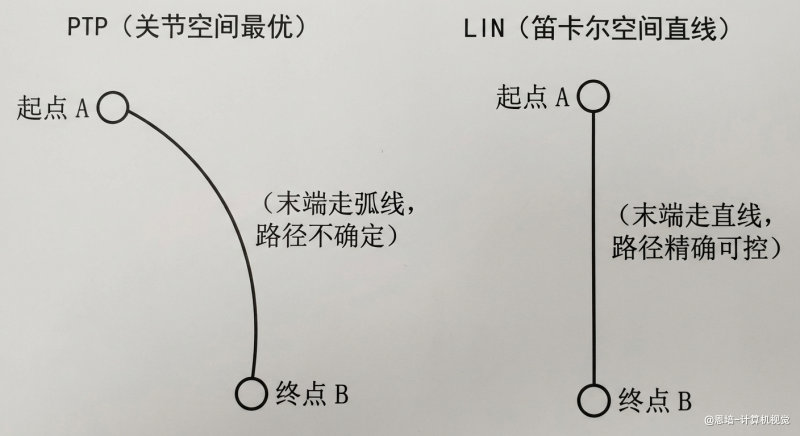
关键理解:PTP 在关节空间做直线插值(每个关节匀速运动),但映射到笛卡尔空间后末端走的是一条弧线。LIN 在笛卡尔空间做直线插值(末端沿直线移动),然后通过逆运动学反算关节角度。
2.3 CIRC 运动的两种约束模式
CIRC(圆弧运动)需要额外指定路径约束来定义圆弧形状,有两种方式:
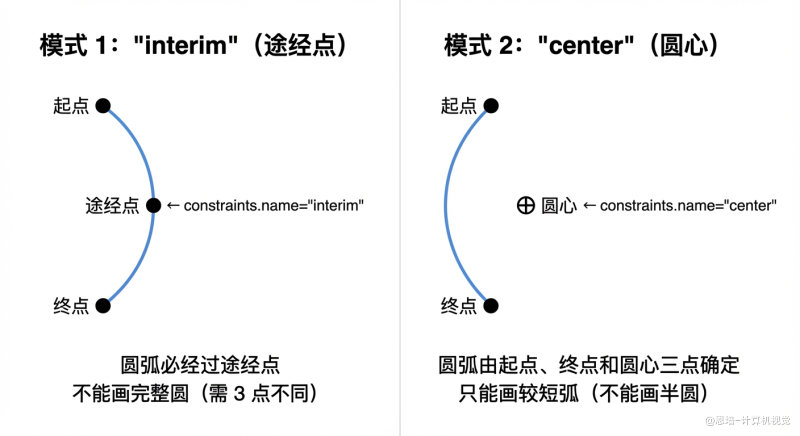
| 约束模式 | constraints.name |
适用场景 |
|---|---|---|
| 途经点 | "interim" |
知道圆弧上某一点 |
| 圆心 | "center" |
知道圆弧圆心 |
2.4 Sequence 混合运动
Sequence 允许将多段运动(PTP/LIN/CIRC)拼接成一条连续轨迹,段与段之间通过 blend_radius(混合半径)实现平滑过渡,不停顿:
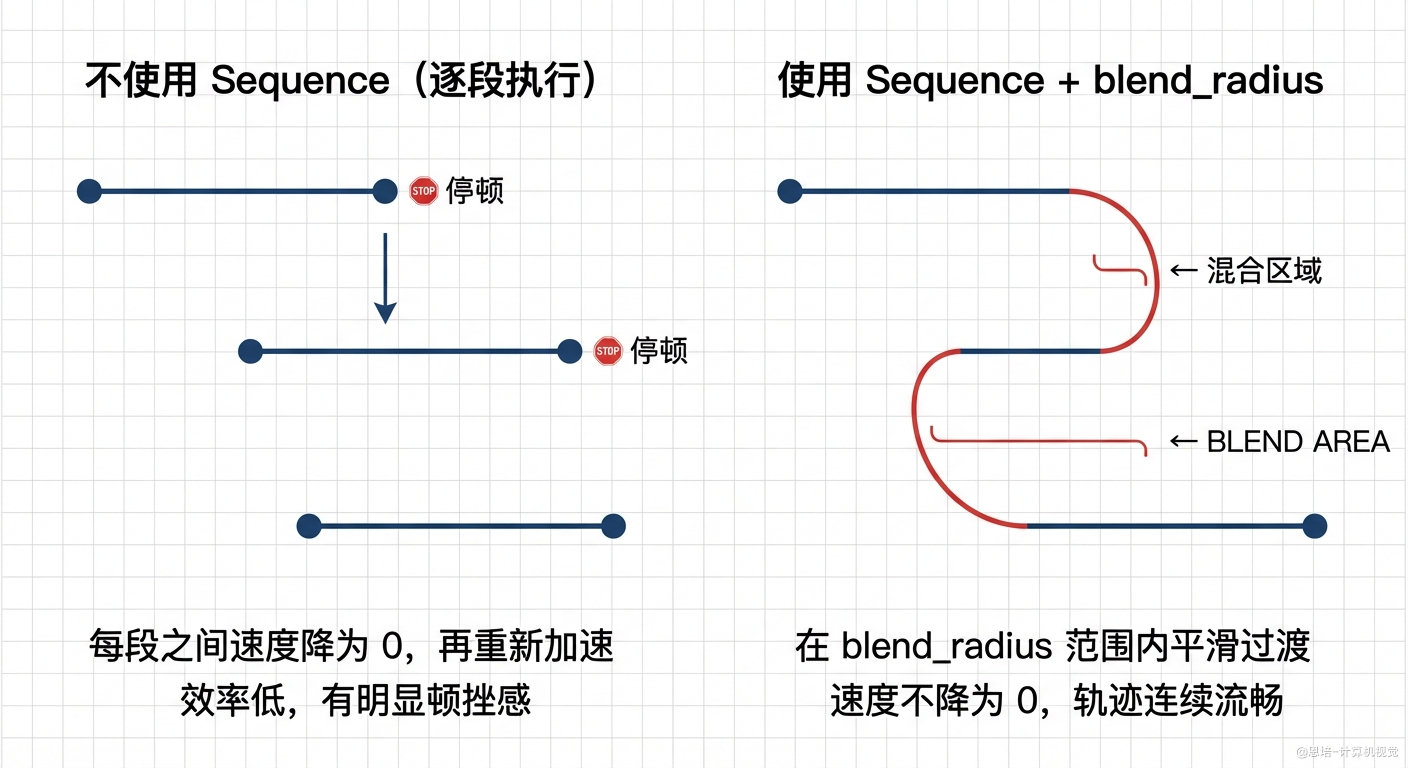
工业价值:在焊接、喷涂等连续加工场景中,Sequence + blend 能显著提高加工效率和表面质量。
三、MoveIt 配置包改动详解
要使用 Pilz 规划器,需要对 MoveIt 配置包(episode1_urdf_student_moveit)进行以下配置。如果你是用 MoveIt Setup Assistant 生成的配置包,部分文件可能已经自动生成。
3.1 新增 pilz_cartesian_limits.yaml
Pilz 的 LIN/CIRC 运动需要知道笛卡尔空间的速度/加速度极限。在配置包的 config/ 目录下新增:
文件路径:episode1_urdf_student_moveit/config/pilz_cartesian_limits.yaml
# Pilz 笛卡尔空间运动限制
# LIN 和 CIRC 运动使用这些限制生成梯形速度曲线
cartesian_limits:
max_trans_vel: 1.0 # 最大平移速度 (m/s)
max_trans_acc: 2.25 # 最大平移加速度 (m/s²)
max_trans_dec: -5.0 # 最大平移减速度 (m/s²,负值)
max_rot_vel: 1.57 # 最大旋转速度 (rad/s,约 90°/s)
参数说明:
| 参数 | 类型 | 说明 | 影响 |
|---|---|---|---|
max_trans_vel |
float | 最大平移速度 (m/s) | 控制 LIN/CIRC 末端最大移动速度 |
max_trans_acc |
float | 最大平移加速度 (m/s²) | 控制加速阶段的快慢 |
max_trans_dec |
float (负) | 最大平移减速度 (m/s²) | 控制减速阶段的快慢,必须为负值 |
max_rot_vel |
float | 最大旋转速度 (rad/s) | 控制姿态变化的最大速度 |
注意:旋转加速度由平移参数推导:
max_rot_acc = max_trans_acc / max_trans_vel * max_rot_vel,无需单独设置。
3.2 确认 joint_limits.yaml
Pilz 需要每个关节的速度和加速度限制。该文件通常由 MoveIt Setup Assistant 自动生成,我们使用下面的数值覆盖一下之前的数值(加速度调大了很多):
为什么加速度要调大? 经过实际测试发现,如果关节加速度限制设置过小(如默认的 1.0 或 3.5),CIRC(圆弧)运动经常会规划失败,返回无解。原因如下:
Pilz 规划器在生成轨迹时,会对每个关节独立进行梯形速度规划(加速 → 匀速 → 减速)。圆弧运动相比直线运动,对关节的运动要求更"苛刻"——末端执行器要沿圆弧走,各关节需要同时协调变化,某些关节可能需要在很短的时间内完成较大的角度变化。如果该关节的加速度上限太小,规划器就无法在约束范围内找到一条满足笛卡尔空间圆弧轨迹的时间同步方案,导致规划直接失败。
简单来说:加速度上限越小 → 关节响应越慢 → 越难满足圆弧轨迹对多关节同步协调的要求 → 规划失败概率越高。将
max_acceleration设为 10.0~20.0 后,关节有足够的"机动能力"来快速调整,CIRC 规划成功率会显著提高。
文件路径:episode1_urdf_student_moveit/config/joint_limits.yaml
default_velocity_scaling_factor: 0.1
default_acceleration_scaling_factor: 0.1
joint_limits:
joint1:
has_velocity_limits: true
max_velocity: 2.0
has_acceleration_limits: true
max_acceleration: 10.0
joint2:
has_velocity_limits: true
max_velocity: 2.0
has_acceleration_limits: true
max_acceleration: 10.0
joint3:
has_velocity_limits: true
max_velocity: 2.0
has_acceleration_limits: true
max_acceleration: 10.0
joint4:
has_velocity_limits: true
max_velocity: 2.094395
has_acceleration_limits: true
max_acceleration: 10.0
joint5:
has_velocity_limits: true
max_velocity: 5.235988
has_acceleration_limits: true
max_acceleration: 10.0
joint6:
has_velocity_limits: true
max_velocity: 10.471976
has_acceleration_limits: true
max_acceleration: 20.0
3.3 确认 Pilz 规划管道配置
需要有一个规划管道配置文件告诉 MoveIt 加载 Pilz 插件:
文件路径:episode1_urdf_student_moveit/config/pilz_industrial_motion_planner_planning.yaml
planning_plugins:
- pilz_industrial_motion_planner/CommandPlanner
# The order of the elements in the adapter corresponds to the order they are processed by the motion planning pipeline.
request_adapters:
- default_planning_request_adapters/ValidateWorkspaceBounds
- default_planning_request_adapters/CheckStartStateBounds
- default_planning_request_adapters/CheckStartStateCollision
default_planner_config: PTP
capabilities: >-
pilz_industrial_motion_planner/MoveGroupSequenceAction
pilz_industrial_motion_planner/MoveGroupSequenceService
说明:
planning_plugins指定 Pilz 的CommandPlanner作为规划插件。request_adapters是规划前的请求适配链,按顺序依次校验工作空间边界、起始状态边界和碰撞。default_planner_config: PTP表示未显式指定planner_id时默认使用 PTP。capabilities增加 Sequence 的 Action 与 Service 能力,否则/plan_sequence_path和/sequence_move_group不会启动。
3.4 配置文件改动汇总
| 文件 | 操作 | 作用 |
|---|---|---|
config/pilz_cartesian_limits.yaml |
新增 | 定义笛卡尔空间速度/加速度极限(LIN/CIRC 必需) |
config/joint_limits.yaml |
确认/修改 | 确保每个关节有加速度限制(Pilz 必需) |
config/pilz_industrial_motion_planner_planning.yaml |
确认 | 加载 Pilz 规划插件 |
四、C++ 功能包结构与部署
4.0 创建功能包(从零开始)
先创建一个新的 C++ 功能包,然后再添加源码:
# 进入工作空间 src 目录
cd ~/ros2_ws/src
# 创建 C++ 包(ament_cmake 构建系统)
ros2 pkg create episode_robot_pilz_test --build-type ament_cmake
创建后,目录结构会自动生成 CMakeLists.txt 和 package.xml,我们在后面章节中再逐步补充源码和依赖。
4.1 功能包结构
episode_robot_pilz_test/
├── CMakeLists.txt # 构建配置
├── package.xml # 包信息与依赖
└── src/
├── episode_robot_lin_test.cpp # 测试 1-3:PTP / LIN / CIRC
└── episode_robot_sequence_test.cpp # 测试 4:Sequence 混合运动
4.2 关键依赖
| 依赖包 | 用途 |
|---|---|
rclcpp |
ROS2 C++ 客户端库 |
moveit_ros_planning_interface |
提供 MoveGroupInterface(核心运动规划接口) |
moveit_msgs |
提供 MotionSequenceRequest 等消息类型(Sequence 需要) |
ament_index_cpp |
查找 ROS 包路径 |
episode1_urdf_1113(exec_depend) |
URDF 机器人模型包 |
episode1_urdf_student_moveit(exec_depend) |
MoveIt 配置包(含 Pilz 配置) |
4.3 package.xml
<?xml version="1.0"?>
<?xml-model href="http://download.ros.org/schema/package_format3.xsd" schematypens="http://www.w3.org/2001/XMLSchema"?>
<package format="3">
<name>episode_robot_pilz_test</name>
<version>0.0.0</version>
<description>Episode 机器人 Pilz 运动规划测试(PTP/LIN/CIRC/Sequence)</description>
<maintainer email="[email protected]">box</maintainer>
<license>TODO: License declaration</license>
<buildtool_depend>ament_cmake</buildtool_depend>
<depend>rclcpp</depend>
<depend>moveit_ros_planning_interface</depend>
<depend>moveit_msgs</depend>
<depend>ament_index_cpp</depend>
<exec_depend>episode1_urdf_1113</exec_depend>
<exec_depend>episode1_urdf_student_moveit</exec_depend>
<test_depend>ament_lint_auto</test_depend>
<test_depend>ament_lint_common</test_depend>
<export>
<build_type>ament_cmake</build_type>
</export>
</package>
4.4 CMakeLists.txt
cmake_minimum_required(VERSION 3.8)
project(episode_robot_pilz_test)
if(CMAKE_COMPILER_IS_GNUCXX OR CMAKE_CXX_COMPILER_ID MATCHES "Clang")
add_compile_options(-Wall -Wextra -Wpedantic)
endif()
# find dependencies
find_package(ament_cmake REQUIRED)
find_package(rclcpp REQUIRED)
find_package(moveit_ros_planning_interface REQUIRED)
find_package(moveit_msgs REQUIRED)
find_package(ament_index_cpp REQUIRED)
# Build the LIN/CIRC test executable
add_executable(episode_robot_lin_test src/episode_robot_lin_test.cpp)
target_include_directories(episode_robot_lin_test PUBLIC
$<BUILD_INTERFACE:${CMAKE_CURRENT_SOURCE_DIR}/include>
$<INSTALL_INTERFACE:include>)
target_compile_features(episode_robot_lin_test PUBLIC c_std_99 cxx_std_17)
ament_target_dependencies(
episode_robot_lin_test
rclcpp
moveit_ros_planning_interface
ament_index_cpp
)
# Build the Sequence test executable
add_executable(episode_robot_sequence_test src/episode_robot_sequence_test.cpp)
target_include_directories(episode_robot_sequence_test PUBLIC
$<BUILD_INTERFACE:${CMAKE_CURRENT_SOURCE_DIR}/include>
$<INSTALL_INTERFACE:include>)
target_compile_features(episode_robot_sequence_test PUBLIC c_std_99 cxx_std_17)
ament_target_dependencies(
episode_robot_sequence_test
rclcpp
moveit_ros_planning_interface
moveit_msgs
ament_index_cpp
)
# Install the executables
install(TARGETS episode_robot_lin_test episode_robot_sequence_test
DESTINATION lib/${PROJECT_NAME})
ament_package()
4.5 复制源码文件
先把示例代码放到功能包中,再进行编译:
# 进入包目录
cd ~/ros2_ws/src/episode_robot_pilz_test
# 新建源码文件
mkdir -p src
touch src/episode_robot_lin_test.cpp
touch src/episode_robot_sequence_test.cpp
# 将本章给出的完整代码复制到对应文件中
# 1) episode_robot_lin_test.cpp
# 2) episode_robot_sequence_test.cpp
如果你是从现有工程复制文件,确保 CMakeLists.txt 和 package.xml 已按本章内容更新。
4.6 编译
cd ~/ros2_ws
colcon build --packages-select episode_robot_pilz_test
source install/setup.bash
4.7 运行方式
方式一:Demo 模式(模拟硬件,无需真实机械臂)
Demo 模式使用 mock_components 模拟硬件,适合开发调试、验证轨迹规划。
# 终端 1:启动 MoveIt Demo(含模拟硬件 + Pilz 规划器 + RViz)
ros2 launch episode1_urdf_student_moveit demo.launch.py
# 终端 2:运行测试 1-3(PTP / LIN / CIRC)
cd ~/ros2_ws && source install/setup.bash
ros2 run episode_robot_pilz_test episode_robot_lin_test
# 或:运行测试 4(Sequence 混合运动)
ros2 run episode_robot_pilz_test episode_robot_sequence_test
方式二:真实机械臂
连接真实机械臂时,不启动 Demo(不使用 mock_components),而是用 robot_interface_node 替代 ros2_control 层(与第 12/13 章一致)。
cd ~/ros2_ws && source install/setup.bash
# 终端 1:启动 Robot State Publisher(发布 /robot_description 和 TF)
ros2 launch episode1_urdf_student_moveit rsp.launch.py
# 终端 2:启动机械臂接口节点(第 12 章,提供 /joint_states + Action Server)
ros2 run py_episode robot_interface_full
# 终端 3:启动 MoveIt 核心节点(含 Pilz 规划器)
ros2 launch episode1_urdf_student_moveit move_group.launch.py
# 终端 4:运行测试(PTP / LIN / CIRC)
ros2 run episode_robot_pilz_test episode_robot_lin_test
# 或:运行 Sequence 测试
ros2 run episode_robot_pilz_test episode_robot_sequence_test
# 终端 5(可选):启动 Movet RViz 可视化
ros2 launch episode1_urdf_student_moveit moveit_rviz.launch.py
# 终端 6(可选):启动 URDF RViz 可视化(运动更流畅)
ros2 launch episode1_urdf_1113 launch.py
两种模式对比
| 对比项 | Demo 模式 | 真实机械臂 |
|---|---|---|
| 硬件 | mock_components 模拟 |
CAN 总线真实电机 |
/joint_states 来源 |
joint_state_broadcaster |
robot_interface_node |
| Action Server | episode_arm_controller |
robot_interface_node |
| C++ 测试代码 | 完全相同,无需修改 | 完全相同,无需修改 |
| 启动方式 | 2 个终端 | 4~5 个终端 |
| 适用场景 | 开发调试、轨迹验证 | 实际控制机械臂运动 |
关键理解:本章的 C++ 代码不需要任何修改就能在 Demo 模式和真实机械臂之间切换。差异只在于底层通信对象(模拟 vs 真实),上层
MoveGroupInterfaceAPI 完全透明。运行顺序:无论哪种模式,都必须先启动 MoveIt 相关节点,等待就绪后,再运行测试节点。
五、完整 C++ 代码:PTP / LIN / CIRC(episode_robot_lin_test.cpp)
5.1 命令行参数说明
改进后的代码支持通过 命令行参数 选择运行哪些测试、调整速度/加速度,无需每次修改源码重新编译:
# 运行全部测试(默认:1→2→3 依次执行)
ros2 run episode_robot_pilz_test episode_robot_lin_test
# 仅运行测试 1(PTP 回 Home)
ros2 run episode_robot_pilz_test episode_robot_lin_test --test 1
# 仅运行测试 2(PTP → LIN 直线运动)
ros2 run episode_robot_pilz_test episode_robot_lin_test --test 2
# 仅运行测试 3(PTP → CIRC 圆弧运动,interim 方式)
ros2 run episode_robot_pilz_test episode_robot_lin_test --test 3
# 仅运行测试 4(PTP → CIRC 圆弧运动,center 方式)
ros2 run episode_robot_pilz_test episode_robot_lin_test --test 4
| 参数 | 说明 | 默认值 |
|---|---|---|
--test <编号> |
指定运行的测试(1、2、3、4 或逗号分隔组合如 1,3) |
全部(1,2,3,4) |
--vel <值> |
全局速度缩放因子(0.0~1.0),覆盖各测试内部默认值 | 各测试内部设定 |
--acc <值> |
全局加速度缩放因子(0.0~1.0),覆盖各测试内部默认值 | 各测试内部设定 |
--help |
显示帮助信息 | — |
5.2 完整代码
#include <memory>
#include <thread>
#include <chrono>
#include <string>
#include <vector>
#include <algorithm>
#include <rclcpp/rclcpp.hpp>
#include <moveit/move_group_interface/move_group_interface.hpp>
#include <tf2_geometry_msgs/tf2_geometry_msgs.hpp>
/**
* Episode 机器人 LIN 运动测试
*
* 该测试演示了 Episode 机械臂的 PTP / LIN / CIRC 运动规划。
*
* 用法:
* ros2 run episode_robot_pilz_test episode_robot_lin_test # 运行全部测试(1→2→3→4)
* ros2 run episode_robot_pilz_test episode_robot_lin_test --test 1 # 仅运行测试 1:PTP 回 Home
* ros2 run episode_robot_pilz_test episode_robot_lin_test --test 2 # 仅运行测试 2:PTP → LIN
* ros2 run episode_robot_pilz_test episode_robot_lin_test --test 3 # 仅运行测试 3:PTP → CIRC(interim)
* ros2 run episode_robot_pilz_test episode_robot_lin_test --test 4 # 仅运行测试 4:PTP → CIRC(center)
* ros2 run episode_robot_pilz_test episode_robot_lin_test --test 1,3 # 运行测试 1 和 3
* ros2 run episode_robot_pilz_test episode_robot_lin_test --help # 显示帮助信息
*
* 可选参数:
* --vel <0.0~1.0> 全局速度缩放因子(默认按各测试内部设定)
* --acc <0.0~1.0> 全局加速度缩放因子(默认按各测试内部设定)
*
* 要运行此示例,首先启动 MoveIt 配置:
* ros2 launch episode1_urdf_student_moveit demo.launch.py
*/
// ==================== 命令行参数解析 ====================
struct TestOptions {
std::vector<int> tests; // 要运行的测试编号,空表示全部
double vel_override = -1.0; // 全局速度覆盖,-1 表示不覆盖
double acc_override = -1.0; // 全局加速度覆盖,-1 表示不覆盖
};
void print_usage()
{
printf("\n");
printf("========================================\n");
printf(" Episode 机器人 Pilz 运动测试\n");
printf("========================================\n");
printf("\n");
printf("用法:\n");
printf(" ros2 run episode_robot_pilz_test episode_robot_lin_test [选项]\n");
printf("\n");
printf("选项:\n");
printf(" --test <编号> 指定运行的测试(1, 2, 3, 4 或组合如 1,3)\n");
printf(" 1 = PTP 移动到 Home\n");
printf(" 2 = PTP → LIN 直线运动\n");
printf(" 3 = PTP → CIRC 圆弧运动(interim)\n");
printf(" 4 = PTP → CIRC 圆弧运动(center)\n");
printf(" --vel <值> 全局速度缩放因子 (0.0~1.0)\n");
printf(" --acc <值> 全局加速度缩放因子 (0.0~1.0)\n");
printf(" --help 显示此帮助信息\n");
printf("\n");
printf("示例:\n");
printf(" ros2 run episode_robot_pilz_test episode_robot_lin_test # 全部测试\n");
printf(" ros2 run episode_robot_pilz_test episode_robot_lin_test --test 1 # 仅 PTP 回 Home\n");
printf(" ros2 run episode_robot_pilz_test episode_robot_lin_test --test 2 # 仅 PTP → LIN\n");
printf(" ros2 run episode_robot_pilz_test episode_robot_lin_test --test 3 # 仅 PTP → CIRC(interim)\n");
printf(" ros2 run episode_robot_pilz_test episode_robot_lin_test --test 4 # 仅 PTP → CIRC(center)\n");
printf(" ros2 run episode_robot_pilz_test episode_robot_lin_test --test 1,3 # 测试 1 和 3\n");
printf(" ros2 run episode_robot_pilz_test episode_robot_lin_test --vel 0.2 --acc 0.2 # 自定义速度\n");
printf("\n");
}
TestOptions parse_args(int argc, char* argv[])
{
TestOptions opts;
for (int i = 1; i < argc; ++i)
{
std::string arg = argv[i];
if (arg == "--help" || arg == "-h")
{
print_usage();
exit(0);
}
else if (arg == "--test" && i + 1 < argc)
{
std::string test_str = argv[++i];
// 解析逗号分隔的测试编号,如 "1,3" 或 "2"
size_t pos = 0;
while (pos < test_str.size())
{
size_t comma = test_str.find(',', pos);
if (comma == std::string::npos) comma = test_str.size();
std::string num_str = test_str.substr(pos, comma - pos);
int num = std::stoi(num_str);
if (num >= 1 && num <= 4)
{
opts.tests.push_back(num);
}
else
{
printf("警告: 忽略无效的测试编号 %d(有效范围: 1-4)\n", num);
}
pos = comma + 1;
}
}
else if (arg == "--vel" && i + 1 < argc)
{
opts.vel_override = std::stod(argv[++i]);
if (opts.vel_override < 0.0 || opts.vel_override > 1.0)
{
printf("警告: 速度缩放因子 %.2f 超出范围 [0.0, 1.0],已限制\n", opts.vel_override);
opts.vel_override = std::clamp(opts.vel_override, 0.01, 1.0);
}
}
else if (arg == "--acc" && i + 1 < argc)
{
opts.acc_override = std::stod(argv[++i]);
if (opts.acc_override < 0.0 || opts.acc_override > 1.0)
{
printf("警告: 加速度缩放因子 %.2f 超出范围 [0.0, 1.0],已限制\n", opts.acc_override);
opts.acc_override = std::clamp(opts.acc_override, 0.01, 1.0);
}
}
// 忽略 ROS 自带参数(如 --ros-args)
}
// 如果未指定测试,则运行全部
if (opts.tests.empty())
{
opts.tests = {1, 2, 3, 4};
}
return opts;
}
bool should_run_test(const TestOptions& opts, int test_num)
{
return std::find(opts.tests.begin(), opts.tests.end(), test_num) != opts.tests.end();
}
// ==================== 主程序 ====================
int main(int argc, char* argv[])
{
// 先解析自定义参数(在 rclcpp::init 之前,避免 ROS 参数干扰)
TestOptions opts = parse_args(argc, argv);
// 初始化 ROS 并创建节点
rclcpp::init(argc, argv);
auto const node = std::make_shared<rclcpp::Node>(
"episode_robot_lin_test_node",
rclcpp::NodeOptions().automatically_declare_parameters_from_overrides(true));
// 启动单线程执行器以便 MoveIt 与 ROS 交互
rclcpp::executors::SingleThreadedExecutor executor;
executor.add_node(node);
auto spinner = std::thread([&executor]() { executor.spin(); });
// 创建 ROS 日志记录器
auto const logger = rclcpp::get_logger("episode_robot_lin_test_node");
// 打印运行配置
RCLCPP_INFO(logger, "========================================");
RCLCPP_INFO(logger, " Episode 机器人 Pilz 运动测试");
RCLCPP_INFO(logger, "========================================");
{
std::string test_list;
for (size_t i = 0; i < opts.tests.size(); ++i)
{
if (i > 0) test_list += ", ";
test_list += std::to_string(opts.tests[i]);
}
RCLCPP_INFO(logger, "将运行测试: [%s]", test_list.c_str());
if (opts.vel_override > 0)
RCLCPP_INFO(logger, "全局速度缩放: %.2f", opts.vel_override);
if (opts.acc_override > 0)
RCLCPP_INFO(logger, "全局加速度缩放: %.2f", opts.acc_override);
}
// 为 episode_arm 创建 MoveIt MoveGroup 接口
using moveit::planning_interface::MoveGroupInterface;
auto move_group_interface = MoveGroupInterface(node, "episode_arm");
// 打印当前位姿作为参考
auto current_pose = move_group_interface.getCurrentPose("link6");
RCLCPP_INFO(logger, "当前末端执行器位姿:");
RCLCPP_INFO(logger, " 位置: [%.3f, %.3f, %.3f]",
current_pose.pose.position.x,
current_pose.pose.position.y,
current_pose.pose.position.z);
RCLCPP_INFO(logger, " 姿态: [%.3f, %.3f, %.3f, %.3f]",
current_pose.pose.orientation.x,
current_pose.pose.orientation.y,
current_pose.pose.orientation.z,
current_pose.pose.orientation.w);
// 设置速度/加速度的辅助函数(支持全局覆盖)
auto set_velocity = [&](double default_vel, double default_acc) {
double vel = (opts.vel_override > 0) ? opts.vel_override : default_vel;
double acc = (opts.acc_override > 0) ? opts.acc_override : default_acc;
move_group_interface.setMaxVelocityScalingFactor(vel);
move_group_interface.setMaxAccelerationScalingFactor(acc);
RCLCPP_INFO(logger, " 速度缩放: %.2f, 加速度缩放: %.2f", vel, acc);
};
// 规划和执行运动的辅助函数
auto const plan_and_execute = [&](const std::string& title) {
RCLCPP_INFO(logger, "正在规划: %s", title.c_str());
// 添加小延迟以便可视化
std::this_thread::sleep_for(std::chrono::seconds(1));
auto const [success, plan] = [&move_group_interface] {
moveit::planning_interface::MoveGroupInterface::Plan msg;
auto const ok = static_cast<bool>(move_group_interface.plan(msg));
return std::make_pair(ok, msg);
}();
// 执行规划
if (success)
{
RCLCPP_INFO(logger, "规划成功!正在执行: %s", title.c_str());
std::this_thread::sleep_for(std::chrono::seconds(1));
move_group_interface.execute(plan);
RCLCPP_INFO(logger, "成功执行: %s", title.c_str());
}
else
{
RCLCPP_ERROR(logger, "规划失败: %s", title.c_str());
}
return success;
};
// 设置规划管道使用 Pilz 工业运动规划器
move_group_interface.setPlanningPipelineId("pilz_industrial_motion_planner");
// 设置规划尝试次数(默认为 1,增加可以提高 IK 求解成功率)
move_group_interface.setNumPlanningAttempts(5);
// 设置规划时间限制(秒)
move_group_interface.setPlanningTime(10.0);
// ==================== 测试 1:PTP 回 Home ====================
if (should_run_test(opts, 1))
{
RCLCPP_INFO(logger, "----------------------------------------");
RCLCPP_INFO(logger, "测试 1:使用 PTP 移动到 home 位置");
RCLCPP_INFO(logger, "----------------------------------------");
move_group_interface.setPlannerId("PTP");
set_velocity(0.5, 0.5);
move_group_interface.setNamedTarget("home");
plan_and_execute("[PTP] 移动到 Home");
}
// ==================== 测试 2:PTP → LIN ====================
if (should_run_test(opts, 2))
{
RCLCPP_INFO(logger, "----------------------------------------");
RCLCPP_INFO(logger, "测试 2:PTP 到第一个位姿,然后 LIN 到第二个位姿");
RCLCPP_INFO(logger, "----------------------------------------");
// 定义第一个位置(毫米,将转换为米)
double x_mm = 260.0;
double y_mm = 0.0;
double z_mm = 350.0;
// 定义姿态(度,将转换为弧度)
double x_rot_deg = 180.0;
double y_rot_deg = 0.0;
double z_rot_deg = 90.0;
// 转换为弧度
double x_rot = x_rot_deg * M_PI / 180.0;
double y_rot = y_rot_deg * M_PI / 180.0;
double z_rot = z_rot_deg * M_PI / 180.0;
// 从欧拉角创建四元数(滚转、俯仰、偏航)
tf2::Quaternion q;
q.setRPY(x_rot, y_rot, z_rot);
// 第一次移动:PTP 从 home 到 (260.0, 0.0, 300.0)
move_group_interface.setPlannerId("PTP");
set_velocity(0.5, 0.5);
geometry_msgs::msg::PoseStamped target_pose;
target_pose.header.frame_id = "base_link";
target_pose.pose.position.x = x_mm / 1000.0; // 毫米转换为米
target_pose.pose.position.y = y_mm / 1000.0;
target_pose.pose.position.z = z_mm / 1000.0;
target_pose.pose.orientation = tf2::toMsg(q);
move_group_interface.setPoseTarget(target_pose, "link6");
RCLCPP_INFO(logger, "第一个目标位姿 (PTP): 位置=[%.1f, %.1f, %.1f]mm, 姿态=[%.1f, %.1f, %.1f]度",
x_mm, y_mm, z_mm,
x_rot_deg, y_rot_deg, z_rot_deg);
plan_and_execute("[PTP] 移动到第一个目标");
// 第二次移动:LIN Z 方向,从 (260.0, 0.0, 300.0) 到 (260.0, 0.0, 200.0),同时俯仰倾斜 +30°
move_group_interface.setPlannerId("LIN");
set_velocity(0.1, 0.1);
z_mm = 150.0;
y_rot_deg = 30.0; // 俯仰倾斜 +30°
y_rot = y_rot_deg * M_PI / 180.0;
target_pose.pose.position.z = z_mm / 1000.0;
tf2::Quaternion q_z;
q_z.setRPY(x_rot, y_rot, z_rot);
target_pose.pose.orientation = tf2::toMsg(q_z);
move_group_interface.setPoseTarget(target_pose, "link6");
RCLCPP_INFO(logger, "LIN Z 方向目标位姿: 位置=[%.1f, %.1f, %.1f]mm, 姿态=[%.1f, %.1f, %.1f]度",
x_mm, y_mm, z_mm,
x_rot_deg, y_rot_deg, z_rot_deg);
plan_and_execute("[LIN] Z 方向直线运动 + 俯仰 +30°");
// 第三次移动:LIN X 方向,从 (260.0, 0.0, 200.0) 到 (200.0, 0.0, 200.0),同时俯仰倾斜到 -30°
move_group_interface.setPlannerId("LIN");
set_velocity(0.1, 0.1);
x_mm = 350.0;
y_rot_deg = -30.0; // 俯仰倾斜 -30°
y_rot = y_rot_deg * M_PI / 180.0;
target_pose.pose.position.x = x_mm / 1000.0;
tf2::Quaternion q_x;
q_x.setRPY(x_rot, y_rot, z_rot);
target_pose.pose.orientation = tf2::toMsg(q_x);
move_group_interface.setPoseTarget(target_pose, "link6");
RCLCPP_INFO(logger, "LIN X 方向目标位姿: 位置=[%.1f, %.1f, %.1f]mm, 姿态=[%.1f, %.1f, %.1f]度",
x_mm, y_mm, z_mm,
x_rot_deg, y_rot_deg, z_rot_deg);
plan_and_execute("[LIN] X 方向直线运动 + 俯仰 -30°");
// 第四次移动:LIN Y 方向,从 (200.0, 0.0, 200.0) 到 (200.0, 100.0, 200.0),同时恢复垂直姿态
move_group_interface.setPlannerId("LIN");
set_velocity(0.1, 0.1);
y_mm = 200.0;
y_rot_deg = 0.0; // 恢复垂直
y_rot = y_rot_deg * M_PI / 180.0;
target_pose.pose.position.y = y_mm / 1000.0;
tf2::Quaternion q_y;
q_y.setRPY(x_rot, y_rot, z_rot);
target_pose.pose.orientation = tf2::toMsg(q_y);
move_group_interface.setPoseTarget(target_pose, "link6");
RCLCPP_INFO(logger, "LIN Y 方向目标位姿: 位置=[%.1f, %.1f, %.1f]mm, 姿态=[%.1f, %.1f, %.1f]度",
x_mm, y_mm, z_mm,
x_rot_deg, y_rot_deg, z_rot_deg);
plan_and_execute("[LIN] Y 方向直线运动 + 恢复垂直");
// 第五次移动:LIN 回到第一个测试点 (260.0, 0.0, 300.0),姿态垂直朝下
move_group_interface.setPlannerId("LIN");
set_velocity(0.1, 0.1);
x_mm = 260.0;
y_mm = 0.0;
z_mm = 300.0;
y_rot_deg = 0.0;
y_rot = y_rot_deg * M_PI / 180.0;
target_pose.pose.position.x = x_mm / 1000.0;
target_pose.pose.position.y = y_mm / 1000.0;
target_pose.pose.position.z = z_mm / 1000.0;
tf2::Quaternion q_back;
q_back.setRPY(x_rot, y_rot, z_rot);
target_pose.pose.orientation = tf2::toMsg(q_back);
move_group_interface.setPoseTarget(target_pose, "link6");
RCLCPP_INFO(logger, "LIN 回到起点: 位置=[%.1f, %.1f, %.1f]mm, 姿态=[%.1f, %.1f, %.1f]度",
x_mm, y_mm, z_mm,
x_rot_deg, y_rot_deg, z_rot_deg);
plan_and_execute("[LIN] 直线运动回到第一个测试点");
}
// ==================== 测试 3:PTP → CIRC(interim) ====================
if (should_run_test(opts, 3))
{
RCLCPP_INFO(logger, "----------------------------------------");
RCLCPP_INFO(logger, "测试 3:PTP 到起始位置,然后 CIRC 圆弧运动(interim)");
RCLCPP_INFO(logger, "----------------------------------------");
// 定义起始位置(毫米,将转换为米)
double x_mm = 260.0;
double y_mm = 0.0;
double z_mm = 300.0;
// 定义姿态(度,将转换为弧度)
double x_rot_deg = 180.0;
double y_rot_deg = 0.0;
double z_rot_deg = 90.0;
// 转换为弧度
double x_rot = x_rot_deg * M_PI / 180.0;
double y_rot = y_rot_deg * M_PI / 180.0;
double z_rot = z_rot_deg * M_PI / 180.0;
// 从欧拉角创建四元数
tf2::Quaternion q;
q.setRPY(x_rot, y_rot, z_rot);
// 第一次移动:PTP 到 (260.0, 0.0, 300.0)
move_group_interface.setPlannerId("PTP");
set_velocity(0.5, 0.5);
geometry_msgs::msg::PoseStamped target_pose;
target_pose.header.frame_id = "base_link";
target_pose.pose.position.x = x_mm / 1000.0; // 毫米转换为米
target_pose.pose.position.y = y_mm / 1000.0;
target_pose.pose.position.z = z_mm / 1000.0;
target_pose.pose.orientation = tf2::toMsg(q);
move_group_interface.setPoseTarget(target_pose, "link6");
RCLCPP_INFO(logger, "起始位姿 (PTP): 位置=[%.1f, %.1f, %.1f]mm, 姿态=[%.1f, %.1f, %.1f]度",
x_mm, y_mm, z_mm,
x_rot_deg, y_rot_deg, z_rot_deg);
plan_and_execute("[PTP] 移动到 CIRC 起始位置");
// --- CIRC 第 1 组:interim 在前方 (370, 0, 200),圆弧向 +X 方向凸出 ---
move_group_interface.setPlannerId("CIRC");
set_velocity(0.1, 0.1);
z_mm = 100.0;
target_pose.pose.position.z = z_mm / 1000.0;
move_group_interface.setPoseTarget(target_pose, "link6");
{
double interim_x = 370.0, interim_y = 0.0, interim_z = 200.0;
geometry_msgs::msg::PoseStamped interim_pose;
interim_pose.header.frame_id = "base_link";
interim_pose.pose.position.x = interim_x / 1000.0;
interim_pose.pose.position.y = interim_y / 1000.0;
interim_pose.pose.position.z = interim_z / 1000.0;
interim_pose.pose.orientation = tf2::toMsg(q);
moveit_msgs::msg::Constraints c;
c.name = "interim";
moveit_msgs::msg::PositionConstraint pc;
pc.header.frame_id = interim_pose.header.frame_id;
pc.link_name = "link6";
pc.constraint_region.primitive_poses.push_back(interim_pose.pose);
pc.weight = 1.0;
c.position_constraints.push_back(pc);
move_group_interface.setPathConstraints(c);
RCLCPP_INFO(logger, "[第1组] 目标位姿: 位置=[%.1f, %.1f, %.1f]mm", x_mm, y_mm, z_mm);
RCLCPP_INFO(logger, "[第1组] 途经点 (interim): [%.1f, %.1f, %.1f]mm — 圆弧向 +X 凸出",
interim_x, interim_y, interim_z);
}
plan_and_execute("[CIRC-interim 1] 圆弧向前凸出 (+X)");
move_group_interface.clearPathConstraints();
// PTP 回到起始位置
move_group_interface.setPlannerId("PTP");
set_velocity(0.5, 0.5);
z_mm = 300.0;
target_pose.pose.position.z = z_mm / 1000.0;
move_group_interface.setPoseTarget(target_pose, "link6");
plan_and_execute("[PTP] 返回起始位置");
// --- CIRC 第 2 组:interim 在后方 (150, 0, 200),圆弧向 -X 方向凸出 ---
move_group_interface.setPlannerId("CIRC");
set_velocity(0.1, 0.1);
z_mm = 100.0;
target_pose.pose.position.z = z_mm / 1000.0;
move_group_interface.setPoseTarget(target_pose, "link6");
{
double interim_x = 150.0, interim_y = 0.0, interim_z = 200.0;
geometry_msgs::msg::PoseStamped interim_pose;
interim_pose.header.frame_id = "base_link";
interim_pose.pose.position.x = interim_x / 1000.0;
interim_pose.pose.position.y = interim_y / 1000.0;
interim_pose.pose.position.z = interim_z / 1000.0;
interim_pose.pose.orientation = tf2::toMsg(q);
moveit_msgs::msg::Constraints c;
c.name = "interim";
moveit_msgs::msg::PositionConstraint pc;
pc.header.frame_id = interim_pose.header.frame_id;
pc.link_name = "link6";
pc.constraint_region.primitive_poses.push_back(interim_pose.pose);
pc.weight = 1.0;
c.position_constraints.push_back(pc);
move_group_interface.setPathConstraints(c);
RCLCPP_INFO(logger, "[第2组] 目标位姿: 位置=[%.1f, %.1f, %.1f]mm", x_mm, y_mm, z_mm);
RCLCPP_INFO(logger, "[第2组] 途经点 (interim): [%.1f, %.1f, %.1f]mm — 圆弧向 -X 凸出",
interim_x, interim_y, interim_z);
}
plan_and_execute("[CIRC-interim 2] 圆弧向后凸出 (-X)");
move_group_interface.clearPathConstraints();
// PTP 回到起始位置
move_group_interface.setPlannerId("PTP");
set_velocity(0.5, 0.5);
z_mm = 300.0;
target_pose.pose.position.z = z_mm / 1000.0;
move_group_interface.setPoseTarget(target_pose, "link6");
plan_and_execute("[PTP] 返回起始位置");
// --- CIRC 第 3 组:interim 在侧方 (260, 100, 200),圆弧向 +Y 方向凸出 ---
move_group_interface.setPlannerId("CIRC");
set_velocity(0.1, 0.1);
z_mm = 100.0;
target_pose.pose.position.z = z_mm / 1000.0;
move_group_interface.setPoseTarget(target_pose, "link6");
{
double interim_x = 260.0, interim_y = 100.0, interim_z = 200.0;
geometry_msgs::msg::PoseStamped interim_pose;
interim_pose.header.frame_id = "base_link";
interim_pose.pose.position.x = interim_x / 1000.0;
interim_pose.pose.position.y = interim_y / 1000.0;
interim_pose.pose.position.z = interim_z / 1000.0;
interim_pose.pose.orientation = tf2::toMsg(q);
moveit_msgs::msg::Constraints c;
c.name = "interim";
moveit_msgs::msg::PositionConstraint pc;
pc.header.frame_id = interim_pose.header.frame_id;
pc.link_name = "link6";
pc.constraint_region.primitive_poses.push_back(interim_pose.pose);
pc.weight = 1.0;
c.position_constraints.push_back(pc);
move_group_interface.setPathConstraints(c);
RCLCPP_INFO(logger, "[第3组] 目标位姿: 位置=[%.1f, %.1f, %.1f]mm", x_mm, y_mm, z_mm);
RCLCPP_INFO(logger, "[第3组] 途经点 (interim): [%.1f, %.1f, %.1f]mm — 圆弧向 +Y 凸出",
interim_x, interim_y, interim_z);
}
plan_and_execute("[CIRC-interim 3] 圆弧向侧方凸出 (+Y)");
// 清除路径约束
move_group_interface.clearPathConstraints();
// PTP 回到初始点
move_group_interface.setPlannerId("PTP");
set_velocity(0.5, 0.5);
z_mm = 300.0;
target_pose.pose.position.z = z_mm / 1000.0;
target_pose.pose.position.y = 0.0 / 1000.0;
move_group_interface.setPoseTarget(target_pose, "link6");
plan_and_execute("[PTP] 返回初始点");
}
// ==================== 测试 4:PTP → CIRC(center) ====================
if (should_run_test(opts, 4))
{
RCLCPP_INFO(logger, "----------------------------------------");
RCLCPP_INFO(logger, "测试 4:PTP 到起始位置,然后 CIRC 圆弧运动(center)");
RCLCPP_INFO(logger, "----------------------------------------");
// 定义起始位置(毫米,将转换为米)
double x_mm = 260.0;
double y_mm = 0.0;
double z_mm = 300.0;
// 定义姿态(度,将转换为弧度)
double x_rot_deg = 180.0;
double y_rot_deg = 0.0;
double z_rot_deg = 90.0;
// 转换为弧度
double x_rot = x_rot_deg * M_PI / 180.0;
double y_rot = y_rot_deg * M_PI / 180.0;
double z_rot = z_rot_deg * M_PI / 180.0;
// 从欧拉角创建四元数
tf2::Quaternion q;
q.setRPY(x_rot, y_rot, z_rot);
// 第一次移动:PTP 到 (260.0, 0.0, 300.0)
move_group_interface.setPlannerId("PTP");
set_velocity(0.5, 0.5);
geometry_msgs::msg::PoseStamped target_pose;
target_pose.header.frame_id = "base_link";
target_pose.pose.position.x = x_mm / 1000.0; // 毫米转换为米
target_pose.pose.position.y = y_mm / 1000.0;
target_pose.pose.position.z = z_mm / 1000.0;
target_pose.pose.orientation = tf2::toMsg(q);
move_group_interface.setPoseTarget(target_pose, "link6");
RCLCPP_INFO(logger, "起始位姿 (PTP): 位置=[%.1f, %.1f, %.1f]mm, 姿态=[%.1f, %.1f, %.1f]度",
x_mm, y_mm, z_mm,
x_rot_deg, y_rot_deg, z_rot_deg);
plan_and_execute("[PTP] 移动到 CIRC(center) 起始位置");
// --- CIRC-center 第 1 组:圆心在前方 (370, 0, 200),圆弧向 +X 凸出 ---
// 起点 (260,0,300) → 终点 (260,0,100)
// d(center→start) = sqrt(110²+100²) ≈ 148.66mm
// d(center→end) = sqrt(110²+100²) ≈ 148.66mm ✓
move_group_interface.setPlannerId("CIRC");
set_velocity(0.1, 0.1);
z_mm = 100.0;
target_pose.pose.position.z = z_mm / 1000.0;
move_group_interface.setPoseTarget(target_pose, "link6");
{
double center_x = 370.0, center_y = 0.0, center_z = 200.0;
geometry_msgs::msg::PoseStamped cp;
cp.header.frame_id = "base_link";
cp.pose.position.x = center_x / 1000.0;
cp.pose.position.y = center_y / 1000.0;
cp.pose.position.z = center_z / 1000.0;
cp.pose.orientation = tf2::toMsg(q);
moveit_msgs::msg::Constraints c;
c.name = "center";
moveit_msgs::msg::PositionConstraint pc;
pc.header.frame_id = cp.header.frame_id;
pc.link_name = "link6";
pc.constraint_region.primitive_poses.push_back(cp.pose);
pc.weight = 1.0;
c.position_constraints.push_back(pc);
move_group_interface.setPathConstraints(c);
RCLCPP_INFO(logger, "[第1组] 目标位姿: 位置=[%.1f, %.1f, %.1f]mm", x_mm, y_mm, z_mm);
RCLCPP_INFO(logger, "[第1组] 圆心 (center): [%.1f, %.1f, %.1f]mm — 圆弧向 +X 凸出",
center_x, center_y, center_z);
}
plan_and_execute("[CIRC-center 1] 圆弧向前凸出 (+X)");
move_group_interface.clearPathConstraints();
// PTP 回到起始位置
move_group_interface.setPlannerId("PTP");
set_velocity(0.5, 0.5);
z_mm = 300.0;
target_pose.pose.position.z = z_mm / 1000.0;
move_group_interface.setPoseTarget(target_pose, "link6");
plan_and_execute("[PTP] 返回起始位置");
// --- CIRC-center 第 2 组:圆心在后方 (150, 0, 200),圆弧向 -X 凸出 ---
// d(center→start) = sqrt(110²+100²) ≈ 148.66mm
// d(center→end) = sqrt(110²+100²) ≈ 148.66mm ✓
move_group_interface.setPlannerId("CIRC");
set_velocity(0.1, 0.1);
z_mm = 100.0;
target_pose.pose.position.z = z_mm / 1000.0;
move_group_interface.setPoseTarget(target_pose, "link6");
{
double center_x = 150.0, center_y = 0.0, center_z = 200.0;
geometry_msgs::msg::PoseStamped cp;
cp.header.frame_id = "base_link";
cp.pose.position.x = center_x / 1000.0;
cp.pose.position.y = center_y / 1000.0;
cp.pose.position.z = center_z / 1000.0;
cp.pose.orientation = tf2::toMsg(q);
moveit_msgs::msg::Constraints c;
c.name = "center";
moveit_msgs::msg::PositionConstraint pc;
pc.header.frame_id = cp.header.frame_id;
pc.link_name = "link6";
pc.constraint_region.primitive_poses.push_back(cp.pose);
pc.weight = 1.0;
c.position_constraints.push_back(pc);
move_group_interface.setPathConstraints(c);
RCLCPP_INFO(logger, "[第2组] 目标位姿: 位置=[%.1f, %.1f, %.1f]mm", x_mm, y_mm, z_mm);
RCLCPP_INFO(logger, "[第2组] 圆心 (center): [%.1f, %.1f, %.1f]mm — 圆弧向 -X 凸出",
center_x, center_y, center_z);
}
plan_and_execute("[CIRC-center 2] 圆弧向后凸出 (-X)");
move_group_interface.clearPathConstraints();
// PTP 回到起始位置
move_group_interface.setPlannerId("PTP");
set_velocity(0.5, 0.5);
z_mm = 300.0;
target_pose.pose.position.z = z_mm / 1000.0;
move_group_interface.setPoseTarget(target_pose, "link6");
plan_and_execute("[PTP] 返回起始位置");
// --- CIRC-center 第 3 组:圆心在侧方 (260, 100, 200),圆弧向 +Y 凸出 ---
// 起点 (260,0,300) d = sqrt(0²+100²+100²) ≈ 141.42mm
// 终点 (260,0,100) d = sqrt(0²+100²+100²) ≈ 141.42mm ✓
move_group_interface.setPlannerId("CIRC");
set_velocity(0.1, 0.1);
z_mm = 100.0;
target_pose.pose.position.z = z_mm / 1000.0;
move_group_interface.setPoseTarget(target_pose, "link6");
{
double center_x = 260.0, center_y = 100.0, center_z = 200.0;
geometry_msgs::msg::PoseStamped cp;
cp.header.frame_id = "base_link";
cp.pose.position.x = center_x / 1000.0;
cp.pose.position.y = center_y / 1000.0;
cp.pose.position.z = center_z / 1000.0;
cp.pose.orientation = tf2::toMsg(q);
moveit_msgs::msg::Constraints c;
c.name = "center";
moveit_msgs::msg::PositionConstraint pc;
pc.header.frame_id = cp.header.frame_id;
pc.link_name = "link6";
pc.constraint_region.primitive_poses.push_back(cp.pose);
pc.weight = 1.0;
c.position_constraints.push_back(pc);
move_group_interface.setPathConstraints(c);
RCLCPP_INFO(logger, "[第3组] 目标位姿: 位置=[%.1f, %.1f, %.1f]mm", x_mm, y_mm, z_mm);
RCLCPP_INFO(logger, "[第3组] 圆心 (center): [%.1f, %.1f, %.1f]mm — 圆弧向 +Y 凸出",
center_x, center_y, center_z);
}
plan_and_execute("[CIRC-center 3] 圆弧向侧方凸出 (+Y)");
move_group_interface.clearPathConstraints();
// PTP 回到初始点
move_group_interface.setPlannerId("PTP");
set_velocity(0.5, 0.5);
z_mm = 300.0;
target_pose.pose.position.z = z_mm / 1000.0;
move_group_interface.setPoseTarget(target_pose, "link6");
plan_and_execute("[PTP] 返回初始点");
}
RCLCPP_INFO(logger, "========================================");
RCLCPP_INFO(logger, " 全部测试完成!");
RCLCPP_INFO(logger, "========================================");
// 关闭 ROS
spinner.join();
rclcpp::shutdown();
return 0;
}
六、核心流程解读
6.1 代码整体框架
┌─────────────────────────────────────────────────────┐
│ 1. 初始化 │
│ rclcpp::init() → 创建 Node → 启动 Executor │
└──────────────────────┬──────────────────────────────┘
│
▼
┌─────────────────────────────────────────────────────┐
│ 2. 创建 MoveGroupInterface │
│ MoveGroupInterface(node, "episode_arm") │
│ → 连接 move_group 节点,获取机器人状态 │
└──────────────────────┬──────────────────────────────┘
│
▼
┌─────────────────────────────────────────────────────┐
│ 3. 设置 Pilz 规划管道 │
│ setPlanningPipelineId("pilz_industrial_motion_ │
│ planner") │
└──────────────────────┬──────────────────────────────┘
│
▼
┌─────────────────────────────────────────────────────┐
│ 4. 执行测试序列 │
│ setPlannerId("PTP"/"LIN"/"CIRC") │
│ → setPoseTarget() / setNamedTarget() │
│ → plan() → execute() │
└──────────────────────┬──────────────────────────────┘
│
▼
┌─────────────────────────────────────────────────────┐
│ 5. 关闭 │
│ spinner.join() → rclcpp::shutdown() │
└─────────────────────────────────────────────────────┘
6.2 C++ 与 Python API 方法对照
| 功能 | C++ (MoveGroupInterface) |
Python (MoveItPy / PlanningComponent) |
|---|---|---|
| 初始化 | MoveGroupInterface(node, "episode_arm") |
MoveItPy(config_dict=...) |
| 获取规划组 | 构造时指定 | robot.get_planning_component("episode_arm") |
| 设置规划管道 | setPlanningPipelineId("pilz...") |
仅 OMPL(不可切换) |
| 设置规划器 | setPlannerId("PTP"/"LIN"/"CIRC") |
不支持 |
| 命名目标 | setNamedTarget("home") |
set_goal_state(configuration_name="home") |
| 位姿目标 | setPoseTarget(pose, "link6") |
set_goal_state(pose_stamped_msg=..., ...) |
| 关节目标 | setJointValueTarget(values) |
set_goal_state(robot_state=state) |
| 速度缩放 | setMaxVelocityScalingFactor(0.5) |
配置字典 max_velocity_scaling_factor |
| 规划 | plan(msg) |
arm.plan() |
| 执行 | execute(plan) |
robot.execute(trajectory, controllers=[]) |
| 路径约束 | setPathConstraints(constraints) |
arm.set_path_constraints(constraints) |
| 获取当前位姿 | getCurrentPose("link6") |
robot_state.get_frame_transform("link6") |
七、测试 1 详解:PTP 移动到 Home
涉及模块:
MoveGroupInterface·Pilz PTP
运行命令:
ros2 run episode_robot_pilz_test episode_robot_lin_test --test 1测试 1 是程序启动后的第一个动作。
7.1 代码解读
// 设置 Pilz 规划管道(全局,只需设置一次)
move_group_interface.setPlanningPipelineId("pilz_industrial_motion_planner");
// 测试 1:PTP 移动到 home
move_group_interface.setPlannerId("PTP"); // 使用 PTP 规划器
move_group_interface.setMaxVelocityScalingFactor(0.5); // 最大速度的 50%
move_group_interface.setMaxAccelerationScalingFactor(0.5); // 最大加速度的 50%
move_group_interface.setNamedTarget("home"); // 目标:SRDF 中的 "home" 配置
plan_and_execute("[PTP] 移动到 Home"); // 规划并执行
7.2 参数说明
| 方法 | 参数 | 说明 |
|---|---|---|
setPlanningPipelineId() |
"pilz_industrial_motion_planner" |
告诉 MoveIt 使用 Pilz 规划管道而非默认的 OMPL |
setPlannerId() |
"PTP" |
Pilz 的点到点运动,关节空间梯形速度曲线 |
setMaxVelocityScalingFactor() |
0.5(0.0~1.0) |
关节最大速度的缩放因子,0.5 = 50% 速度 |
setMaxAccelerationScalingFactor() |
0.5(0.0~1.0) |
关节最大加速度的缩放因子 |
setNamedTarget() |
"home" |
使用 SRDF 中预定义的命名关节配置 |
八、测试 2 详解:PTP → LIN 直线运动
涉及模块:
MoveGroupInterface·Pilz PTP·Pilz LIN·tf2::Quaternion
运行命令:
ros2 run episode_robot_pilz_test episode_robot_lin_test --test 2测试 2 在测试 1 完成后自动执行。
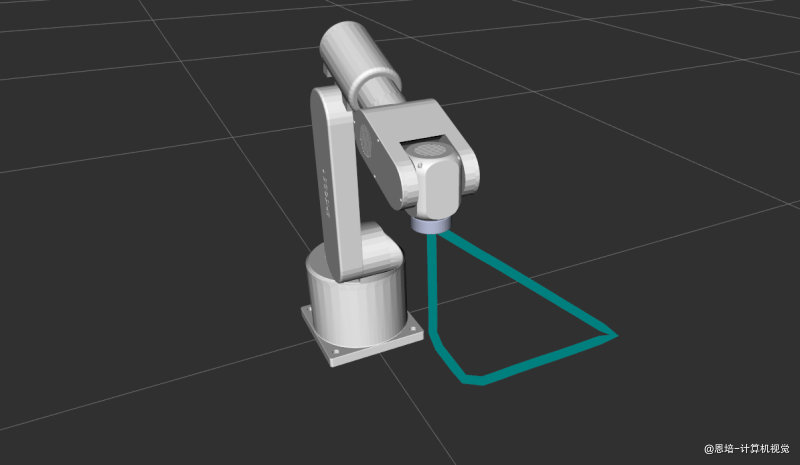
8.1 运动过程
Z(mm)
350 ● A (260, 0, 350) ← PTP 从 Home 到达,姿态垂直朝下
│ ↑
│ ① LIN Z↓ + 俯仰→+30° │
300 │ ④ LIN 回到起点
│ E (260, 0, 300)
│
150 ● B (260, 0, 150) 俯仰+30°
│
└────────●────────────────●──── X(mm)
260 350
C (350, 0, 150) 俯仰-30°
│
② LIN X→ + 俯仰→-30°│ ③ LIN Y→ + 恢复垂直
│
└───────── Y(mm)
200
D (350, 200, 150) 垂直
完整路径: Home →[PTP]→ A →[LIN]→ B →[LIN]→ C →[LIN]→ D →[LIN]→ E
测试 2 分五步,不仅演示位置直线运动,还同时改变末端姿态:
- PTP:从 Home 快速移动到点 A
(260, 0, 350)mm,姿态垂直朝下 (Roll=180°, Pitch=0°, Yaw=90°)——速度 0.5 - ① LIN(Z↓ + 俯仰 +30°):从 A 直线下降到点 B
(260, 0, 150)mm,同时俯仰角从 0° 变为 +30°——演示位置 + 姿态同步插值 - ② LIN(X→ + 俯仰-30°):从 B 直线平移到点 C
(350, 0, 150)mm,同时俯仰角从 +30° 变为 -30°——姿态反向倾斜 - ③ LIN(Y→ + 恢复垂直):从 C 直线平移到点 D
(350, 200, 150)mm,同时俯仰角从 -30° 恢复为 0°——末端回到垂直朝下 - ④ LIN(回到起点):从 D 直线运动回到点 E
(260, 0, 300)mm,姿态保持垂直——三轴同时变化的对角线直线运动
亮点:这组测试验证了 Pilz LIN 规划器不仅能做单轴位置直线运动,还能在位置变化的同时平滑地改变末端姿态。这在实际应用中非常常见,例如焊枪沿焊缝移动时需要同时调整倾斜角度。
8.2 坐标系与单位转换
代码中的位置使用毫米输入,但 ROS 标准使用米,因此需要转换:
double x_mm = 260.0;
target_pose.pose.position.x = x_mm / 1000.0; // 260mm → 0.260m
姿态使用度输入,通过 tf2::Quaternion::setRPY 转换为四元数:
double x_rot_deg = 180.0; // Roll = 180°
double y_rot_deg = 0.0; // Pitch = 0°
double z_rot_deg = 90.0; // Yaw = 90°
tf2::Quaternion q;
q.setRPY(x_rot * M_PI / 180.0, y_rot * M_PI / 180.0, z_rot * M_PI / 180.0);
| 输入参数 | 单位 | ROS 标准 | 转换 |
|---|---|---|---|
| 位置 x, y, z | mm | m | ÷ 1000.0 |
| 旋转 roll, pitch, yaw | 度 | 弧度 | × M_PI / 180.0 |
| 四元数 | — | — | tf2::Quaternion::setRPY() 自动转换 |
8.3 多段 LIN 的实现技巧
代码中每段 LIN 在修改位置的同时,也更新了末端姿态(俯仰角):
// LIN Z 方向 + 俯仰变化:更新 z 和姿态
z_mm = 150.0;
y_rot_deg = 30.0; // 俯仰倾斜 +30°
y_rot = y_rot_deg * M_PI / 180.0;
target_pose.pose.position.z = z_mm / 1000.0;
tf2::Quaternion q_z;
q_z.setRPY(x_rot, y_rot, z_rot);
target_pose.pose.orientation = tf2::toMsg(q_z);
// LIN X 方向 + 俯仰反转:更新 x 和姿态
x_mm = 350.0;
y_rot_deg = -30.0; // 俯仰倾斜 -30°
// LIN Y 方向 + 恢复垂直:更新 y 和姿态
y_mm = 200.0;
y_rot_deg = 0.0; // 恢复垂直
关键设计:
- 每段运动都同时修改位置 + 姿态,验证 LIN 规划器对位置和姿态的同步插值能力
- 每段运动为新的四元数重新创建
tf2::Quaternion对象(q_z、q_x、q_y),避免复用导致混淆 - 最后一段 LIN 同时改变 x/y/z 三个位置分量,验证 LIN 规划器能处理任意方向的直线运动(不限于单轴)
8.4 PTP vs LIN 实际末端轨迹对比
同样从 A 到 B,PTP 和 LIN 的末端轨迹完全不同:
| 对比项 | PTP | LIN |
|---|---|---|
| 规划空间 | 关节空间 | 笛卡尔空间 |
| 末端路径 | 不确定的弧线 | 精确直线 |
| 速度曲线 | 关节梯形曲线 | 笛卡尔梯形曲线 |
| 速度含义 | scaling_factor × max_joint_vel |
scaling_factor × max_trans_vel |
| 适用场景 | 快速定位(不关心中间路径) | 焊接/涂胶/搬运(末端必须走直线) |
| 起始状态 | 可以有速度 | 必须速度为零 |
九、测试 3 详解:PTP → CIRC 圆弧运动(interim 途经点模式)
涉及模块:
MoveGroupInterface·Pilz PTP·Pilz CIRC·moveit_msgs::msg::Constraints
运行命令:
ros2 run episode_robot_pilz_test episode_robot_lin_test --test 3
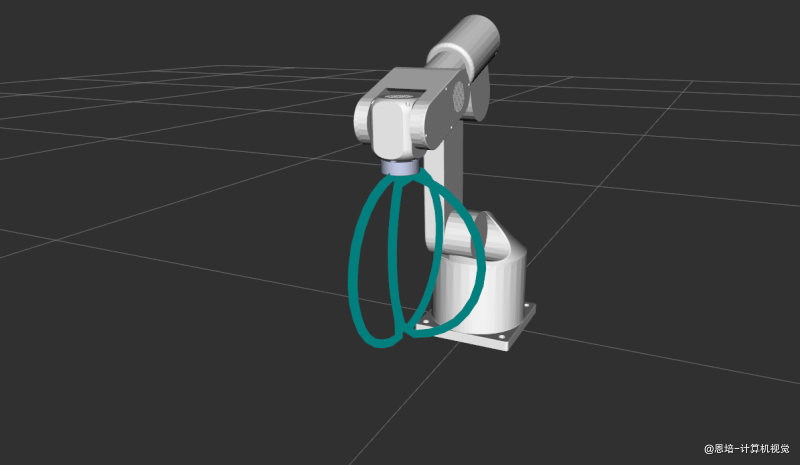
9.1 运动过程
测试 3 演示了 3 组不同方向的 CIRC-interim 圆弧运动,起点和终点相同,通过改变途经点位置让圆弧向不同方向凸出:
Start A (260, 0, 300) End B (260, 0, 100) PTP back to A between groups
Group 1: arc bulge +X Group 2: arc bulge -X Group 3: arc bulge +Y
Z(mm) Z(mm) Z(mm)
300 * A 300 * A 300 * A
| \ / | |
| \ / | / |
200 | * I1(370,0,200) 200 * I2(150,0,200) | 200 * I3(260,100,200)
| / \ | \ |
| / \ | |
100 * B 100 * B 100 * B
+------- X(mm) +------- X(mm) +------- Y(mm)
260 370 150 260 0 100
完整流程:
- PTP → 起点 A
(260, 0, 300)mm - 第 1 组 CIRC:A → 途经点 I1
(370, 0, 200)mm→ B(260, 0, 100)mm——圆弧向 +X 方向凸出 - PTP 返回 A
- 第 2 组 CIRC:A → 途经点 I2
(150, 0, 200)mm→ B——圆弧向 -X 方向凸出 - PTP 返回 A
- 第 3 组 CIRC:A → 途经点 I3
(260, 100, 200)mm→ B——圆弧向 +Y 方向凸出 - PTP 返回 A
设计思路:保持起点和终点不变,只改变途经点的位置,就能让圆弧向不同方向“弯”。这直观地展示了 interim 模式中“3 点定弧”的原理。
9.2 CIRC 路径约束构造
CIRC 运动需要通过 moveit_msgs::msg::Constraints 指定途经点:
// 1. 创建途经点位姿
geometry_msgs::msg::PoseStamped interim_pose;
interim_pose.header.frame_id = "base_link";
interim_pose.pose.position.x = 370.0 / 1000.0; // 途经点 x = 370mm
interim_pose.pose.position.y = 0.0 / 1000.0; // 途经点 y = 0mm
interim_pose.pose.position.z = 200.0 / 1000.0; // 途经点 z = 200mm
// 2. 创建 Constraints 消息
moveit_msgs::msg::Constraints c;
c.name = "interim"; // ← 关键!"interim" = 途经点
// 3. 创建 PositionConstraint,将途经点放入 constraint_region
moveit_msgs::msg::PositionConstraint pc;
pc.header.frame_id = "base_link";
pc.link_name = "link6";
pc.constraint_region.primitive_poses.push_back(interim_pose.pose);
pc.weight = 1.0;
c.position_constraints.push_back(pc);
// 4. 应用路径约束并规划
move_group_interface.setPathConstraints(c);
plan_and_execute("[CIRC-interim] 圆弧运动");
// 5. 清除路径约束(重要!否则影响后续规划)
move_group_interface.clearPathConstraints();
注意:每组 CIRC 运动完成后必须调用
clearPathConstraints()清除路径约束,否则会影响后续的 PTP 或其他运动规划。
9.3 "interim" vs "center" 对比
| 属性 | "interim"(途经点) |
"center"(圆心) |
|---|---|---|
constraints.name |
"interim" |
"center" |
| 指定的点 | 圆弧上的一个中间点 | 圆弧的圆心 |
| 圆弧确定方式 | 起点 + 途经点 + 终点(3 点定弧) | 起点 + 终点 + 圆心(圆心定弧) |
| 能画半圆? | √ 可以 | X 不能(只取短弧) |
| 能画全圆? | X 不能(3 点必须不同) | X 不能 |
| 常用场景 | 知道路径经过某个点 | 知道圆弧半径和圆心 |
测试 3 使用
"interim"模式,测试 4 使用"center"模式,两者形成对照。
十、测试 4 详解:PTP → CIRC 圆弧运动(center 圆心模式)
涉及模块:
MoveGroupInterface·Pilz PTP·Pilz CIRC·moveit_msgs::msg::Constraints
运行命令:
ros2 run episode_robot_pilz_test episode_robot_lin_test --test 4
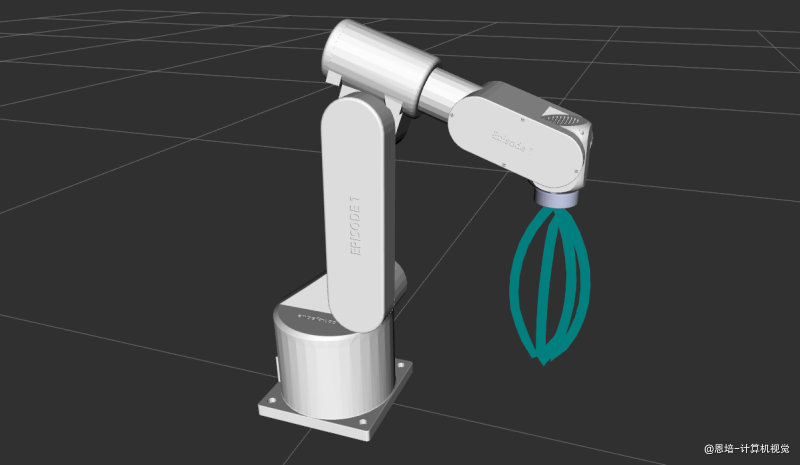
10.1 运动过程
测试 4 与测试 3 结构完全相同,但使用 "center"(圆心)模式而非途经点模式。同样 3 组圆弧,圆心位置与测试 3 的途经点位置相同:
Start A (260, 0, 300) End B (260, 0, 100) PTP back to A between groups
Group 1: center at +X Group 2: center at -X Group 3: center at +Y
Z(mm) Z(mm) Z(mm)
300 * A 300 * A 300 * A
| \ / | |
| \ r~149 / | / |
200 | + C1(370,0,200) 200 + C2(150,0,200) | 200 + C3(260,100,200)
| / \ | \ |
| / \ | |
100 * B 100 * B 100 * B
+------- X(mm) +------- X(mm) +------- Y(mm)
260 370 150 260 0 100
完整流程:
- PTP → 起点 A
(260, 0, 300)mm - 第 1 组 CIRC:圆心 C1
(370, 0, 200)mm,A → B——圆弧向 +X 方向凸出 - PTP 返回 A
- 第 2 组 CIRC:圆心 C2
(150, 0, 200)mm,A → B——圆弧向 -X 方向凸出 - PTP 返回 A
- 第 3 组 CIRC:圆心 C3
(260, 100, 200)mm,A → B——圆弧向 +Y 方向凸出 - PTP 返回 A
10.2 center 模式的关键约束:等距离要求
使用 "center" 模式时,圆心到起点的距离必须等于圆心到终点的距离(即半径相等),否则规划失败。代码中的验证:
// 起点 A (260, 0, 300),终点 B (260, 0, 100),圆心 C1 (370, 0, 200)
// d(C1→A) = sqrt((370-260)² + (200-300)²) = sqrt(110² + 100²) ≈ 148.66mm
// d(C1→B) = sqrt((370-260)² + (200-100)²) = sqrt(110² + 100²) ≈ 148.66mm ✓ 相等!
第 3 组(圆心在侧方):
// 起点 A (260, 0, 300),终点 B (260, 0, 100),圆心 C3 (260, 100, 200)
// d(C3→A) = sqrt(0² + 100² + 100²) = sqrt(20000) ≈ 141.42mm
// d(C3→B) = sqrt(0² + 100² + 100²) = sqrt(20000) ≈ 141.42mm ✓ 相等!
重要:如果两个距离不等,Pilz 规划器会报错并返回规划失败。设计圆弧时请先验算
d(圆心→起点) == d(圆心→终点)。
10.3 center 模式代码示例
// 设置圆心位置
double center_x = 370.0, center_y = 0.0, center_z = 200.0;
geometry_msgs::msg::PoseStamped cp;
cp.header.frame_id = "base_link";
cp.pose.position.x = center_x / 1000.0;
cp.pose.position.y = center_y / 1000.0;
cp.pose.position.z = center_z / 1000.0;
// 创建约束——注意 name = "center"
moveit_msgs::msg::Constraints c;
c.name = "center"; // ← 与 interim 的唯一区别
moveit_msgs::msg::PositionConstraint pc;
pc.header.frame_id = cp.header.frame_id;
pc.link_name = "link6";
pc.constraint_region.primitive_poses.push_back(cp.pose);
pc.weight = 1.0;
c.position_constraints.push_back(pc);
move_group_interface.setPathConstraints(c);
10.4 测试 3 vs 测试 4 对比
| 对比项 | 测试 3(interim) | 测试 4(center) |
|---|---|---|
constraints.name |
"interim" |
"center" |
| 指定的点 | 圆弧上的途经点 | 圆弧的圆心 |
| 圆弧确定方式 | 3 点定弧 | 圆心 + 半径定弧 |
| 等距离约束 | 无 | 必须满足 d(圆心 → 起点) = d(圆心 → 终点) |
| 圆弧方向 | 途经点在哪侧,弧就往哪侧弯 | 圆心在哪侧,弧就往哪侧弯 |
| 能画半圆及以上 | √ | X(只取短弧) |
十一、完整 C++ 代码:Sequence 混合运动(episode_robot_sequence_test.cpp)
涉及模块:
MoveGroupInterface·Pilz PTP·Pilz LIN·MotionSequenceRequest·GetMotionSequence Service·MoveGroupSequence Action
运行命令:
# 终端 2 ros2 run episode_robot_pilz_test episode_robot_sequence_test
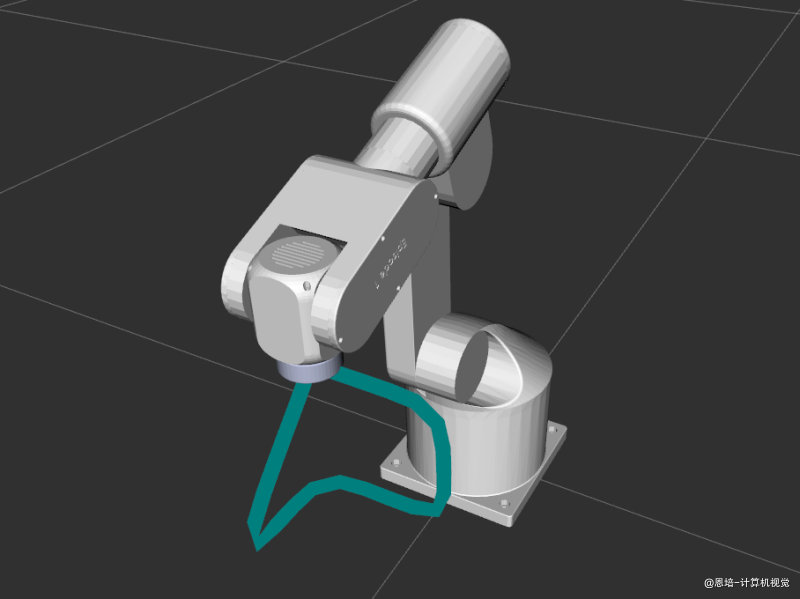
11.1 运动过程
五段 LIN 运动组成一条封闭路径:
- 段 1:LIN
(260, 0, 300)→(260, 100, 300)mm— 沿 Y 轴平移 100mm(blend = 40mm) - 段 2:LIN
(260, 100, 300)→(260, 100, 200)mm— 沿 Z 轴下降 100mm(blend = 40mm) - 段 3:LIN
(260, 100, 200)→(260, 0, 200)mm— 沿 Y 轴回移 100mm(blend = 40mm) - 段 4:LIN
(260, 0, 200)→(360, 0, 200)mm— 沿 X 轴平移 100mm(blend = 40mm) - 段 5:LIN
(360, 0, 200)→(260, 0, 300)mm— 回到初始位置(精确停止,blend = 0)
包含两种调用方式:
- Service 接口(
/plan_sequence_path):仅规划轨迹,然后逐段执行 - Action 接口(
/sequence_move_group):规划并执行轨迹,一步到位
11.2 完整代码
#include <memory>
#include <thread>
#include <chrono>
#include <rclcpp/rclcpp.hpp>
#include <rclcpp_action/rclcpp_action.hpp>
#include <moveit/move_group_interface/move_group_interface.hpp>
#include <moveit/kinematic_constraints/utils.hpp>
#include <moveit_msgs/msg/motion_sequence_item.hpp>
#include <moveit_msgs/msg/motion_sequence_request.hpp>
#include <moveit_msgs/srv/get_motion_sequence.hpp>
#include <moveit_msgs/action/move_group_sequence.hpp>
#include <tf2_geometry_msgs/tf2_geometry_msgs.hpp>
/**
* Episode 机器人 Sequence(混合运动)测试
*
* 该测试演示了使用 Pilz Sequence 能力将多段运动(LIN + LIN + LIN)
* 拼接成一条连续轨迹,通过 blend_radius 实现段间平滑过渡(不停顿)。
*
* 包含两种调用方式:
* 1. Service 接口(/plan_sequence_path):仅规划轨迹,不执行
* 2. Action 接口(/sequence_move_group):规划并执行轨迹
*
* 要运行此示例,首先启动 MoveIt 配置(需包含 Sequence 能力):
* ros2 launch episode1_urdf_student_moveit demo.launch.py
*
* 然后运行此测试:
* ros2 run episode_robot_pilz_test episode_robot_sequence_test
*/
static const std::string PLANNING_GROUP = "episode_arm";
static const std::string END_EFFECTOR_LINK = "link6";
static const std::string BASE_FRAME = "base_link";
using moveit_msgs::action::MoveGroupSequence;
using GoalHandleMoveGroupSequence = rclcpp_action::ClientGoalHandle<MoveGroupSequence>;
int main(int argc, char* argv[])
{
// 初始化 ROS 并创建节点
rclcpp::init(argc, argv);
auto const node = std::make_shared<rclcpp::Node>(
"episode_robot_sequence_test_node",
rclcpp::NodeOptions().automatically_declare_parameters_from_overrides(true));
// 启动单线程执行器
rclcpp::executors::SingleThreadedExecutor executor;
executor.add_node(node);
auto spinner = std::thread([&executor]() { executor.spin(); });
// 创建 ROS 日志记录器
auto const logger = rclcpp::get_logger("episode_robot_sequence_test_node");
// 为 episode_arm 创建 MoveIt MoveGroup 接口(用于初始 PTP 定位和获取机器人模型)
using moveit::planning_interface::MoveGroupInterface;
auto move_group_interface = MoveGroupInterface(node, PLANNING_GROUP);
// ==================== 辅助函数 ====================
// 创建 PoseStamped 的辅助函数(输入:mm 和 度)
auto make_pose = [](double x_mm, double y_mm, double z_mm,
double roll_deg, double pitch_deg, double yaw_deg)
{
geometry_msgs::msg::PoseStamped pose;
pose.header.frame_id = BASE_FRAME;
pose.pose.position.x = x_mm / 1000.0;
pose.pose.position.y = y_mm / 1000.0;
pose.pose.position.z = z_mm / 1000.0;
tf2::Quaternion q;
q.setRPY(roll_deg * M_PI / 180.0,
pitch_deg * M_PI / 180.0,
yaw_deg * M_PI / 180.0);
pose.pose.orientation = tf2::toMsg(q);
return pose;
};
// 规划和执行运动的辅助函数(单段 PTP,用于初始定位)
auto const plan_and_execute = [&](const std::string& title) {
RCLCPP_INFO(logger, "正在规划: %s", title.c_str());
std::this_thread::sleep_for(std::chrono::seconds(1));
auto const [success, plan] = [&move_group_interface] {
moveit::planning_interface::MoveGroupInterface::Plan msg;
auto const ok = static_cast<bool>(move_group_interface.plan(msg));
return std::make_pair(ok, msg);
}();
if (success)
{
RCLCPP_INFO(logger, "规划成功!正在执行: %s", title.c_str());
std::this_thread::sleep_for(std::chrono::seconds(1));
move_group_interface.execute(plan);
RCLCPP_INFO(logger, "成功执行: %s", title.c_str());
}
else
{
RCLCPP_ERROR(logger, "规划失败: %s", title.c_str());
}
};
// ==================== 步骤 1:PTP 移动到 Sequence 起始位置 ====================
{
RCLCPP_INFO(logger, "步骤 1:使用 PTP 移动到 Sequence 起始位置");
move_group_interface.setPlanningPipelineId("pilz_industrial_motion_planner");
move_group_interface.setPlannerId("PTP");
move_group_interface.setMaxVelocityScalingFactor(0.3);
move_group_interface.setMaxAccelerationScalingFactor(0.3);
move_group_interface.setNumPlanningAttempts(5);
move_group_interface.setPlanningTime(10.0);
auto start_pose = make_pose(260.0, 0.0, 300.0, 180.0, 0.0, 90.0);
move_group_interface.setPoseTarget(start_pose, END_EFFECTOR_LINK);
plan_and_execute("[PTP] 移动到 Sequence 起始位置");
}
// ==================== 构建 Sequence Items ====================
// 定义三段 LIN 运动的目标位姿
// 段 1: LIN 从当前位置 (260, 0, 300) → (260, 100, 300) 沿 Y 轴平移
// 段 2: LIN 从 (260, 100, 300) → (260, 100, 200) 沿 Z 轴下降
// 段 3: LIN 从 (260, 100, 200) → (260, 0, 200) 沿 Y 轴回移
// 段 4: LIN 从 (260, 0, 200) → (360, 0, 200) 沿 X 轴平移 100mm
// 段 5: LIN 从 (360, 0, 200) → (260, 0, 300) 回到初始位置
auto pose1 = make_pose(260.0, 100.0, 300.0, 180.0, 0.0, 90.0);
auto pose2 = make_pose(260.0, 100.0, 200.0, 180.0, 0.0, 90.0);
auto pose3 = make_pose(260.0, 0.0, 200.0, 180.0, 0.0, 90.0);
auto pose4 = make_pose(360.0, 0.0, 200.0, 180.0, 0.0, 90.0);
auto pose5 = make_pose(260.0, 0.0, 300.0, 180.0, 0.0, 90.0);
// ---------- blend_radius 约束条件 ----------
// Pilz Sequence 要求相邻两段的混合半径之和必须小于两段中较短段的长度:
// r[n] + r[n+1] < min(dist[n], dist[n+1])
// 本例各段距离均为 100mm,混合半径均为 40mm:
// 40 + 40 = 80mm < 100mm ✓ 满足约束
// 最后一段 blend_radius 必须为 0(精确停在目标点)
// ---------- 构建 MotionSequenceItem 1 ----------
moveit_msgs::msg::MotionSequenceItem item1;
item1.blend_radius = 0.04; // 混合半径 40mm,r1+r2=80mm < dist1=100mm ✓
item1.req.pipeline_id = "pilz_industrial_motion_planner";
item1.req.group_name = PLANNING_GROUP;
item1.req.planner_id = "LIN";
item1.req.allowed_planning_time = 5.0;
item1.req.max_velocity_scaling_factor = 0.05;
item1.req.max_acceleration_scaling_factor = 0.05;
item1.req.goal_constraints.push_back(
kinematic_constraints::constructGoalConstraints(END_EFFECTOR_LINK, pose1));
// ---------- 构建 MotionSequenceItem 2 ----------
moveit_msgs::msg::MotionSequenceItem item2;
item2.blend_radius = 0.04; // 混合半径 40mm,r2+r3=80mm < dist2=100mm ✓
item2.req.pipeline_id = "pilz_industrial_motion_planner";
item2.req.group_name = PLANNING_GROUP;
item2.req.planner_id = "LIN";
item2.req.allowed_planning_time = 5.0;
item2.req.max_velocity_scaling_factor = 0.05;
item2.req.max_acceleration_scaling_factor = 0.05;
item2.req.goal_constraints.push_back(
kinematic_constraints::constructGoalConstraints(END_EFFECTOR_LINK, pose2));
// ---------- 构建 MotionSequenceItem 3 ----------
moveit_msgs::msg::MotionSequenceItem item3;
item3.blend_radius = 0.04; // 混合半径 40mm,r3+r4=80mm < dist3=100mm ✓
item3.req.pipeline_id = "pilz_industrial_motion_planner";
item3.req.group_name = PLANNING_GROUP;
item3.req.planner_id = "LIN";
item3.req.allowed_planning_time = 5.0;
item3.req.max_velocity_scaling_factor = 0.05;
item3.req.max_acceleration_scaling_factor = 0.05;
item3.req.goal_constraints.push_back(
kinematic_constraints::constructGoalConstraints(END_EFFECTOR_LINK, pose3));
// ---------- 构建 MotionSequenceItem 4(X 轴平移) ----------
moveit_msgs::msg::MotionSequenceItem item4;
item4.blend_radius = 0.04; // 混合半径 40mm,r4+r5=40+0=40mm < dist4=100mm ✓
item4.req.pipeline_id = "pilz_industrial_motion_planner";
item4.req.group_name = PLANNING_GROUP;
item4.req.planner_id = "LIN";
item4.req.allowed_planning_time = 5.0;
item4.req.max_velocity_scaling_factor = 0.05;
item4.req.max_acceleration_scaling_factor = 0.05;
item4.req.goal_constraints.push_back(
kinematic_constraints::constructGoalConstraints(END_EFFECTOR_LINK, pose4));
// ---------- 构建 MotionSequenceItem 5(最后一段,回到初始位置,blend_radius = 0) ----------
moveit_msgs::msg::MotionSequenceItem item5;
item5.blend_radius = 0.0; // 最后一段必须为 0(约束要求),精确停在目标点
item5.req.pipeline_id = "pilz_industrial_motion_planner";
item5.req.group_name = PLANNING_GROUP;
item5.req.planner_id = "LIN";
item5.req.allowed_planning_time = 5.0;
item5.req.max_velocity_scaling_factor = 0.05;
item5.req.max_acceleration_scaling_factor = 0.05;
item5.req.goal_constraints.push_back(
kinematic_constraints::constructGoalConstraints(END_EFFECTOR_LINK, pose5));
RCLCPP_INFO(logger, "已构建 5 段 LIN Sequence 请求:");
RCLCPP_INFO(logger, " 段 1: LIN → (260, 100, 300)mm blend=40mm");
RCLCPP_INFO(logger, " 段 2: LIN → (260, 100, 200)mm blend=40mm");
RCLCPP_INFO(logger, " 段 3: LIN → (260, 0, 200)mm blend=40mm");
RCLCPP_INFO(logger, " 段 4: LIN → (360, 0, 200)mm blend=40mm(X 轴平移 100mm)");
RCLCPP_INFO(logger, " 段 5: LIN → (260, 0, 300)mm blend=0mm(回到初始位置)");
// ==================== 步骤 2:使用 Service 接口仅规划(不执行) ====================
{
RCLCPP_INFO(logger, "步骤 2:使用 MoveGroupSequence Service 接口规划轨迹(仅规划)");
// 创建 /plan_sequence_path 的 Service 客户端
using GetMotionSequence = moveit_msgs::srv::GetMotionSequence;
auto service_client = node->create_client<GetMotionSequence>("/plan_sequence_path");
// 等待 Service 可用
while (!service_client->wait_for_service(std::chrono::seconds(5)))
{
RCLCPP_WARN(logger, "等待 /plan_sequence_path 服务可用...");
if (!rclcpp::ok())
{
RCLCPP_ERROR(logger, "ROS 已关闭,退出等待");
rclcpp::shutdown();
return 1;
}
}
RCLCPP_INFO(logger, "/plan_sequence_path 服务已连接");
// 组装 Sequence 请求并调用 Service
auto service_request = std::make_shared<GetMotionSequence::Request>();
service_request->request.items.push_back(item1);
service_request->request.items.push_back(item2);
service_request->request.items.push_back(item3);
service_request->request.items.push_back(item4);
service_request->request.items.push_back(item5);
RCLCPP_INFO(logger, "正在调用 Service 规划服务...");
auto service_future = service_client->async_send_request(service_request);
// 等待规划结果
std::future_status service_status;
do
{
switch (service_status = service_future.wait_for(std::chrono::seconds(1)); service_status)
{
case std::future_status::deferred:
RCLCPP_ERROR(logger, "Service 调用被延迟");
break;
case std::future_status::timeout:
RCLCPP_INFO(logger, "等待 Sequence 轨迹规划中...");
break;
case std::future_status::ready:
RCLCPP_INFO(logger, "Service 规划完成!");
break;
}
} while (service_status != std::future_status::ready && rclcpp::ok());
auto service_response = service_future.get();
if (service_response->response.error_code.val == moveit_msgs::msg::MoveItErrorCodes::SUCCESS)
{
RCLCPP_INFO(logger, "Service 规划成功!共 %zu 段轨迹",
service_response->response.planned_trajectories.size());
// 逐段执行规划好的轨迹
for (size_t i = 0; i < service_response->response.planned_trajectories.size(); ++i)
{
RCLCPP_INFO(logger, "正在执行第 %zu 段轨迹...", i + 1);
move_group_interface.execute(service_response->response.planned_trajectories[i]);
}
RCLCPP_INFO(logger, "Service 方式:全部轨迹执行完成!");
}
else
{
RCLCPP_ERROR(logger, "Service 规划失败,错误码: %d",
service_response->response.error_code.val);
}
}
// ==================== 步骤 3:PTP 回到起始位置,为 Action 测试做准备 ====================
{
RCLCPP_INFO(logger, "步骤 3:PTP 回到起始位置,准备 Action 测试");
move_group_interface.setPlanningPipelineId("pilz_industrial_motion_planner");
move_group_interface.setPlannerId("PTP");
move_group_interface.setMaxVelocityScalingFactor(0.3);
move_group_interface.setMaxAccelerationScalingFactor(0.3);
auto start_pose = make_pose(260.0, 0.0, 300.0, 180.0, 0.0, 90.0);
move_group_interface.setPoseTarget(start_pose, END_EFFECTOR_LINK);
plan_and_execute("[PTP] 回到 Sequence 起始位置");
}
// ==================== 步骤 4:使用 Action 接口规划并执行 ====================
{
RCLCPP_INFO(logger, "步骤 4:使用 MoveGroupSequence Action 接口规划并执行轨迹");
// 创建 Action 客户端
auto action_client = rclcpp_action::create_client<MoveGroupSequence>(node, "/sequence_move_group");
// 等待 Action Server 可用
if (!action_client->wait_for_action_server(std::chrono::seconds(10)))
{
RCLCPP_ERROR(logger, "等待 /sequence_move_group Action Server 超时");
rclcpp::shutdown();
return 1;
}
RCLCPP_INFO(logger, "/sequence_move_group Action Server 已连接");
// 构建 MotionSequenceRequest
moveit_msgs::msg::MotionSequenceRequest sequence_request;
sequence_request.items.push_back(item1);
sequence_request.items.push_back(item2);
sequence_request.items.push_back(item3);
sequence_request.items.push_back(item4);
sequence_request.items.push_back(item5);
// 创建 Action Goal
auto goal_msg = MoveGroupSequence::Goal();
goal_msg.request = sequence_request;
// 规划选项
goal_msg.planning_options.planning_scene_diff.is_diff = true;
goal_msg.planning_options.planning_scene_diff.robot_state.is_diff = true;
// Goal 响应回调
auto send_goal_options = rclcpp_action::Client<MoveGroupSequence>::SendGoalOptions();
send_goal_options.goal_response_callback = [&logger](std::shared_ptr<GoalHandleMoveGroupSequence> goal_handle) {
try
{
if (!goal_handle)
{
RCLCPP_ERROR(logger, "Action Goal 被服务器拒绝");
}
else
{
RCLCPP_INFO(logger, "Action Goal 已被接受,等待执行结果...");
}
}
catch (const std::exception& e)
{
RCLCPP_ERROR(logger, "等待 Goal 响应时异常: %s", e.what());
}
};
// 结果回调
send_goal_options.result_callback = [&logger](const GoalHandleMoveGroupSequence::WrappedResult& result) {
switch (result.code)
{
case rclcpp_action::ResultCode::SUCCEEDED:
RCLCPP_INFO(logger, "Action 执行成功!");
break;
case rclcpp_action::ResultCode::ABORTED:
RCLCPP_ERROR(logger, "Action 被中止,错误码: %d", result.result->response.error_code.val);
break;
case rclcpp_action::ResultCode::CANCELED:
RCLCPP_ERROR(logger, "Action 被取消");
break;
default:
RCLCPP_ERROR(logger, "Action 未知结果");
break;
}
};
// 发送 Action Goal
RCLCPP_INFO(logger, "正在发送 Action Goal(规划 + 执行)...");
auto goal_handle_future = action_client->async_send_goal(goal_msg, send_goal_options);
// 获取结果
auto action_result_future = action_client->async_get_result(goal_handle_future.get());
// 等待执行完成
std::future_status action_status;
do
{
switch (action_status = action_result_future.wait_for(std::chrono::seconds(1)); action_status)
{
case std::future_status::deferred:
RCLCPP_ERROR(logger, "Action 被延迟");
break;
case std::future_status::timeout:
RCLCPP_INFO(logger, "正在执行 Sequence 轨迹...");
break;
case std::future_status::ready:
RCLCPP_INFO(logger, "Action 执行完成!");
break;
}
} while (action_status != std::future_status::ready && rclcpp::ok());
if (action_result_future.valid())
{
auto result = action_result_future.get();
RCLCPP_INFO(logger, "Action 最终结果码: %d", static_cast<int>(result.code));
}
else
{
RCLCPP_ERROR(logger, "Action 无法获取结果");
}
}
RCLCPP_INFO(logger, "Sequence 运动测试完成(Service + Action 两种方式)!");
// 关闭 ROS
rclcpp::shutdown();
spinner.join();
return 0;
}
11.3 Sequence 核心概念讲解
MotionSequenceItem 结构
每段运动封装为一个 MotionSequenceItem,包含两个字段:
moveit_msgs::msg::MotionSequenceItem item;
item.blend_radius = 0.04; // 混合半径(米)
item.req = ...; // MotionPlanRequest(与单段规划完全相同)
| 字段 | 类型 | 说明 |
|---|---|---|
blend_radius |
double |
混合半径(米)。> 0 时该段与下一段平滑混合;= 0 时精确停在目标点 |
req |
MotionPlanRequest |
该段的规划请求(包含 planner_id、目标、速度缩放等) |
blend_radius 的工作原理
● A ─────────────── ● B ─────────────── ● C
╱ ╲
╱ ╲
blend_radius blend_radius
当 TCP 进入 B 点周围 blend_radius 半径的球内时,
开始向 C 段过渡,离开球体后完全进入 C 段轨迹。
blend_radius 约束规则
| 规则 | 说明 |
|---|---|
| 最后一段必须 = 0 | 最后一段之后没有下一段,不能混合 |
| 第一段可以 > 0 | 如果后面有更多段 |
| 相邻球体不能重叠 | blend_radius[i] + blend_radius[i+1] < 两目标点之间的距离 |
只有第一段可以有 start_state |
后续段自动从上一段终点开始 |
Service vs Action 接口
Sequence 提供两种调用方式:
| 接口 | Service | Action |
|---|---|---|
| 名称 | /plan_sequence_path |
/sequence_move_group |
| 类型 | GetMotionSequence |
MoveGroupSequence |
| 功能 | 只规划,返回轨迹,需自行执行 | 规划并执行 |
| 适用场景 | 需要先预览轨迹再决定是否执行 | 直接规划 + 执行一步到位 |
| 本章示例 | √ 步骤 2 使用此方式 | √ 步骤 4 使用此方式 |
十二、常见问题排查
| 现象 | 可能原因 | 解决方案 |
|---|---|---|
Pilz 规划失败(所有运动类型) |
未加载 pilz_cartesian_limits.yaml |
检查 launch 文件是否加载了 Pilz 管道;运行 ros2 param list /move_group --filter .*cartesian_limits 确认参数存在 |
LIN 规划失败 |
速度/加速度缩放因子过大 | 降低 setMaxVelocityScalingFactor() 和 setMaxAccelerationScalingFactor()(建议从 0.1 开始) |
LIN 规划失败 |
起始状态速度不为零 | 确保执行 LIN 前机械臂已完全停止;PTP 执行后添加 sleep |
CIRC 规划失败 |
constraints.name 拼写错误 |
必须精确为 "interim" 或 "center",区分大小写 |
CIRC 规划失败 |
途经点/圆心位置不合理 | 检查三点(起点、途经点/圆心、终点)能否合理定义一段圆弧;确保三点不共线 |
CIRC 用 "center" 模式失败 |
弧度超过半圆 | "center" 模式只能规划较短弧(< 半圆),改用 "interim" 模式 |
Sequence Service 连接超时 |
未启用 Sequence 能力 | 在 launch 文件中添加 capabilities: "pilz_industrial_motion_planner/MoveGroupSequenceAction pilz_industrial_motion_planner/MoveGroupSequenceService" |
Sequence 规划失败 |
相邻 blend_radius 球体重叠 |
确保 blend_radius[i] + blend_radius[i+1] < 两目标点距离 |
Sequence 最后一段 blend ≠ 0 |
最后一段 blend_radius 必须为 0 |
将最后一个 MotionSequenceItem 的 blend_radius 设为 0.0 |
关节加速度限制未设置 |
joint_limits.yaml 缺少加速度配置 |
为每个关节添加 has_acceleration_limits: true 和 max_acceleration |
setPlanningPipelineId 报错 |
未安装 / 未加载 Pilz 插件 | 确认已安装 ros-jazzy-pilz-industrial-motion-planner;确认配置包中有 pilz_industrial_motion_planner_planning_planner.yaml |
找不到 /plan_sequence_path 服务 |
move_group 节点未加载 Sequence 插件 | 参考 3.4 节在 launch 文件中添加 capabilities 参数 |