3.3 ROS2 核心概念:Nodes、Topics、Services、Actions、TF2
一、ROS2 核心概念概览
1.1 用外卖系统类比理解 ROS2
在学习抽象的 ROS2 概念前,先通过熟悉的外卖系统来理解:
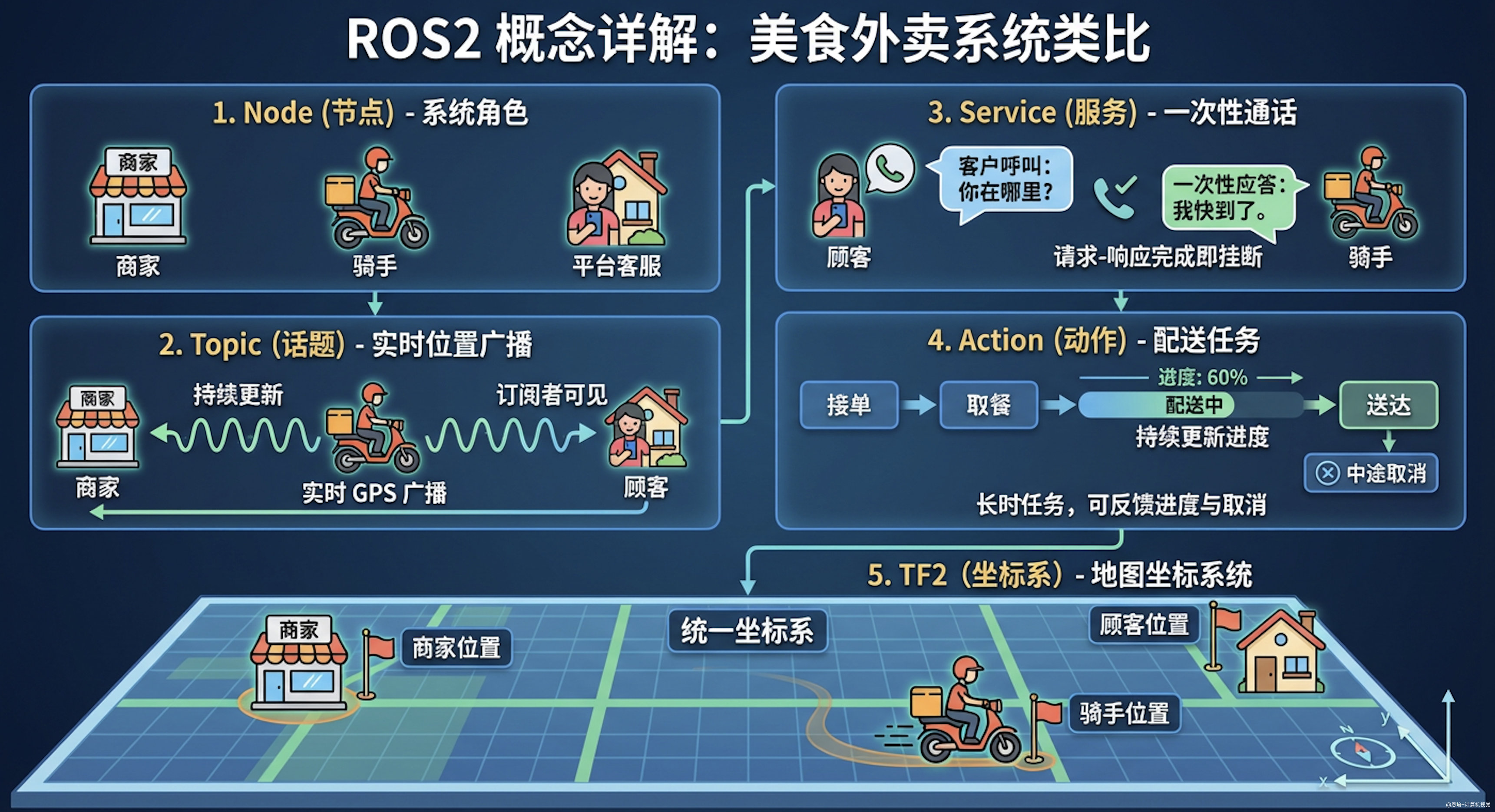
| ROS2 概念 | 外卖系统类比 | 实际例子 |
|---|---|---|
| Node(节点) | 系统中的各个角色 | 商家、骑手、顾客、平台客服 |
| Topic(话题) | 实时位置广播 | 骑手持续广播自己的 GPS 位置,所有订阅的人都能看到 |
| Service(服务) | 打电话问一次 | 顾客打电话问"到哪了",骑手回答一次就挂了 |
| Action(动作) | 配送任务 | 接单 → 取餐 → 配送(持续更新进度)→ 送达(可中途取消) |
| TF2(坐标变换) | 地图坐标系统 | 商家位置、顾客位置、骑手位置在同一地图上 |
1.2 核心概念速查
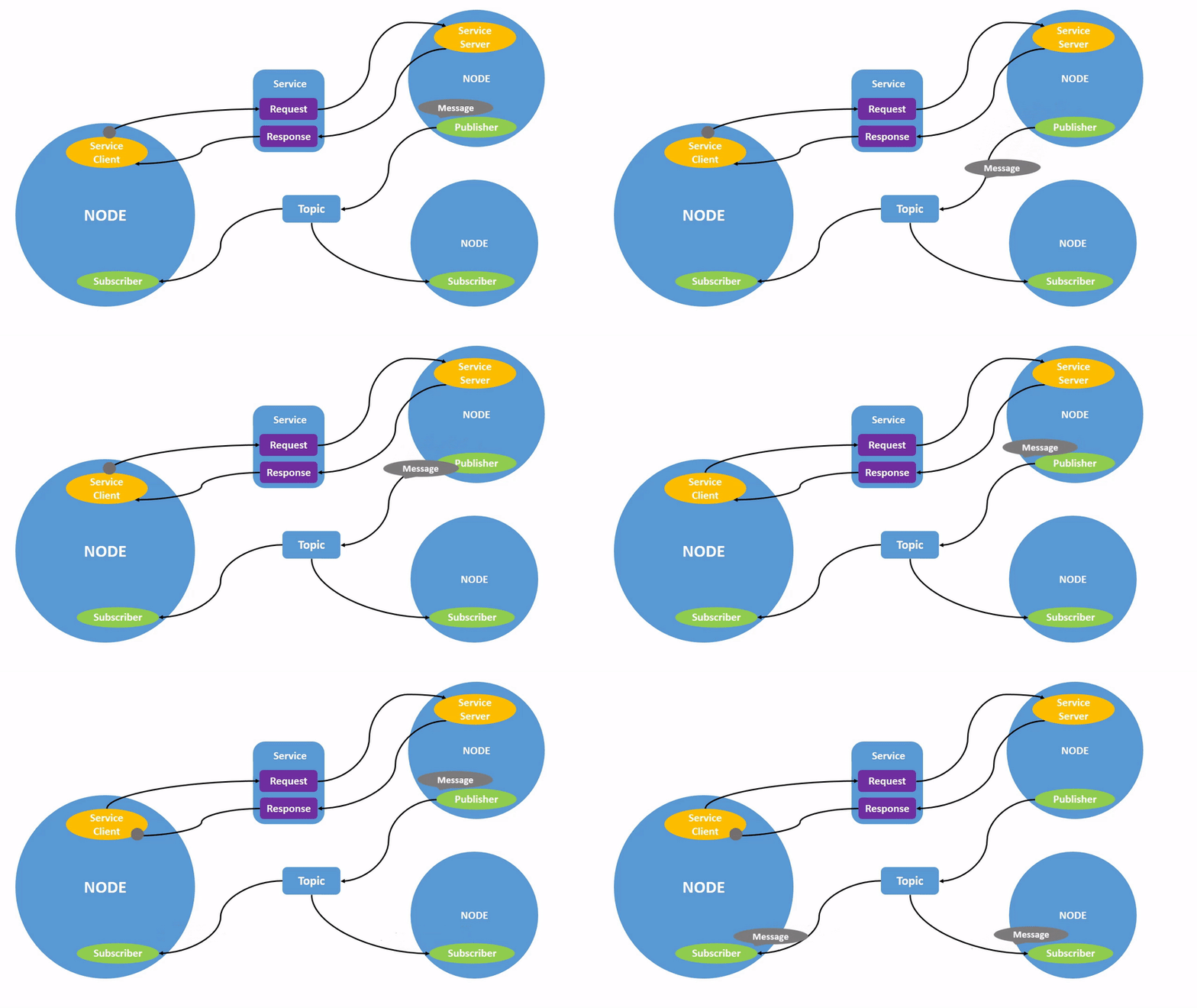
在开始深入学习之前,先了解 ROS2 的核心架构。ROS2 系统可以理解为一个通信网络,由多个模块化的**节点(Nodes)**组成,它们通过不同的通信方式交换数据:
- Nodes(节点):独立的功能模块,如相机驱动、路径规划器
- Topics(话题):持续数据流传输,如传感器数据发布
- Services(服务):请求-响应式通信,如一次性查询
- Actions(动作):长时任务执行,支持反馈和取消
- TF2(坐标变换):管理不同坐标系之间的关系
1.3 为什么 ROS2 这样设计?
问题:为什么不用一种通信方式解决所有问题?
想象一下,如果只有 Topic(持续广播)这一种方式:
问题场景 1:查询一次机械臂当前角度
- 如果用 Topic:需要一直发布数据,浪费带宽
- 如果用 Service:问一次答一次,节省资源 ✓
问题场景 2:机械臂移动到目标点(需要10秒)
- 如果用 Service:调用后等10秒才返回,无法知道进度
- 如果用 Action:可以实时看到进度,还能中途取消 ✓
问题场景 3:相机每秒发布30帧图像
- 如果用 Service:需要每秒调用30次,效率低
- 如果用 Topic:订阅者自动接收,高效 ✓
设计原则:为不同场景选择最合适的工具
| 场景特征 | 最佳选择 | 原因 |
|---|---|---|
| 高频连续数据 | Topic | 异步、不阻塞、多订阅者 |
| 一次性查询 | Service | 同步、节省资源 |
| 耗时任务 | Action | 有反馈、可取消 |
| 空间关系 | TF2 | 自动计算、实时查询 |
1.4 ROS2 设计带来的好处
1.4.1 模块化与解耦
每个节点只负责一件事,节点之间通过标准化接口通信:
优点:
✓ 替换任意模块不影响其他部分(如换相机只需换相机节点)
✓ 团队并行开发(A做视觉,B做控制,互不干扰)
✓ 测试简单(单独测试每个节点)
✓ 代码复用(相机节点可用于不同机器人)
1.4.2 分布式系统
节点可以运行在不同计算机上:
实际案例:
[笔记本] [机械臂控制器] [工业相机]
视觉识别节点 --Topic--> 运动规划节点 --Topic--> 相机驱动节点
|
机械臂控制节点
|
[机械臂硬件]
优点:
- 计算密集任务放服务器(GPU 视觉处理)
- 实时控制放嵌入式(机械臂控制)
- 监控界面放笔记本(RViz 可视化)
1.4.3 语言无关性
不同节点可以用不同语言编写:
Python 节点(视觉识别)--Topic--> C++ 节点(实时控制)
↕ Service ↕ Action
Rust 节点(传感器) <--TF2--> Julia 节点(数据分析)
1.5 设计哲学总结
ROS2 的核心设计哲学:Unix 哲学在机器人领域的应用
"每个程序只做一件事,但做到极致;程序之间通过标准接口协作"
体现在 ROS2 中:
- 单一职责:每个节点只负责一个功能
- 标准化接口:Topic/Service/Action 是通用协议
- 组合大于继承:通过组合不同节点构建系统
- 工具化:丰富的命令行工具用于调试
实际收益:
传统单体程序: 修改相机 → 重新编译整个系统 → 测试所有功能 → 部署 ROS2 模块化: 修改相机节点 → 只编译相机节点 → 测试相机功能 → 替换单个节点
二、Nodes(节点)
2.1 什么是节点?
回顾外卖系统类比:
还记得开头的外卖系统吗?其中的商家、骑手、顾客、客服都是独立的角色(节点),各司其职:
- 商家节点:负责接单和做餐
- 骑手节点:负责配送
- 顾客节点:负责下单和收货
- 客服节点:负责处理投诉
它们不需要知道彼此的内部实现,只需要通过标准化的方式沟通(打电话、发位置、看订单状态)。
在 ROS2 中:
节点是 ROS2 中的基本执行单元,每个节点负责一个单一、模块化的功能:
- 控制电机(类比:骑手控制电动车)
- 处理相机数据(类比:骑手用 GPS 定位)
- 执行路径规划(类比:导航软件规划路线)
- 发布传感器读数(类比:骑手实时广播位置)
一个完整的机器人系统由多个节点协同工作组成。在 ROS2 中,一个可执行文件(Python/C++ 程序)可以包含一个或多个节点。
2.2 节点相关命令
2.2.1 启动节点
ros2 run <package_name> <executable_name>
# 示例:启动 turtlesim 节点
ros2 run turtlesim turtlesim_node
# 示例:启动turtle_teleop_key控制节点
ros2 run turtlesim turtle_teleop_key
# 或者:启动Episode1控制
ros2 run episode_controller interface
<package_name>是功能包名,<executable_name>是可执行程序名。一个包可以包含多个可执行程序,具体定义在setup.py中配置(后续章节详解)。
2.2.2 查看活动节点
ros2 node list
# 如果你只启动了小海龟那么你会看到
/turtlesim
/teleop_turtle
# 如果你还启动了Episode1包,那你会看到:
/episode_robot_interface
/teleop_turtle
/turtlesim
重要区分:
- 包名(package_name):代码组织单位,如
turtlesim、episode_controller- 可执行程序名(executable_name):包内的程序文件,如
turtlesim_node、interface- 节点名(node_name):程序运行时的标识,如
/turtlesim、/episode_robot_interface举例:
ros2 run turtlesim turtlesim_node启动后,节点名是/turtlesim(可能与可执行程序名不同)
2.2.3 查看节点详情
ros2 node info <node_name>
# 示例
ros2 node info /turtlesim
# 输出示例
/turtlesim
Subscribers:
/parameter_events: rcl_interfaces/msg/ParameterEvent
/turtle1/cmd_vel: geometry_msgs/msg/Twist
Publishers:
/parameter_events: rcl_interfaces/msg/ParameterEvent
/rosout: rcl_interfaces/msg/Log
/turtle1/color_sensor: turtlesim/msg/Color
/turtle1/pose: turtlesim/msg/Pose
Service Servers:
/clear: std_srvs/srv/Empty
/kill: turtlesim/srv/Kill
/reset: std_srvs/srv/Empty
/spawn: turtlesim/srv/Spawn
/turtle1/set_pen: turtlesim/srv/SetPen
/turtle1/teleport_absolute: turtlesim/srv/TeleportAbsolute
/turtle1/teleport_relative: turtlesim/srv/TeleportRelative
/turtlesim/describe_parameters: rcl_interfaces/srv/DescribeParameters
/turtlesim/get_parameter_types: rcl_interfaces/srv/GetParameterTypes
/turtlesim/get_parameters: rcl_interfaces/srv/GetParameters
/turtlesim/get_type_description: type_description_interfaces/srv/GetTypeDescription
/turtlesim/list_parameters: rcl_interfaces/srv/ListParameters
/turtlesim/set_parameters: rcl_interfaces/srv/SetParameters
/turtlesim/set_parameters_atomically: rcl_interfaces/srv/SetParametersAtomically
Service Clients:
Action Servers:
/turtle1/rotate_absolute: turtlesim/action/RotateAbsolute
Action Clients:
# 示例
ros2 node info /episode_robot_interface
# 输出示例,可以看到我写好的一些的API
/episode_robot_interface
Subscribers:
Publishers:
/joint_states: sensor_msgs/msg/JointState # 120HZ发布关节角度
/parameter_events: rcl_interfaces/msg/ParameterEvent
/rosout: rcl_interfaces/msg/Log
Service Servers:
/episode_robot_interface/describe_parameters: rcl_interfaces/srv/DescribeParameters
/episode_robot_interface/get_parameter_types: rcl_interfaces/srv/GetParameterTypes
/episode_robot_interface/get_parameters: rcl_interfaces/srv/GetParameters
/episode_robot_interface/get_type_description: type_description_interfaces/srv/GetTypeDescription
/episode_robot_interface/list_parameters: rcl_interfaces/srv/ListParameters
/episode_robot_interface/set_parameters: rcl_interfaces/srv/SetParameters
/episode_robot_interface/set_parameters_atomically: rcl_interfaces/srv/SetParametersAtomically
/gripper_control: robot_arm_interfaces/srv/GripperControl # 用来控制吸盘
/read_motor_angles: robot_arm_interfaces/srv/ReadMotorAngles # 读取关节角度
/servo_gripper: robot_arm_interfaces/srv/ServoGripper # 用来控制舵机夹爪张合角度
/set_free_mode: robot_arm_interfaces/srv/SetFreeMode # 使能模式
Service Clients:
Action Servers:
/angle_mode: robot_arm_interfaces/action/AngleMode # 角度运动模式
/episode_arm_controller/follow_joint_trajectory: control_msgs/action/FollowJointTrajectory # 接受Moveit轨迹
/linear_move: robot_arm_interfaces/action/LinearMove # 直线运动模式
/move_xyz_rotation: robot_arm_interfaces/action/MoveXyzRotation # 位姿运动模式
Action Clients:
输出包括:
- Subscribers:订阅的话题
- Publishers:发布的话题
- Service Servers:提供的服务
- Service Clients:调用的服务
- Action Servers:提供的动作
- Action Clients:调用的动作
三、Topics(话题)
3.1 什么是话题?
回顾外卖系统类比:
还记得外卖系统中骑手的位置广播吗?
- 骑手节点持续广播自己的 GPS 位置(发布者)
- 顾客、商家、平台都可以实时查看骑手位置(订阅者)
- 骑手不关心有多少人在看,只管持续发送位置
- 即使没人看,骑手也会继续广播
- 新加入的人可以立即看到最新位置
这就是**发布-订阅(Pub-Sub)**模式:信息源持续发布,感兴趣的人自动接收。
在 ROS2 中:
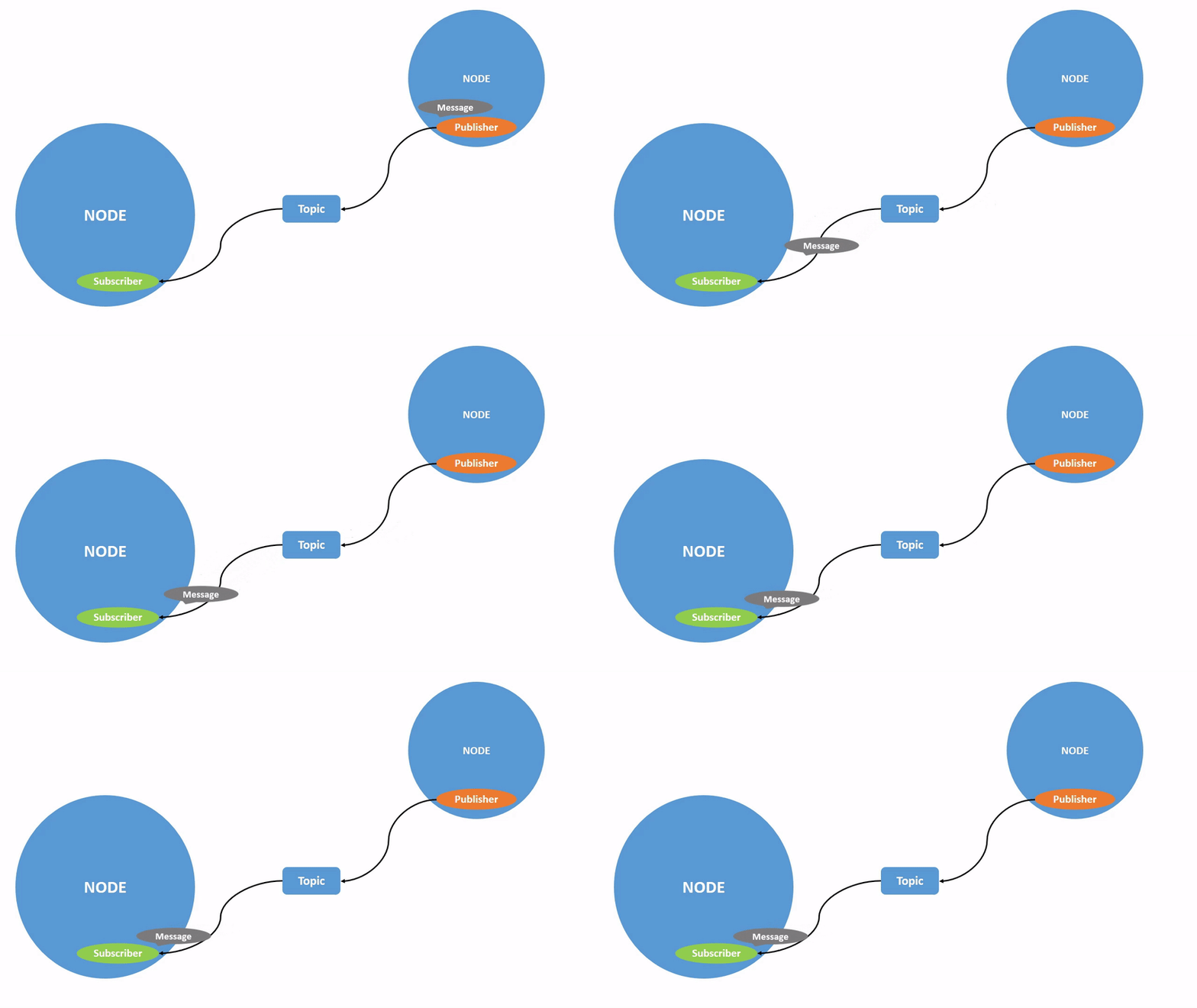
话题是 ROS2 中用于持续数据流传输的通信机制,采用发布-订阅模型:
- 发布者(Publisher):持续发送数据到话题(类比:骑手广播位置)
- 订阅者(Subscriber):从话题接收数据(类比:顾客查看位置)
特点:
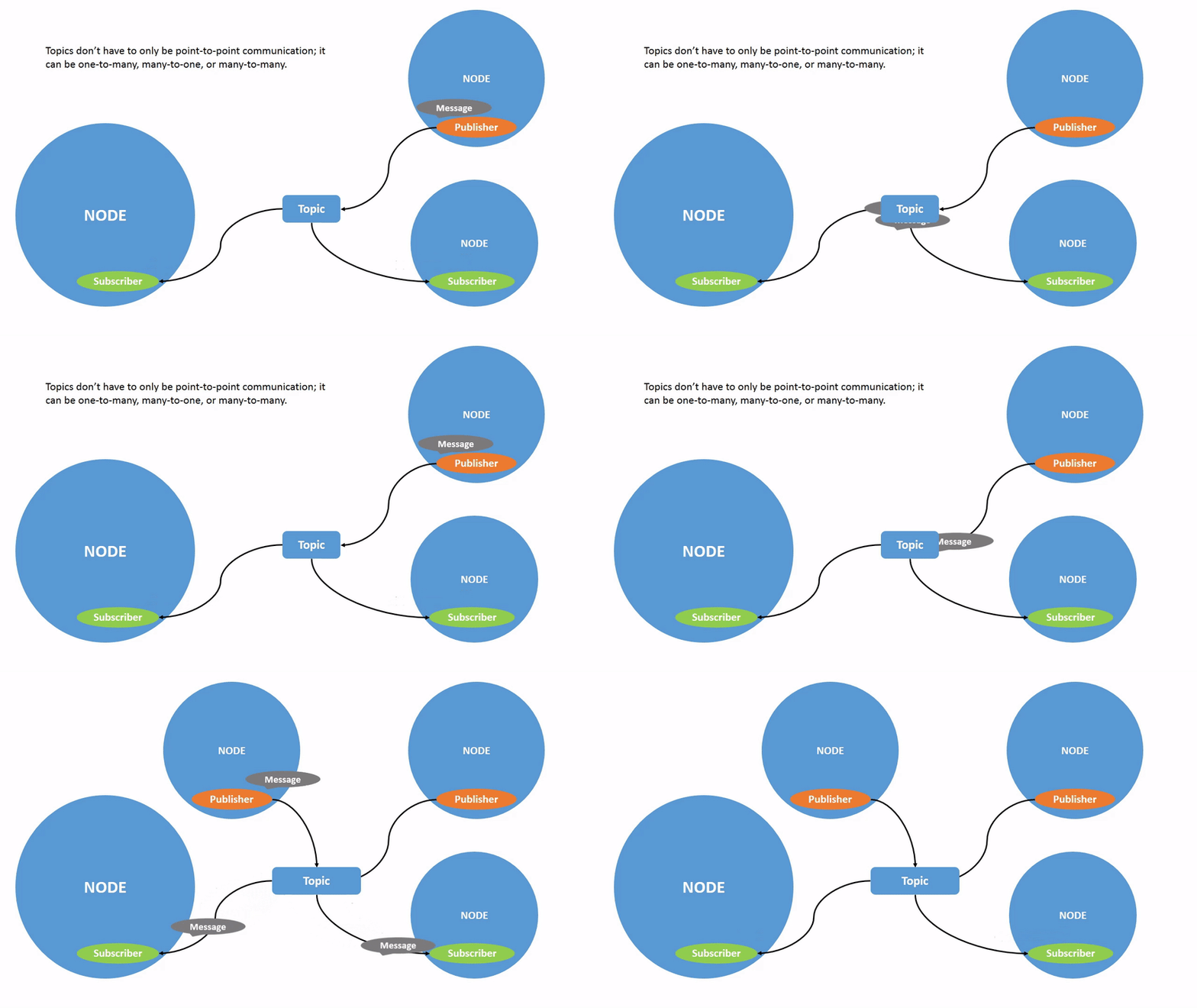
- ✓ 一对多、多对一、多对多通信
- ✓ 异步通信,发布者不等待订阅者
- ✓ 适合高频传感器数据(如相机、激光雷达)
| 一对一 | 一对多 |
|---|---|
 |
 |
3.2 Topic 相关命令
3.2.1 可视化工具
rqt_graph 可以可视化节点和话题的连接关系:
ros2 run rqt_graph rqt_graph
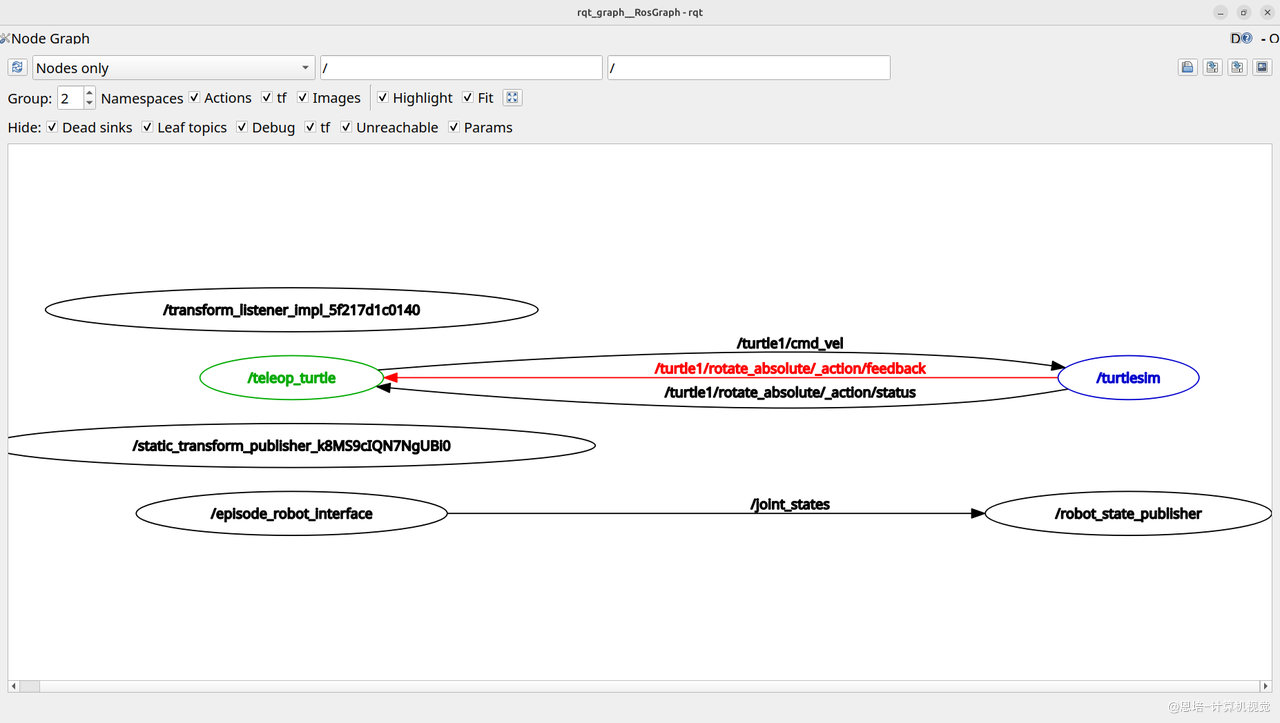
如果 Episode1 相关包没有启动,则可以看到:
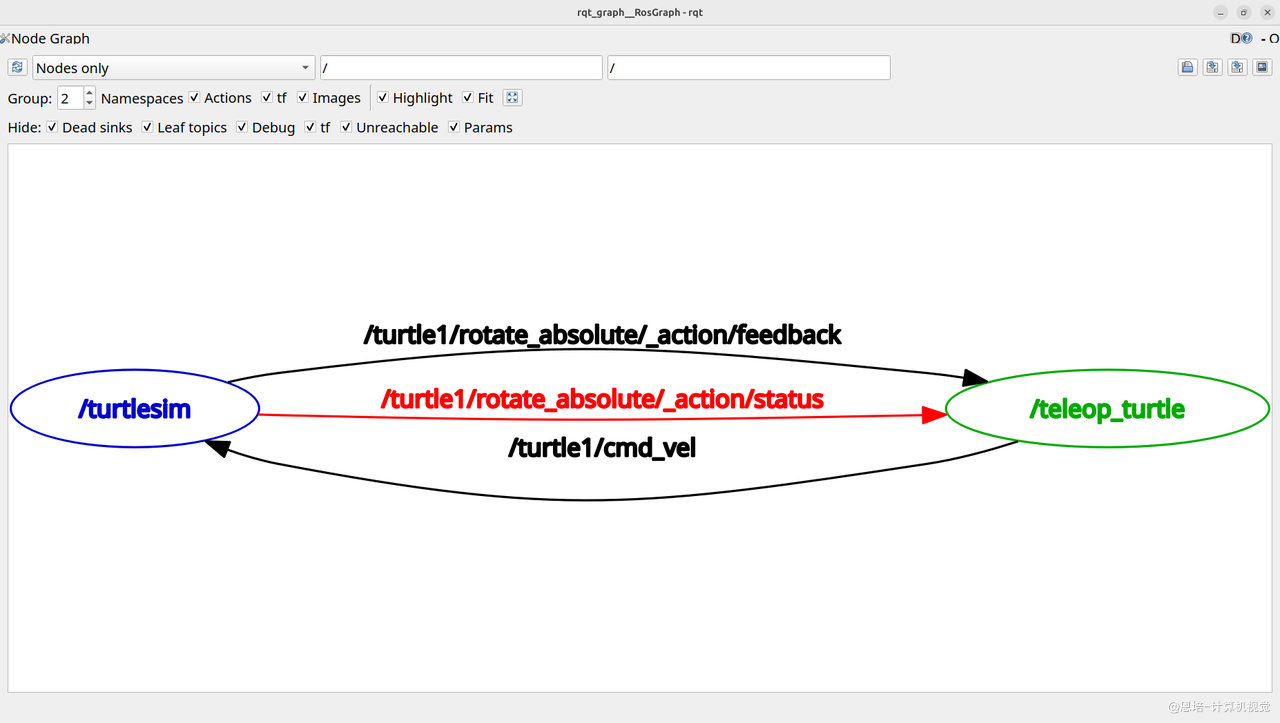
3.2.2 查看活动中的 Topic
为了简化结果,现在关闭 RVIZ 和对应的终端,但保留机械臂控制程序:
# 查看当前活动中的Topic
ros2 topic list
# 输出:
/joint_states # 机械臂的
/parameter_events
/rosout
/turtle1/cmd_vel
/turtle1/color_sensor
/turtle1/pose
# 还可以显示话题类型
ros2 topic list -t
# 输出
/joint_states [sensor_msgs/msg/JointState] # 机械臂的
/parameter_events [rcl_interfaces/msg/ParameterEvent]
/rosout [rcl_interfaces/msg/Log]
/turtle1/cmd_vel [geometry_msgs/msg/Twist]
/turtle1/color_sensor [turtlesim/msg/Color]
/turtle1/pose [turtlesim/msg/Pose]
关于消息类型:方括号中的类型(如
geometry_msgs/msg/Twist)定义了话题传输的数据结构。
geometry_msgs:包名msg:消息类型Twist:具体的消息名称(包含线速度和角速度)ROS2 提供了丰富的标准消息类型(如几何、传感器、图像等),你也可以自定义消息类型。后续章节会详细讲解如何定义和使用消息类型。
3.2.3 查看话题详情
ros2 topic info <topic_name>
# 示例
ros2 topic info /turtle1/cmd_vel
# 输出
Type: geometry_msgs/msg/Twist
Publisher count: 1
Subscription count: 1
# 或者
ros2 topic info /joint_states
# 输出
Type: sensor_msgs/msg/JointState
Publisher count: 1
Subscription count: 0
可以看到这里/joint_states 目前只有发布,还没有人订阅(RVIZ 关闭了,你可以试试打开 RVIZ,看看订阅数量有没有增加)
3.2.4 监听话题数据
ros2 topic echo <topic_name>
# 示例:
ros2 topic echo /turtle1/pose
# 输出:
x: 3.0185012817382812
y: 3.47914981842041
theta: -2.7631852626800537
linear_velocity: 0.0
angular_velocity: 0.0
# 示例:监听机械臂关节状态
ros2 topic echo /joint_states
# 示例输出:
header:
stamp:
sec: 1767421204
nanosec: 803170692
frame_id: ''
name:
- joint1
- joint2
- joint3
- joint4
- joint5
- joint6
position:
- 0.0
- 0.0005235987755983187
- 0.0010471975511966373
- -0.00017453292519946023
- -0.0003490658503987965
- -0.0008726646259971772
velocity: []
effort: []
---
3.2.5 发布话题数据
# 命令格式
ros2 topic pub <topic_name> <msg_type> '<data_in_yaml_format>'
# 示例:控制海龟移动
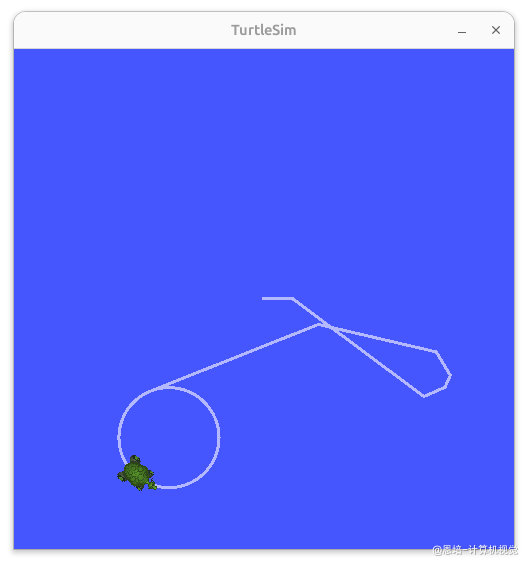
ros2 topic pub /turtle1/cmd_vel geometry_msgs/msg/Twist "{linear: {x: 2.0}, angular: {z: 1.8}}"
应该可以看到小海龟转圈。
注意:命令行发布 Topic 更多用于调试和快速测试,实际项目中我们会用 Python 或 C++ 代码编写发布者节点来控制机器人。后续章节会详细讲解如何编写代码实现。
3.2.6 Tips
-
rqt_graph需要界面才可以看到Topic通讯情况,也可以使用下面命令在终端检查详情# 加一个 --verbose ros2 topic info /turtle1/cmd_vel --verbos e Type: geometry_msgs/msg/Twist Publisher count: 1 Node name: teleop_turtle Node namespace: / Topic type: geometry_msgs/msg/Twist Topic type hash: RIHS01_9c45bf16fe0983d80e3cfe750d6835843d265a9a6c46bd2e609fcddde6fb8d2a Endpoint type: PUBLISHER GID: 01.0f.94.f1.de.9f.7f.d3.00.00.00.00.00.00.14.03 QoS profile: Reliability: RELIABLE History (Depth): UNKNOWN Durability: VOLATILE Lifespan: Infinite Deadline: Infinite Liveliness: AUTOMATIC Liveliness lease duration: Infinite Subscription count: 1 Node name: turtlesim Node namespace: / Topic type: geometry_msgs/msg/Twist Topic type hash: RIHS01_9c45bf16fe0983d80e3cfe750d6835843d265a9a6c46bd2e609fcddde6fb8d2a Endpoint type: SUBSCRIPTION GID: 01.0f.94.f1.42.73.85.67.00.00.00.00.00.00.1d.04 QoS profile: Reliability: RELIABLE History (Depth): UNKNOWN Durability: VOLATILE Lifespan: Infinite Deadline: Infinite Liveliness: AUTOMATIC Liveliness lease duration: Infinite如果有机械臂,你可以试试
ros2 topic info /joint_states --verbose -
更多
topic相关命令可以-h查看:# 帮助 ros2 topic -h # 输出 Commands: bw Display bandwidth used by topic delay Display delay of topic from timestamp in header echo Output messages from a topic find Output a list of available topics of a given type hz Print the average receiving rate to screen info Print information about a topic list Output a list of available topics pub Publish a message to a topic type Print a topic's type Call `ros2 topic <command> -h` for more detailed usage.
四、Services(服务)
4.1 什么是服务?
回顾外卖系统类比:
还记得开头的外卖系统中,顾客打电话问骑手"到哪了"的场景吗?
- 顾客打电话给骑手:询问当前位置(发送请求)
- 骑手接听电话:告诉顾客"我在 XX 路口"(返回响应)
- 通话结束,挂断电话
- 如果想再次知道位置,需要再打一次电话
这就是**请求-响应(Request-Response)**模式:需要时主动询问,得到答案后结束,不会持续收到信息。
对比话题(Topic):
- 话题(GPS 位置广播):骑手持续广播位置,顾客被动接收,无需主动询问
- 服务(打电话询问):顾客主动打电话询问,骑手响应一次,通话结束
在 ROS2 中:
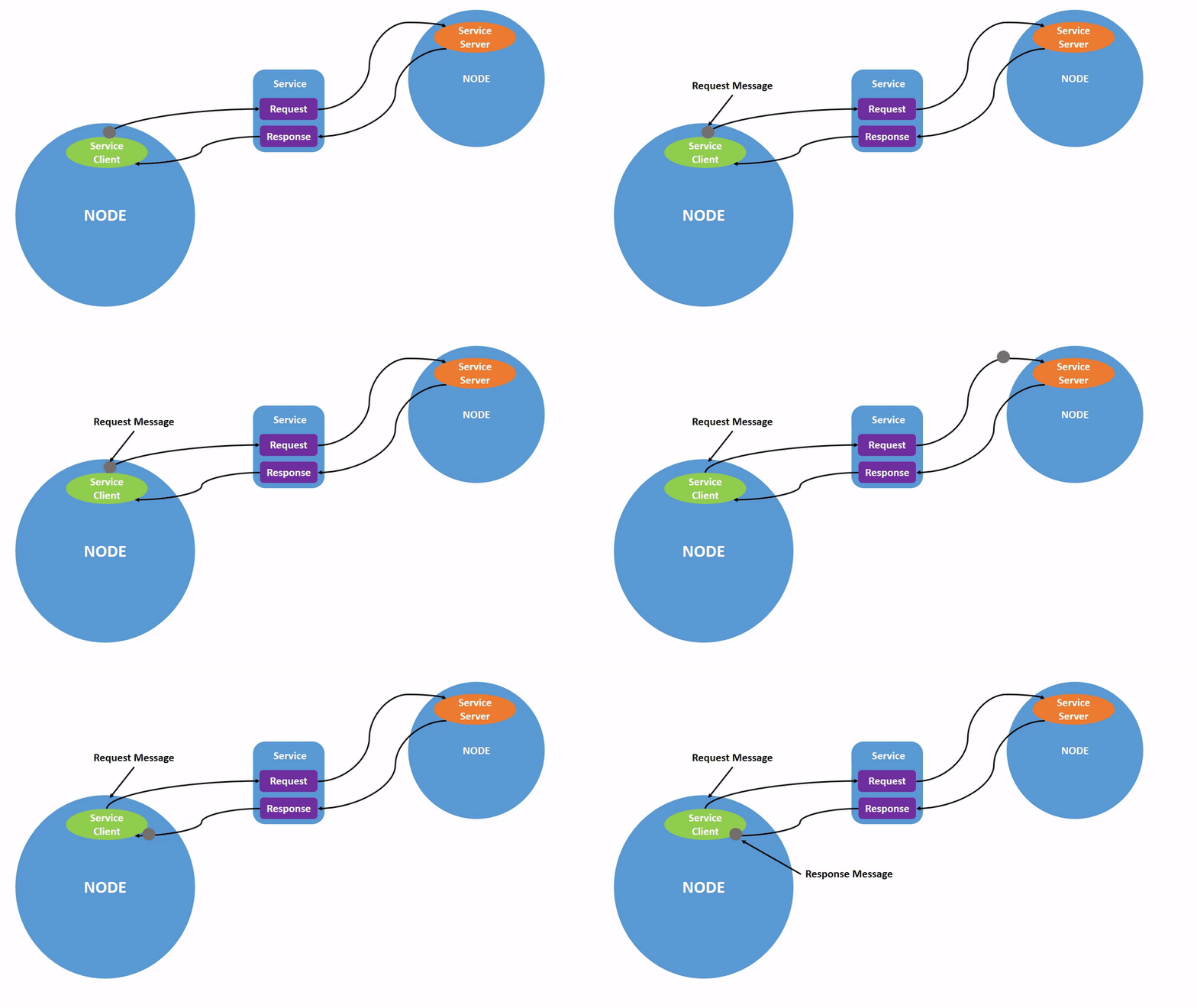
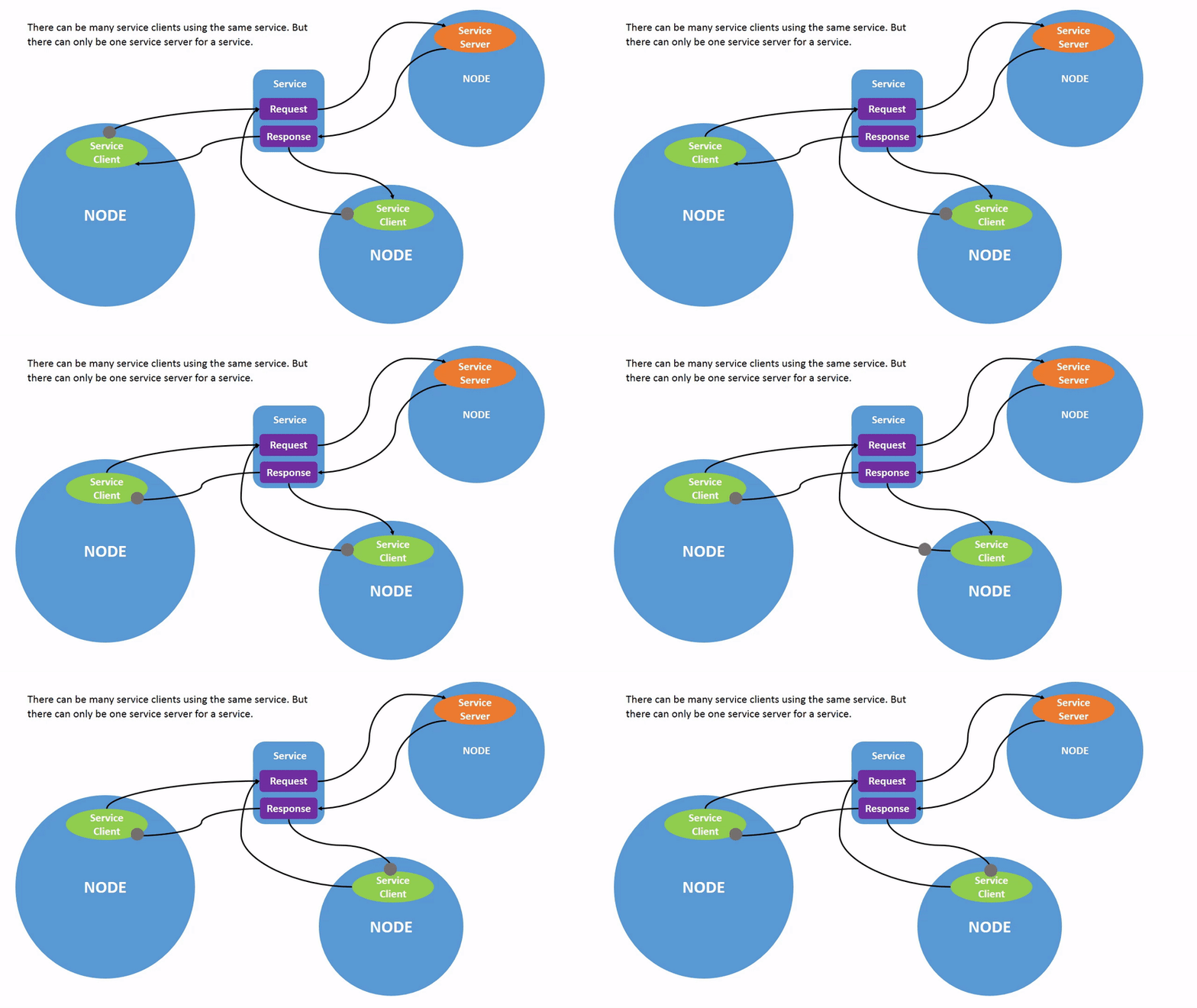
服务是基于请求-响应模型的同步通信机制:
- 客户端(Client):发送请求(类比:顾客打电话)
- 服务端(Server):处理请求并返回响应(类比:骑手接电话回答)
与话题的区别:
- 话题:持续数据流,异步(像持续的 GPS 广播)
- 服务:一次性调用,同步等待响应(像打一次电话)
Services 也支持多个客户端同时请求:
| 单客户端 | 多客户端 |
|---|---|
 |
 |
典型应用场景:
- 清除轨迹
/clear - 重置状态
/reset - 打开开关
- 执行一次性计算或操作
4.2 服务相关命令
类似 Topic 的操作,服务也支持各种命令:
4.2.1 查看活动服务
为了简化结果,现在关闭 RVIZ 和对应的终端,但保留机械臂控制程序:
# 列出活动中的服务
ros2 service list
# 输出:
/clear
/episode_robot_interface/describe_parameters
/episode_robot_interface/get_parameter_types
/episode_robot_interface/get_parameters
/episode_robot_interface/get_type_description
/episode_robot_interface/list_parameters
/episode_robot_interface/set_parameters
/episode_robot_interface/set_parameters_atomically
/gripper_control # 控制吸盘
/kill
/read_motor_angles # 读取角度
/reset
/servo_gripper # 舵机夹爪
/set_free_mode # 使能
/spawn
/teleop_turtle/describe_parameters
/teleop_turtle/get_parameter_types
/teleop_turtle/get_parameters
/teleop_turtle/get_type_description
/teleop_turtle/list_parameters
/teleop_turtle/set_parameters
/teleop_turtle/set_parameters_atomically
/turtle1/set_pen
/turtle1/teleport_absolute
/turtle1/teleport_relative
/turtlesim/describe_parameters
/turtlesim/get_parameter_types
/turtlesim/get_parameters
/turtlesim/get_type_description
/turtlesim/list_parameters
/turtlesim/set_parameters
/turtlesim/set_parameters_atomically
# 显示服务类型
ros2 service list -t
# 输出类似(已省略):
/clear [std_srvs/srv/Empty]
/gripper_control [robot_arm_interfaces/srv/GripperControl]
/kill [turtlesim/srv/Kill]
/read_motor_angles [robot_arm_interfaces/srv/ReadMotorAngles]
/reset [std_srvs/srv/Empty]
/servo_gripper [robot_arm_interfaces/srv/ServoGripper]
/set_free_mode [robot_arm_interfaces/srv/SetFreeMode]
/spawn [turtlesim/srv/Spawn]
4.2.2 查看服务类型
ros2 service type <service_name>
# 示例
ros2 service type /clear
# 输出:
std_srvs/srv/Empty
# 示例
ros2 service type /read_motor_angles
# 输出
robot_arm_interfaces/srv/ReadMotorAngles
4.2.3 查看服务详情
ros2 service info <service_name>
# 示例
ros2 service info /clear
# 输出
Type: std_srvs/srv/Empty
Clients count: 0
Services count: 1
# 示例
ros2 service info /read_motor_angles
# 输出
Type: robot_arm_interfaces/srv/ReadMotorAngles
Clients count: 0
Services count: 1
4.2.4 调用服务
我们可以在命令行调用服务(一般调试时用),但是需要拼凑很多参数,分别是 <service_name> <service_type> <arguments>。
所以需要先知道一个 service_name 的 <service_type> <arguments>,我们可以:
# 以生成新海龟的service:/spawn 为例
# 我们可以使用下面命令ros2 service info 先检查service_type:
ros2 service info /spawn
# 输出
Type: turtlesim/srv/Spawn
Clients count: 0
Services count: 1
# 再通过ros2 interface show 检查这个service_type的参数:
ros2 interface show turtlesim/srv/Spawn
# 输出
float32 x
float32 y
float32 theta
string name # Optional. A unique name will be created and returned if this is empty
---
string name
参数解释:
---上方是**请求(Request)**参数:客户端调用服务时需要传入的数据
x,y: 新海龟的位置坐标theta: 新海龟的朝向角度name: 新海龟的名字(可选)---下方是**响应(Response)**参数:服务端处理完成后返回的数据
name: 返回实际创建的海龟名字在后续章节中,我们会详细讲解如何用代码定义和实现自定义服务接口。
ros2 service call <service_name> <service_type> <arguments>
# 示例:生成新海龟,参数需要用YAML格式
ros2 service call /spawn turtlesim/srv/Spawn "{x: 2, y: 2, theta: 0.2, name: 'turtle2'}"
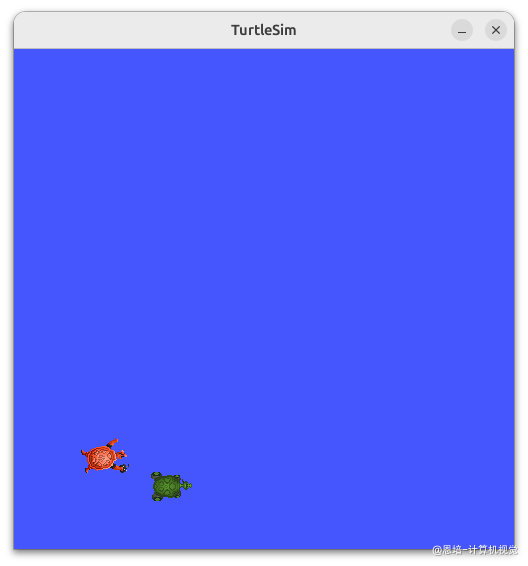
我们也可以试试机械臂的例子(读取当前角度):
# 获取/read_motor_angles类别
ros2 service info /read_motor_angles
# 输出
Type: robot_arm_interfaces/srv/ReadMotorAngles
Clients count: 0
Services count: 1
# 获取robot_arm_interfaces/srv/ReadMotorAngles 参数:
ros2 interface show robot_arm_interfaces/srv/ReadMotorAngles
# 输出
# Request: No input needed
---
# Response: Motor angles for all 6 joints
float64[6] angles # Current angles of all 6 motors in degrees
bool success # True if reading was successful
string message # Error message if reading failed
# 可以看到无需参数,直接调用(参数不是必须填写的)
ros2 service call /read_motor_angles robot_arm_interfaces/srv/ReadMotorAngles
# 输出
waiting for service to become available...
requester: making request: robot_arm_interfaces.srv.ReadMotorAngles_Request()
response:
robot_arm_interfaces.srv.ReadMotorAngles_Response(angles=array([180. , 90.03, 83.06, 29.99, 109.99, 29.99]), success=True, message='Services-读取角度-成功')
五、Actions(动作)
5.1 什么是动作?
回顾外卖系统类比:
还记得开头的外卖系统中,整个配送任务的流程吗?
- 顾客下单:明确配送目标"送到 XX 小区"(发送目标 Goal)
- 骑手接单:开始执行配送任务
- 持续更新进度:
- "已到达商家" → "正在取餐" → "配送中" → "还有 5 分钟到达"(持续反馈 Feedback)
- 顾客实时看到骑手位置和状态
- 任务完成:骑手送达,订单完成(返回结果 Result)
- 可以取消:配送过程中顾客可以取消订单,骑手停止配送
这就是**目标-反馈-结果(Goal-Feedback-Result)**模式:执行长时间任务,持续告知进度,支持中途取消。
对比话题(Topic)和服务(Service):
- 话题(GPS 广播):持续发送位置,但不知道任务是否完成
- 服务(打电话询问):问一次答一次,不适合长时间任务
- 动作(配送任务):有明确目标,持续反馈进度,最终返回结果,还能中途取消
在 ROS2 中:
动作用于长时间运行的任务,结合了话题和服务的特性:
- 目标(Goal):客户端发送任务目标(类比:下单指定配送地址)
- 反馈(Feedback):服务端持续发送进度(类比:骑手更新配送状态)
- 结果(Result):任务完成后返回最终结果(类比:订单完成通知)
特点:
- ✓ 可以取消正在执行的任务(类比:取消订单)
- ✓ 提供实时反馈(类比:查看配送进度)
- ✓ 适合导航、机械臂运动等长时任务
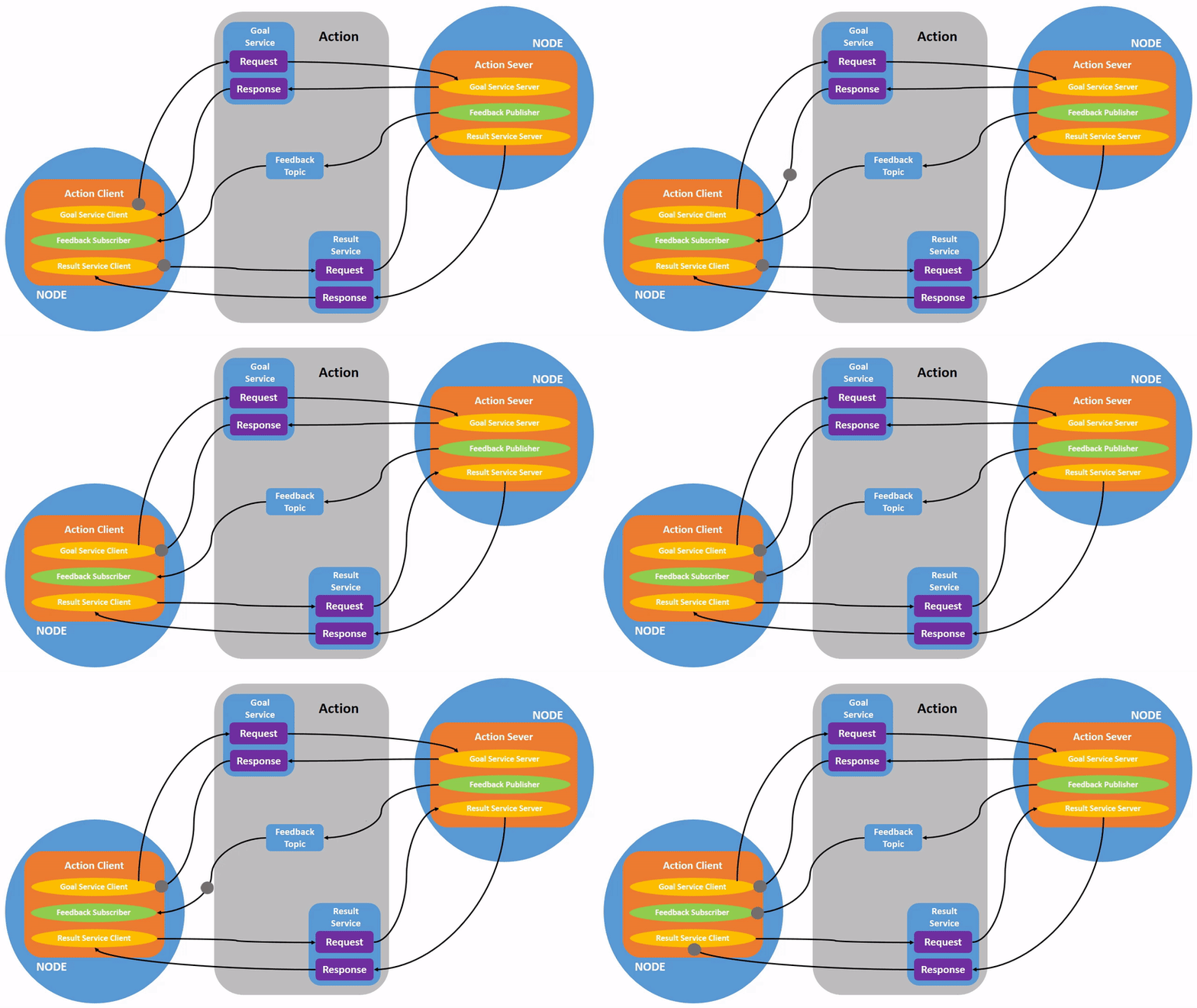
注意,可以看到,feedback 又多次传输,但是 response 只有一次
5.2 动作相关命令
5.2.1 查看活动动作
ros2 action list
# 输出
/angle_mode
/episode_arm_controller/follow_joint_trajectory
/linear_move
/move_xyz_rotation
/turtle1/rotate_absolute
/turtle2/rotate_absolute
# 显示动作类型
ros2 action list -t
# 输出
/angle_mode [robot_arm_interfaces/action/AngleMode]
/episode_arm_controller/follow_joint_trajectory [control_msgs/action/FollowJointTrajectory]
/linear_move [robot_arm_interfaces/action/LinearMove]
/move_xyz_rotation [robot_arm_interfaces/action/MoveXyzRotation]
/turtle1/rotate_absolute [turtlesim/action/RotateAbsolute]
/turtle2/rotate_absolute [turtlesim/action/RotateAbsolute]
5.2.2 查看动作详情
ros2 action info <action_name>
# 示例
ros2 action info /turtle1/rotate_absolute
# 输出
Action: /turtle1/rotate_absolute
Action clients: 1
/teleop_turtle
Action servers: 1
/turtlesim
# 示例
ros2 action info /angle_mode
# 输出
Action: /angle_mode
Action clients: 0
Action servers: 1
/episode_robot_interface
5.2.3 查看动作接口定义
ros2 interface show <action_type>
# 示例
ros2 interface show turtlesim/action/RotateAbsolute
# 输出
# The desired heading in radians
float32 theta
---
# The angular displacement in radians to the starting position
float32 delta
---
# The remaining rotation in radians
float32 remaining
# 示例
ros2 interface show robot_arm_interfaces/action/AngleMode
# 输出
# Goal: What the client sends to start angle mode movement
float64[6] angles # Target angles for 6 motors (degrees)
float64 speed_ratio # Speed ratio (0.0 to 1.0)
---
# Result: What server sends when done
bool success # True if movement successful
string message # Error message or success info
float64 execution_time # How long the movement took
float64[6] final_angles # Final angles achieved
---
# Feedback: Sent continuously during execution
float64 elapsed_time # Time elapsed since start
float64 progress # Movement progress (0.0 to 1.0)
float64[6] current_angles # Current motor angles
string status_message # Human-readable status
动作定义包含三部分(用
---分隔):
- Goal(目标)
- Result(结果)
- Feedback(反馈)
5.2.4 发送动作目标
ros2 action send_goal <action_name> <action_type> <goal>
# 示例:让海龟旋转
ros2 action send_goal /turtle1/rotate_absolute turtlesim/action/RotateAbsolute "{theta: 1.57}"
# 显示反馈
ros2 action send_goal /turtle1/rotate_absolute turtlesim/action/RotateAbsolute "{theta: -1.57}" --feedback
# 机械臂测试:
ros2 action send_goal /angle_mode robot_arm_interfaces/action/AngleMode "{angles: [180.00,0.00,163.00,30.00,110.00,30.00], speed_ratio: 1.0}" --feedback
# 恢复默认位置
ros2 action send_goal /angle_mode robot_arm_interfaces/action/AngleMode "{angles: [180.00,90.00,83.00,30.00,110.00,30.00], speed_ratio: 1.0}" --feedback
六、TF2(坐标变换)
6.1 什么是 TF2?
在机器人系统中,需要管理多个坐标系之间的关系:
- base_link:机器人基座
- camera_link:相机坐标系
- end_effector:机械臂末端
- world:世界坐标系
TF2 提供了一个坐标变换库,自动维护这些坐标系之间的关系,并可以查询任意两个坐标系之间的变换。
6.2 TF2 相关命令
6.2.1 查看坐标系树
- 先安装
sudo apt update && sudo apt install ros-jazzy-tf2-tools -y - 然后启动 Episode1 ROS 包和 Rviz:
ros2 launch episode1_urdf_1113 launch.py - 运行下面命令生成,生成 PDF 文件,显示所有坐标系的层级关系。
ros2 run tf2_tools view_frames
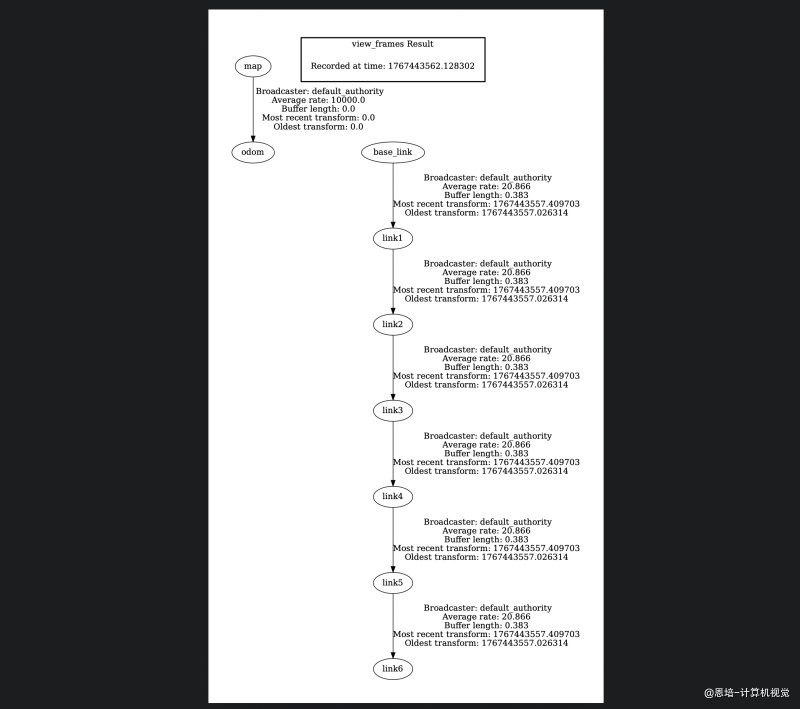
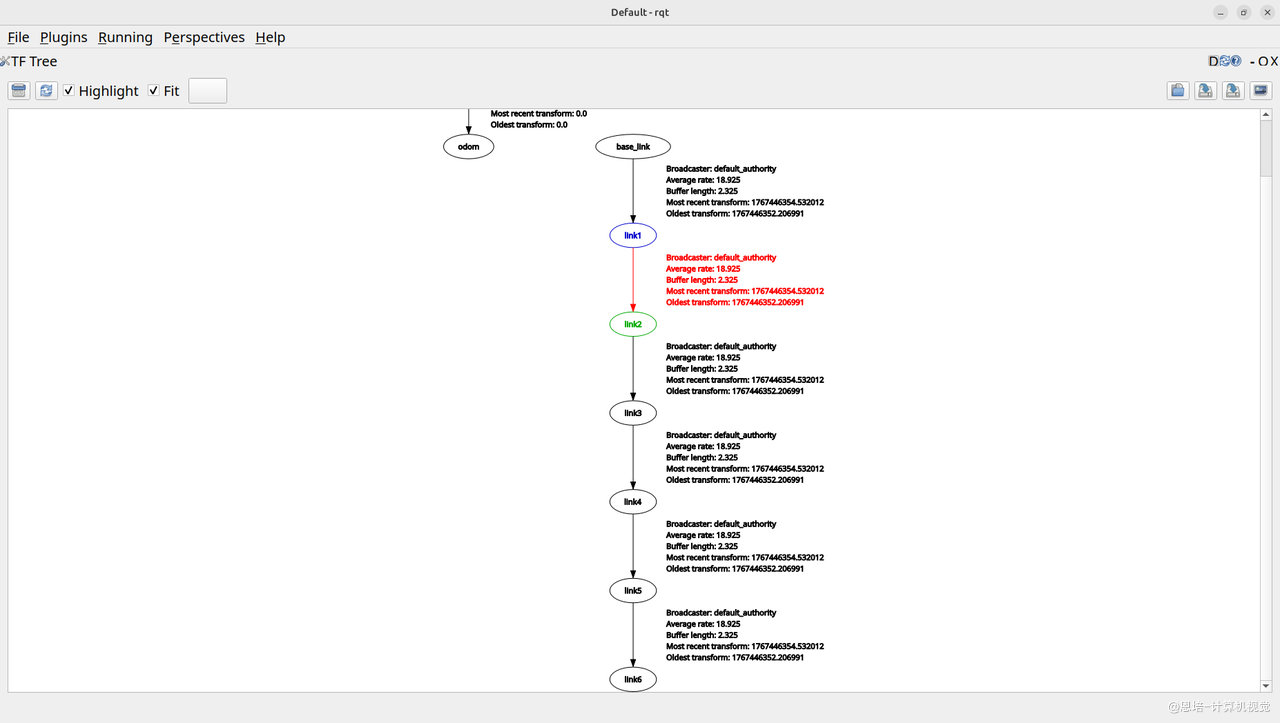
可以看到机械臂的
base_link是link1的父亲,然后一直延续到link6。
或者使用 rqt 查看:
6.2.2 查看坐标系列表
ros2 run tf2_ros tf2_echo <source_frame> <target_frame>
# 示例:查看 link6 相对于 base_link 的变换
ros2 run tf2_ros tf2_echo base_link link6
# 输出类似
At time 1767444337.858066210
- Translation: [0.089, -0.000, 0.264]
- Rotation: in Quaternion (xyzw) [0.643, 0.000, 0.765, 0.000]
- Rotation: in RPY (radian) [0.005, -1.398, 3.137]
- Rotation: in RPY (degree) [0.286, -80.100, 179.709]
- Matrix:
-0.172 -0.000 0.985 0.089
0.001 -1.000 -0.000 -0.000
0.985 0.001 0.172 0.264
0.000 0.000 0.000 1.000
输出包括:
- 平移(Translation):x, y, z
- 旋转(Rotation):四元数表示、欧拉角
- 变换矩阵
6.2.3 可视化工具:RViz
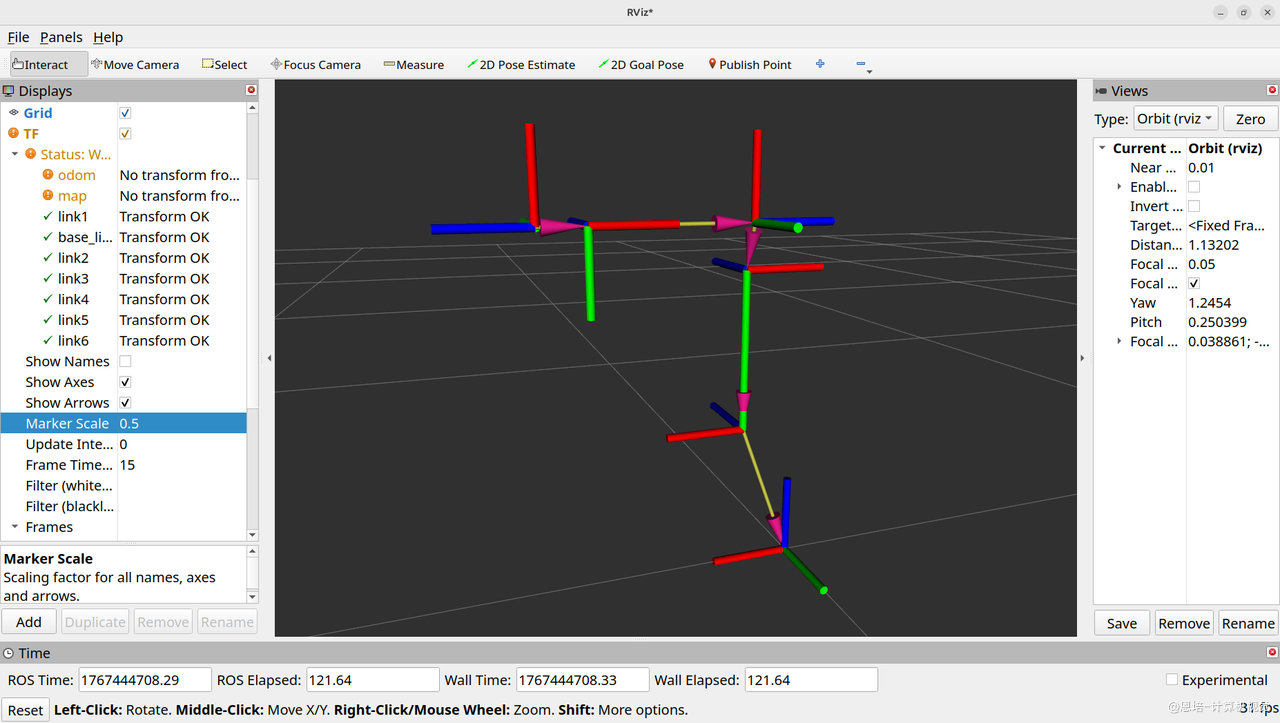
在 RViz 中添加 TF 显示插件,可以实时查看所有坐标系:
ros2 run rviz2 rviz2
6.3 实践:机械臂坐标系
启动 Episode1 的 URDF 可视化:
ros2 launch episode1_urdf_1113 launch.py
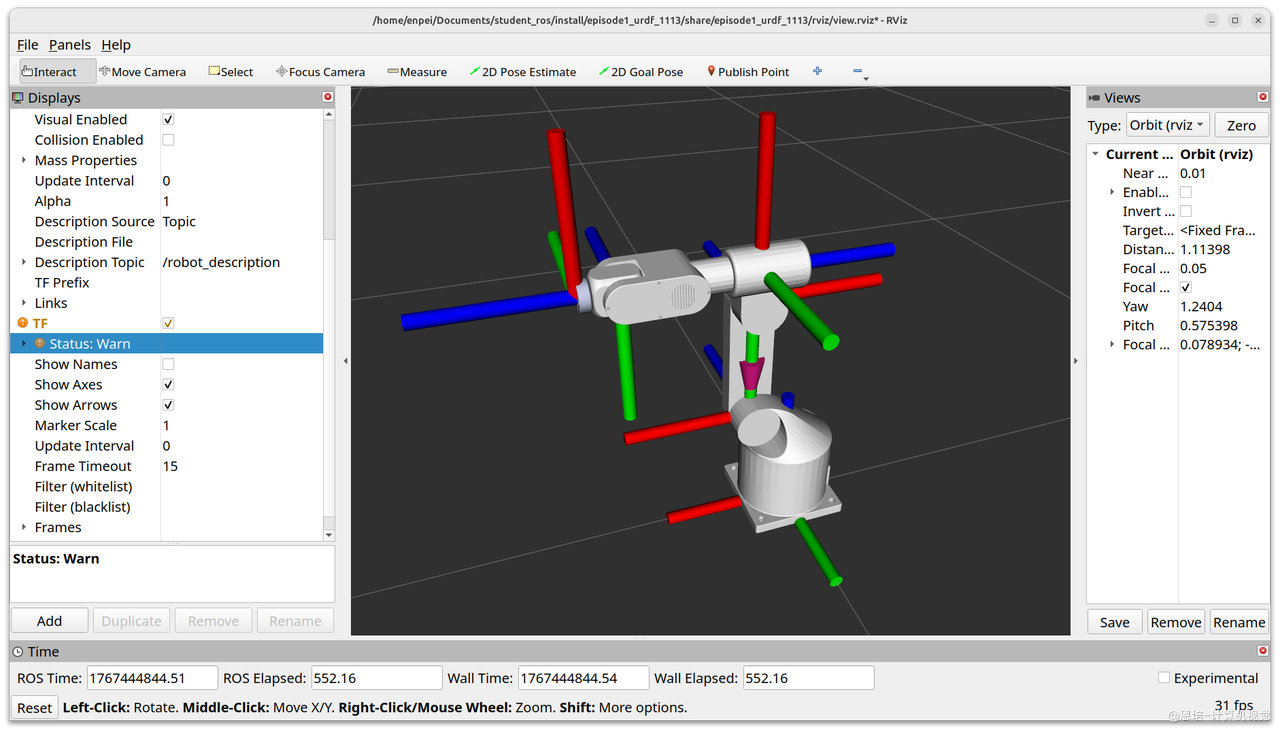
在 RViz 中:
- 添加 TF 显示
- 观察从
base_link到link6(末端)的坐标系关系 - 移动机械臂,观察坐标系变化
七、综合实践:分析 Episode1 系统
7.1 启动完整系统
# 终端 1:启动机械臂接口
ros2 run episode_controller interface
# 终端 2:启动 RViz 可视化
ros2 launch episode1_urdf_1113 launch.py
# 终端 3:运行测试客户端
ros2 run episode_controller client_demo --action move_xyz
7.2 分析系统架构
查看所有节点
ros2 node list
查看通信拓扑
ros2 run rqt_graph rqt_graph
查看话题
# 查看所有话题
ros2 topic list
# 监听关节状态
ros2 topic echo /joint_states
# 查看话题频率
ros2 topic hz /joint_states
查看服务
ros2 service list
查看动作
ros2 action list
查看坐标系
# 生成坐标系树
ros2 run tf2_tools view_frames
# 查看末端相对于基座的位置
ros2 run tf2_ros tf2_echo base_link link6
八、总结对比
| 通信类型 | 模型 | 特点 | 典型应用 |
|---|---|---|---|
| Topic | 发布-订阅 | 异步、持续数据流、多对多 | 传感器数据、状态发布 |
| Service | 请求-响应 | 同步、一次性调用 | 配置查询、重置操作 |
| Action | 目标-反馈-结果 | 异步、可取消、有反馈 | 导航、机械臂运动 |
| TF2 | 坐标变换 | 管理坐标系关系 | 位置转换、视觉定位 |
选择建议
- 高频数据(>10Hz)→ Topic
- 一次性查询/设置 → Service
- 耗时任务(需要进度反馈)→ Action
- 空间位置关系 → TF2
九、常用调试技巧
9.1 查看数据流
# 监听话题内容
ros2 topic echo <topic_name>
# 查看话题发布频率
ros2 topic hz <topic_name>
# 查看话题带宽
ros2 topic bw <topic_name>
9.2 手动测试
# 手动发布话题
ros2 topic pub <topic> <type> <data>
# 手动调用服务
ros2 service call <service> <type> <request>
# 手动发送动作
ros2 action send_goal <action> <type> <goal> --feedback
9.3 可视化工具
# 节点关系图
ros2 run rqt_graph rqt_graph
# 3D 可视化
ros2 run rviz2 rviz2
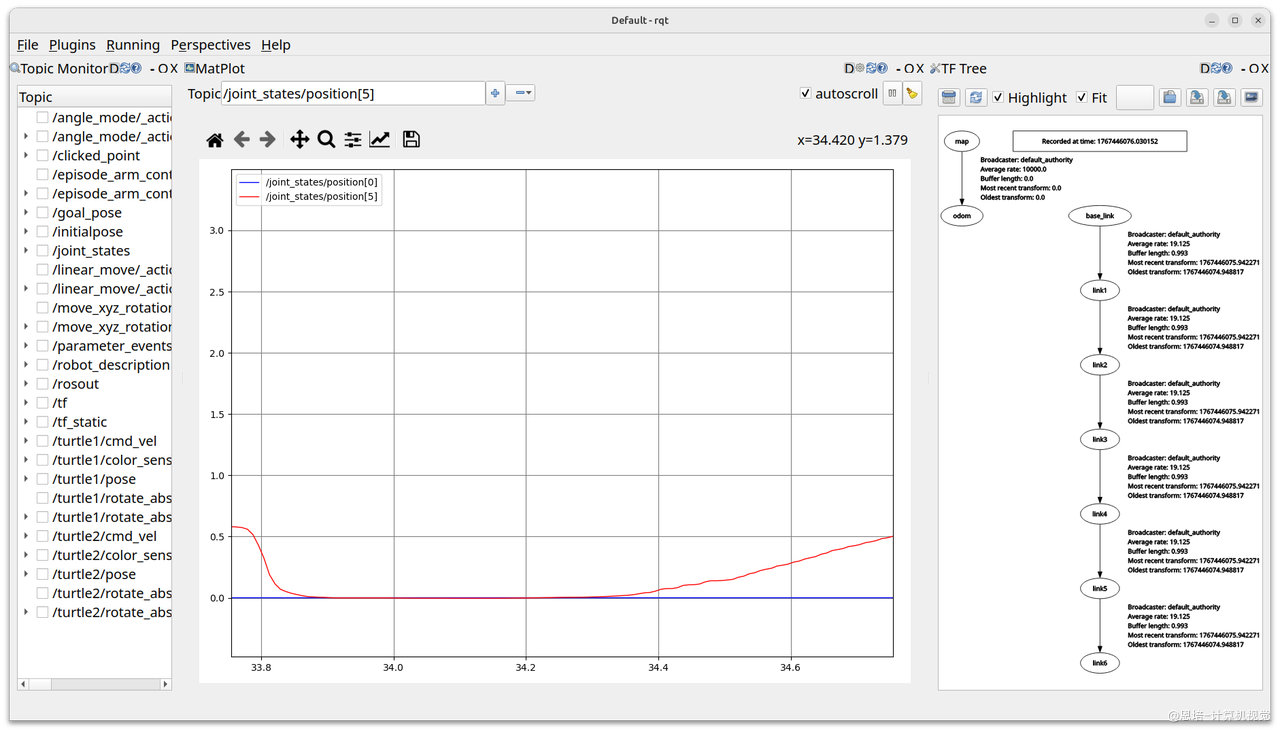
# 综合调试工具
rqt
9.4 录制和回放
# 录制话题数据
ros2 bag record -a # 录制所有话题
ros2 bag record <topic1> <topic2> # 录制指定话题
# 回放数据
ros2 bag play <bag_file>
十、下一步学习
完成本章后,你应该能够:
- ✓ 理解 ROS2 的核心通信机制
- ✓ 使用命令行工具调试 ROS2 系统
- ✓ 分析机械臂系统的节点和通信架构
下一章将学习如何编写自己的 ROS2 节点,实现自定义功能。