3.8 ROS2 TF2 机械臂坐标系实战
一、本章目标
本节课会涉及坐标系、欧拉角、正运动学等知识,建议配套学习《大模型 3D/6D 视觉抓取 6 轴机械臂》 下列内容:
- 七、运动控制:坐标系·姿态·欧拉角·旋转矩阵·齐次变换矩阵
- 八、运动控制:DH 参数建模与正逆运动学
- 九、相机内参、相机标定、手眼标定原理、3D 抓取
在前面的章节中,我们学习了 Topic(数据流)、Service(一问一答)、Action(长时间任务)三种通信方式。但在机器人应用中,还有一个核心问题没有解决:
如何处理不同坐标系之间的关系?
想象以下场景:
- 相机看到一个物体,坐标是
(0.3, 0.2, 0.5)—— 但这是相机坐标系下的位置 - 机械臂需要抓取这个物体,但机械臂使用的是基座坐标系
- 机械臂末端还可能安装了夹爪,夹爪又有自己的坐标系
问题来了:
- 相机坐标怎么转换成机械臂基座坐标?
- 机械臂的 6 个关节各自形成的坐标系关系是什么?
- 末端夹爪的位置怎么实时跟踪?
这就是 TF2(Transform Library 2) 要解决的问题:管理和查询机器人系统中所有坐标系之间的变换关系。
1.1 学习路线
第1步:理解坐标系和变换的概念
↓
第2步:发布静态坐标变换(固定关系,如相机与末端)
↓
第3步:发布动态坐标变换(运动关系,如关节角度)
↓
第4步:监听和查询坐标变换(获取两个坐标系之间的关系)
↓
第5步:构建完整机械臂TF树(base → link1-6 → tool0)
↓
第6步:实战案例:简化的视觉抓取坐标转换
1.2 本章目标
完成本章后,你将能够:
- 理解 TF2 的坐标系树(TF Tree)结构
- 使用
StaticTransformBroadcaster发布固定坐标关系 - 使用
TransformBroadcaster发布动态坐标关系(关节运动) - 使用
Buffer和TransformListener查询坐标变换 - 构建机械臂的完整 TF 树(
base_link → link1 → link2 → ... → link6 → tool0) - 实现简单的坐标转换案例(相机坐标 → 机械臂基座坐标)
1.3 与前几章的关系
| 章节 | 通信方式 | 本章中的角色 |
|---|---|---|
| 第 4 章 Topic | 发布关节角度 | 作为 TF2 的数据源(订阅角度消息来计算坐标变换) |
| 第 5 章 Service | 查询当前状态 | 可以提供"查询某坐标系相对某坐标系的位置"服务 |
| 第 6 章 Action | 长时间运动任务 | 运动过程中持续更新 TF 树 |
| 第 8 章 TF2 | 坐标变换 | 所有模块的空间关系基础 |
核心理念:TF2 不是一种新的通信方式,而是一个坐标系管理系统,它基于 Topic 实现(发布到
/tf和/tf_static话题)。
二、TF2 核心概念
2.1 三个核心概念
概念 1:Frame(坐标系)
Frame 是一个带有名称的坐标系。每个 Frame 都有:
- 名称(如
world、base_link、camera_link) - 原点位置
- 坐标轴方向(
X、Y、Z)
机械臂中的常见 Frame:
| Frame 名称 | 含义 | 特点 |
|---|---|---|
world |
世界坐标系 | 通常是固定的全局参考系 |
base_link |
机械臂基座 | 机械臂的根坐标系 |
link1 ~ link6 |
各关节坐标系 | 随关节运动而变化 |
tool0 |
末端法兰 | 机械臂第 6 轴输出位置 |
gripper_link |
夹爪坐标系 | 夹爪中心或指尖位置 |
camera_link |
相机坐标系 | 相机光学中心 |
概念 2:Transform(变换)
Transform 描述两个 Frame 之间的空间关系,包含两部分:
| 组成部分 | 内容 | 数据格式 |
|---|---|---|
| Translation(平移) | X、Y、Z 方向的偏移 |
(x, y, z) 单位:米 |
| Rotation(旋转) | 姿态差异 | 四元数 (x, y, z, w) 或欧拉角 (roll, pitch, yaw) |
生活类比:
问题:"客厅"相对于"卧室"在哪里?
答案:
- 平移:向前走5米,向左2米(Translation)
- 旋转:面朝西方(Rotation)
这就是两个坐标系之间的 Transform。
概念 3:TF Tree(坐标树)
TF Tree 是由 Frame 和 Transform 构成的树状结构:
world (根节点)
├── base_link (机械臂底座)
│ ├── link1 (第1关节)
│ │ ├── link2 (第2关节)
│ │ │ ├── link3 (第3关节)
│ │ │ │ ├── link4 (第4关节)
│ │ │ │ │ ├── link5 (第5关节)
│ │ │ │ │ │ ├── link6 (第6关节)
│ │ │ │ │ │ │ ├── tool0 (末端法兰)
│ │ │ │ │ │ │ │ ├── gripper_link (夹爪)
│ │ │ │ │ │ │ │ └── camera_link (相机)
└── map (全局地图,可选)
在前序课程中,我们使用
rqt也展示过TF tree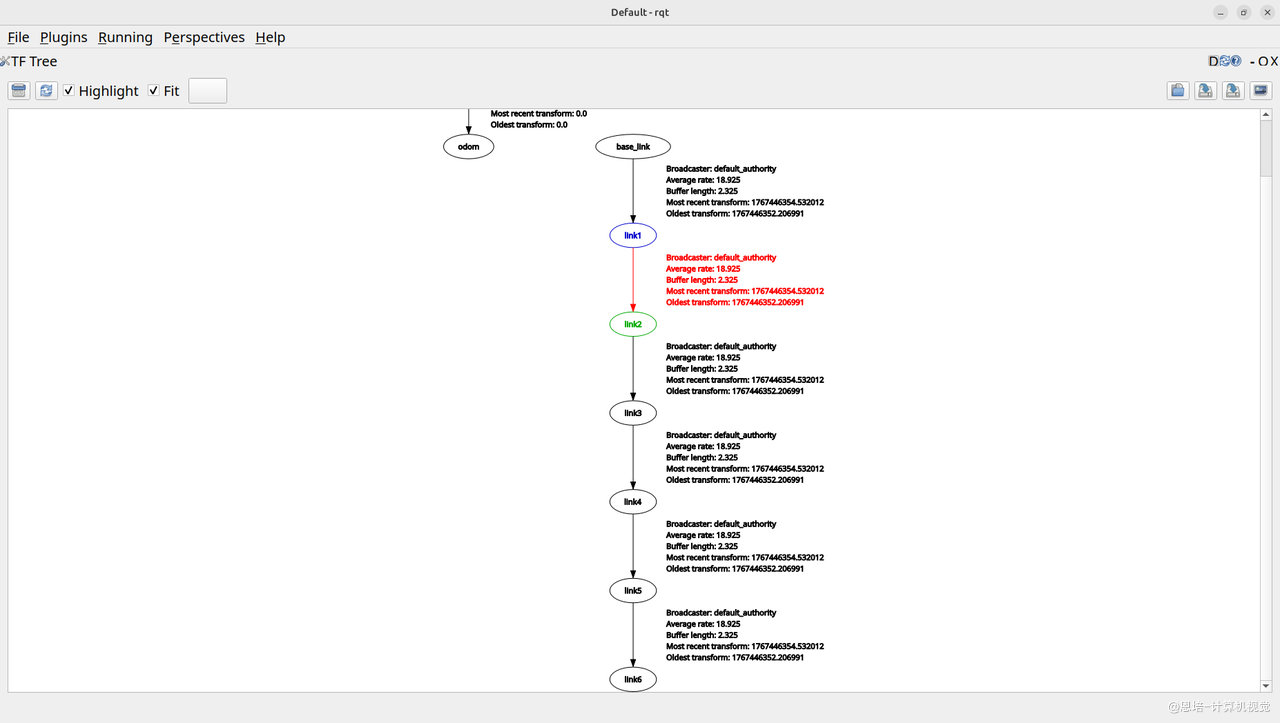
TF Tree 的规则:
| 规则 | 说明 | 示例 |
|---|---|---|
| 树结构 | 每个节点只有一个父节点 | link2 的父节点只能是 link1 |
| 不允许闭环 | 不能形成循环依赖 | A→B→C→A |
| 单根或多根 | 可以有多个独立的树 | world 和 map 可以并存 |
2.2 TF2 与 Topic 的关系
TF2 本质上是基于 Topic 实现的:
| TF2 组件 | 底层实现 | 话题名称 |
|---|---|---|
StaticTransformBroadcaster |
发布到静态变换话题 | /tf_static |
TransformBroadcaster |
发布到动态变换话题 | /tf |
TransformListener |
订阅变换话题 | /tf + /tf_static |
查看 TF 话题:
# 查看当前发布的 TF 数据
ros2 topic echo /tf
ros2 topic echo /tf_static
# 查看 TF 消息类型
ros2 topic info /tf
# 类型: tf2_msgs/msg/TFMessage
-
打开
Episode 1 ROS2包,启动ros2 run episode_controller interface,使用ros2 topic list:# 只有角度发布的Topic /joint_states /parameter_events /rosout如果没有
Episode1机械臂,请将src/episode1_urdf_1113/launch/launch.py的ld.add_action(start_joint_state_publisher_cmd)取消注释,启动Rviz后可以看到关节滑块区域: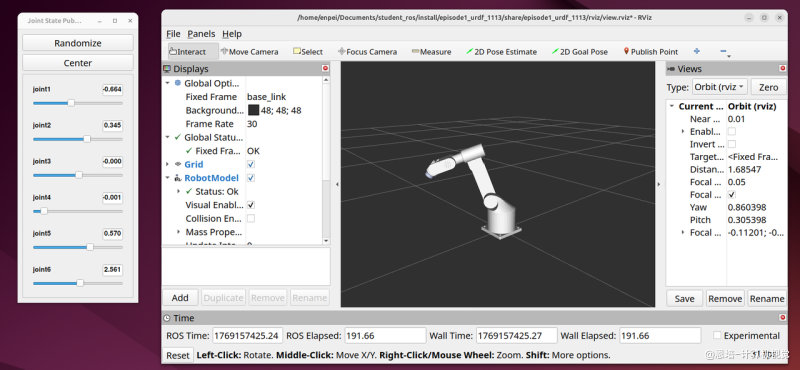
-
然后启动
RVIZ仿真:ros2 launch episode1_urdf_1113 launch.py,再次查看/clicked_point /goal_pose /initialpose /joint_states /parameter_events /robot_description /rosout # 可以看到出现了/tf和/tf_static,这便是URDF + robot_state_publisher发布的 /tf /tf_static -
调试:
# 查看动态tf ros2 topic echo /tf # 输出 ... - header: stamp: sec: 1769154502 nanosec: 506771888 frame_id: link4 child_frame_id: link5 transform: translation: x: 0.0 y: 0.0 z: -0.192 rotation: x: 0.5000872588433475 y: -0.4999127259190354 z: 0.4999145628454793 w: 0.5000854225647451 - header: stamp: sec: 1769154502 nanosec: 506771888 frame_id: link5 child_frame_id: link6 ... # 查看静态tf ros2 topic echo /tf_static # 输出:map和odom transforms: - header: stamp: sec: 1769154403 nanosec: 393914403 frame_id: map child_frame_id: odom transform: translation: x: 0.0 y: 0.0 z: 0.0 rotation: x: 0.0 y: 0.0 z: 0.0 w: 1.0 --- transforms: [] --- # 查看消息类型 ros2 topic info /tf # 输出 Type: tf2_msgs/msg/TFMessage Publisher count: 1 Subscription count: 1
2.3 两种变换类型对比
| 特性 | Static Transform(静态变换) | Dynamic Transform(动态变换) |
|---|---|---|
| 发布频率 | 只发布一次(或低频发布) | 持续高频发布(如 30Hz) |
| 使用场景 | 固定不变的关系 | 随时间变化的关系 |
| 典型例子 | • 相机与末端法兰的位置• 机械臂底座与世界坐标 | • 各关节角度引起的坐标变化• 移动机器人的位置 |
| 话题 | /tf_static |
/tf |
| Python 类 | StaticTransformBroadcaster |
TransformBroadcaster |
2.4 外卖系统类比
继续用外卖系统来理解 TF2:
| TF2 概念 | 外卖类比 | 说明 |
|---|---|---|
| Frame | 地点(家、餐厅、配送站) | 每个地点是一个坐标系 |
| Transform | "餐厅相对于家的位置" | 描述两地点之间的关系 |
| Static Transform | "小区门口相对于家的位置" | 固定不变 |
| Dynamic Transform | "骑手相对于餐厅的实时位置" | 持续变化 |
| TF Tree | 整个配送网络的位置关系图 | 树状结构:配送站 → 餐厅 → 骑手 |
| lookup_transform | "查询骑手相对于我家的位置" | 跨多个节点计算 |
2.5 TF2 工具一览
| 工具命令 | 功能 | 输出 |
|---|---|---|
ros2 run tf2_tools view_frames |
生成 TF 树的 PDF 可视化 | frames.pdf |
ros2 run tf2_ros tf2_echo |
实时显示两个坐标系之间的变换 | 平移 + 旋转 |
ros2 run tf2_ros tf2_monitor |
监控 TF 延迟 | 平均延迟时间 |
ros2 run rviz2 rviz2 |
可视化所有坐标系 | 3D 显示坐标轴 |
rqt |
动态查看 TF 树 | GUI 界面 |
工具演示(后续实战中使用):
# 生成 TF 树 PDF(等待5秒收集数据)
ros2 run tf2_tools view_frames
# 输出:frames.pdf
# 实时查看 base_link 到 tool0 的变换
ros2 run tf2_ros tf2_echo base_link link6
# 输出
At time 1769154878.941803011
- Translation: [0.302, -0.000, 0.422]
- Rotation: in Quaternion (xyzw) [0.708, 0.001, 0.706, 0.001]
- Rotation: in RPY (radian) [2.158, -1.568, 0.984]
- Rotation: in RPY (degree) [123.634, -89.820, 56.366]
- Matrix:
0.002 0.000 1.000 0.302
0.003 -1.000 -0.000 -0.000
1.000 0.003 -0.002 0.422
0.000 0.000 0.000 1.000
# 监控 TF 延迟
ros2 run tf2_ros tf2_monitor
# 输出
Gathering data on all frames for 10 seconds...
RESULTS: for all Frames
Frames:
Frame: link1, published by <no authority available>, Average Delay: 0.00186811, Max Delay: 0.146899
Frame: link2, published by <no authority available>, Average Delay: 0.00186895, Max Delay: 0.1469
Frame: link3, published by <no authority available>, Average Delay: 0.00186991, Max Delay: 0.146902
Frame: link4, published by <no authority available>, Average Delay: 0.00187049, Max Delay: 0.146906
Frame: link5, published by <no authority available>, Average Delay: 0.00187102, Max Delay: 0.146907
Frame: link6, published by <no authority available>, Average Delay: 0.00187174, Max Delay: 0.146908
Frame: odom, published by <no authority available>, Average Delay: 373.826, Max Delay: 373.826
All Broadcasters:
Node: <no authority available> 19.0211 Hz, Average Delay: 1.90912 Max Delay: 373.826
# 在 rviz2 中可视化
ros2 run rviz2 rviz2
# 综合工具
rqt
| Rviz2 | rqt |
|---|---|
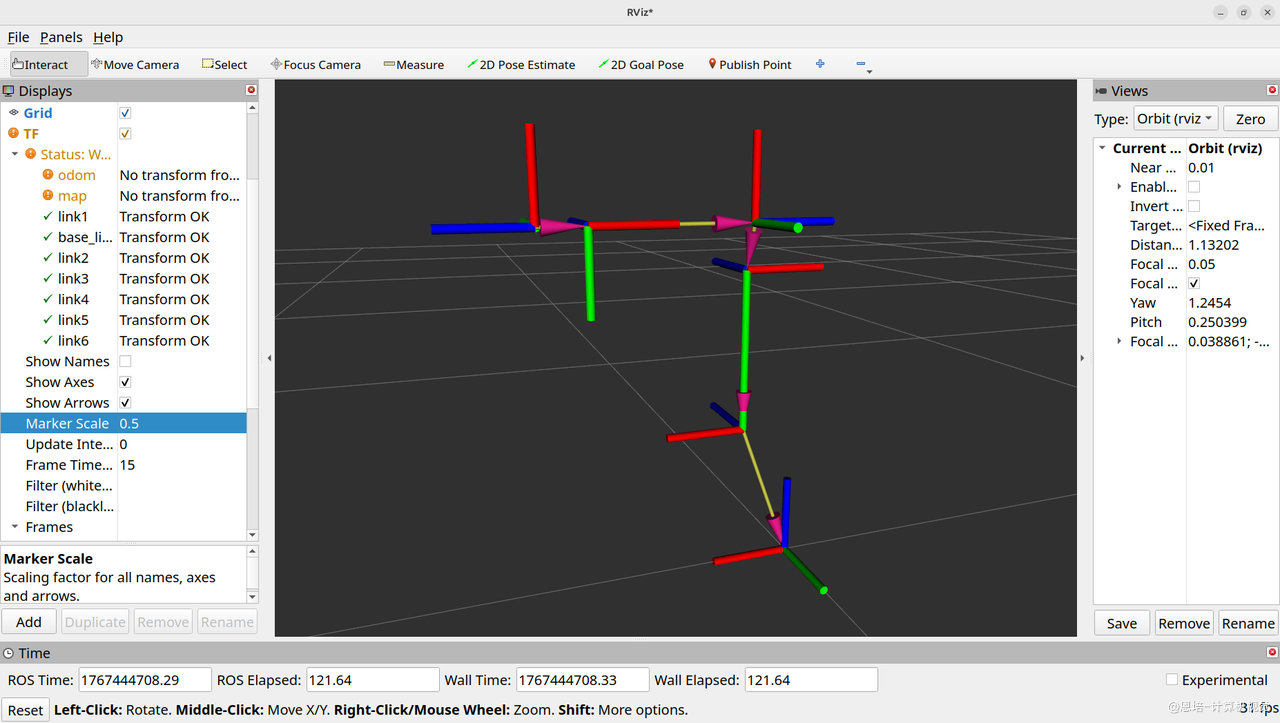 |
|
三、静态坐标变换:固定关系
3.1 使用场景
什么时候用静态变换?
| 场景 | 说明 | 示例 |
|---|---|---|
| 传感器安装位置 | 相机、激光雷达相对于机器人的位置 | camera_link → base_link |
| 机械臂底座位置 | 机械臂相对于世界坐标的固定位置 | base_link → world |
| 手眼标定结果 | 相机与末端法兰的标定关系 | camera_link → tool0 |
| 固定工装 | 工作台、料盒相对于机器人的位置 | workbench → base_link |
3.2 三种发布方式对比
| 方式 | 适用场景 | 优点 | 缺点 |
|---|---|---|---|
| 命令行工具 | 临时测试、快速验证 | 无需编写代码 | 不持久,需要手动启动 |
| Python 节点 | 固定的静态关系 | 可集成到启动文件 | 需要编写代码 |
| URDF + robot_state_publisher | 复杂机器人模型 | 自动发布所有静态链接 | 需要学习 URDF(后续章节) |
3.3 方式一:命令行工具(快速验证)
示例 1:发布世界坐标到机械臂基座
为避免干扰,请关闭之前打开的程序。
# 格式:static_transform_publisher x y z yaw pitch roll frame_id child_frame_id
ros2 run tf2_ros static_transform_publisher \
--x 0.0 --y 0.0 --z 0.0 \
--yaw 0 --pitch 0 --roll 0 \
--frame-id world --child-frame-id base_link
参数说明:
| 参数 | 含义 | 单位 | 示例值 |
|---|---|---|---|
--x, --y, --z |
平移 | 米 | 0.0 0.0 0.0 |
--yaw, --pitch, --roll |
欧拉角旋转 | 弧度 | 0 0 0(无旋转) |
--frame-id |
父坐标系 | - | world |
--child-frame-id |
子坐标系 | - | base_link |
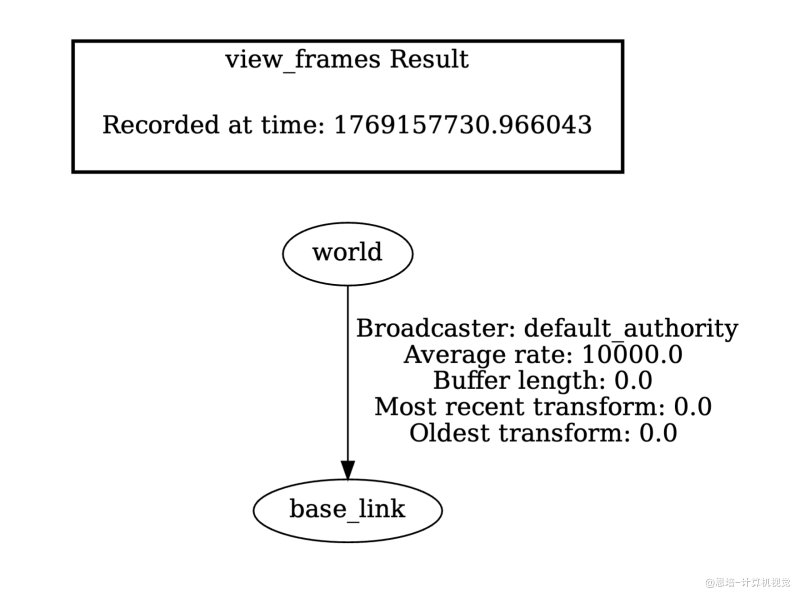
查看发布结果
# 查看 TF 树
ros2 run tf2_tools view_frames
# 打开生成的 frames.pdf
# 实时查看变换
ros2 run tf2_ros tf2_echo world base_link
# 输出:
At time 0.0
- Translation: [0.000, 0.000, 0.000]
- Rotation: in Quaternion (xyzw) [0.000, 0.000, 0.000, 1.000]
- Rotation: in RPY (radian) [0.000, -0.000, 0.000]
- Rotation: in RPY (degree) [0.000, -0.000, 0.000]
- Matrix:
1.000 0.000 0.000 0.000
0.000 1.000 0.000 0.000
0.000 0.000 1.000 0.000
0.000 0.000 0.000 1.000
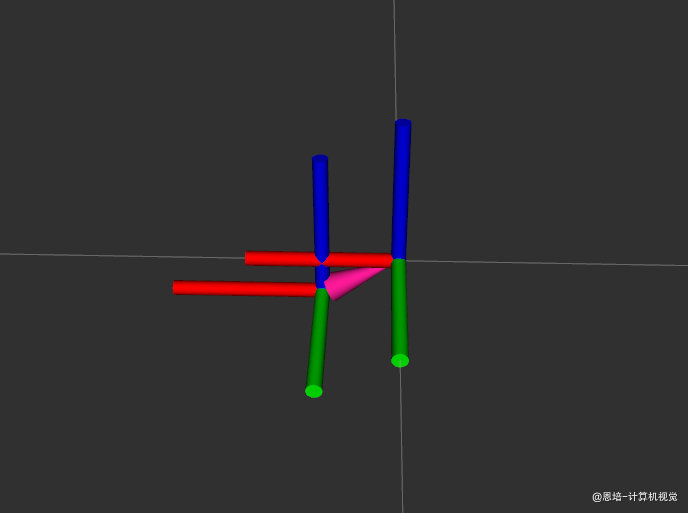
示例 2:发布相机到末端法兰(手眼标定结果)
# 假设相机在末端法兰前方10cm,向下5cm,无旋转
ros2 run tf2_ros static_transform_publisher \
--x 0.1 --y 0.0 --z -0.05 \
--yaw 0 --pitch 0 --roll 0 \
--frame-id tool0 --child-frame-id camera_link
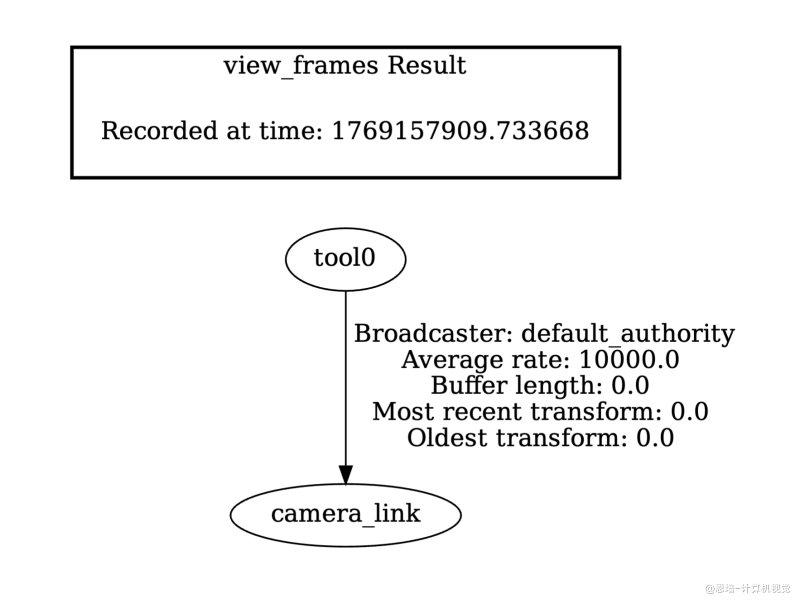
查看发布结果
# 查看 TF 树
ros2 run tf2_tools view_frames
# 打开生成的 frames.pdf
# 实时查看变换
ros2 run tf2_ros tf2_echo tool0 camera_link
# 输出
At time 0.0
- Translation: [0.100, 0.000, -0.050]
- Rotation: in Quaternion (xyzw) [0.000, 0.000, 0.000, 1.000]
- Rotation: in RPY (radian) [0.000, -0.000, 0.000]
- Rotation: in RPY (degree) [0.000, -0.000, 0.000]
- Matrix:
1.000 0.000 0.000 0.100
0.000 1.000 0.000 0.000
0.000 0.000 1.000 -0.050
0.000 0.000 0.000 1.000
| RVIZ | |
|---|---|
 |
 |
3.4 方式二:Python 节点
版本 0:最基础的静态变换发布器
目标:发布 world → base_link 的固定关系。
创建文件 ~/ros2_ws/src/py_episode/py_episode/static_tf_publisher.py:
#!/usr/bin/env python3
"""
静态坐标变换发布器 - 版本 0
发布 world → base_link 的固定关系
"""
import rclpy
from rclpy.node import Node
from geometry_msgs.msg import TransformStamped
from tf2_ros.static_transform_broadcaster import StaticTransformBroadcaster
class StaticTFPublisher(Node):
"""静态坐标变换发布节点"""
def __init__(self):
super().__init__('static_tf_publisher')
# 创建静态变换广播器
self.tf_broadcaster = StaticTransformBroadcaster(self)
# 发布变换
self.publish_static_transform()
self.get_logger().info('静态 TF 发布器已启动')
def publish_static_transform(self):
"""发布 world → base_link 的静态变换"""
# 创建 TransformStamped 消息
t = TransformStamped()
# 设置时间戳(静态变换通常用当前时间)
t.header.stamp = self.get_clock().now().to_msg()
# 设置父坐标系(frame_id)和子坐标系(child_frame_id)
t.header.frame_id = 'world' # 父坐标系
t.child_frame_id = 'base_link' # 子坐标系
# 设置平移(单位:米)
# base_link 相对于 world 的位置
t.transform.translation.x = 0.0
t.transform.translation.y = 0.0
t.transform.translation.z = 0.0 # 假设机械臂底座在地面上
# 设置旋转(四元数,无旋转时 w=1, x=y=z=0)
t.transform.rotation.x = 0.0
t.transform.rotation.y = 0.0
t.transform.rotation.z = 0.0
t.transform.rotation.w = 1.0 # 无旋转
# 发布变换
self.tf_broadcaster.sendTransform(t)
self.get_logger().info(
f'已发布静态变换: {t.header.frame_id} → {t.child_frame_id}')
def main(args=None):
rclpy.init(args=args)
node = StaticTFPublisher()
try:
rclpy.spin(node)
except KeyboardInterrupt:
pass
finally:
node.destroy_node()
rclpy.shutdown()
if __name__ == '__main__':
main()
关键知识点:
TransformStamped:描述两个坐标系之间关系的"信封"- 包含:父坐标系、子坐标系、时间戳、平移、旋转
- 命名含义:Transform(变换)+ Stamped(带时间戳,ROS2 惯例)
- 类似命名:
PointStamped、PoseStamped等
StaticTransformBroadcaster:发布静态变换的"邮递员"- 用于发布不会变化的坐标关系(如传感器安装位置)
- 只需发布一次,TF2 会永久记住
- 发布到
/tf_static话题
- 平移:
transform.translation.x/y/z,单位是米 - 旋转:
transform.rotation.x/y/z/w(四元数),无旋转时w=1, x=y=z=0 - 时间戳:
header.stamp,使用get_clock().now().to_msg() - 坐标系名称:
header.frame_id(父)+child_frame_id(子)
查看消息类型:
# 检查TransformStamped类型具体信息
ros2 interface show geometry_msgs/msg/TransformStamped
# 输出
# The frame id in the header is used as the reference frame of this transform.
std_msgs/Header header
builtin_interfaces/Time stamp
int32 sec
uint32 nanosec
string frame_id
# The frame id of the child frame to which this transform points.
string child_frame_id
# Translation and rotation in 3-dimensions of child_frame_id from header.frame_id.
Transform transform
Vector3 translation
float64 x
float64 y
float64 z
Quaternion rotation
float64 x 0
float64 y 0
float64 z 0
float64 w 1
关于消息类型的疑问解答
你可能会有疑问:代码中使用的是 geometry_msgs/msg/TransformStamped,但查看话题类型时却不一样?
# 查看 TF 话题
ros2 topic list
# 输出包含: /tf_static
# 查看话题类型
ros2 topic info /tf_static
# 输出: Type: tf2_msgs/msg/TFMessage ← 为什么不是 TransformStamped?
原因解释:
| 层级 | 消息类型 | 作用 |
|---|---|---|
| 代码层 | geometry_msgs/msg/TransformStamped |
描述单个坐标变换(父坐标系 → 子坐标系) |
| 话题层 | tf2_msgs/msg/TFMessage |
包含多个 TransformStamped 的数组,用于话题传输 |
TFMessage 的结构:
# 检查
ros2 interface show tf2_msgs/msg/TFMessage
# 输出:
geometry_msgs/TransformStamped[] transforms # ← 是一个数组!
#
#
std_msgs/Header header
builtin_interfaces/Time stamp
int32 sec
uint32 nanosec
string frame_id
string child_frame_id
Transform transform
Vector3 translation
float64 x
float64 y
float64 z
Quaternion rotation
float64 x 0
float64 y 0
float64 z 0
float64 w 1
工作原理:
简单理解:
TransformStamped是一个快递包裹(单个变换)TFMessage是快递车(可以装多个包裹)StaticTransformBroadcaster.sendTransform()会自动把你的包裹装车发送
这也是为什么 sendTransform() 可以接受单个 TransformStamped 或列表 [t1, t2, t3] 的原因。
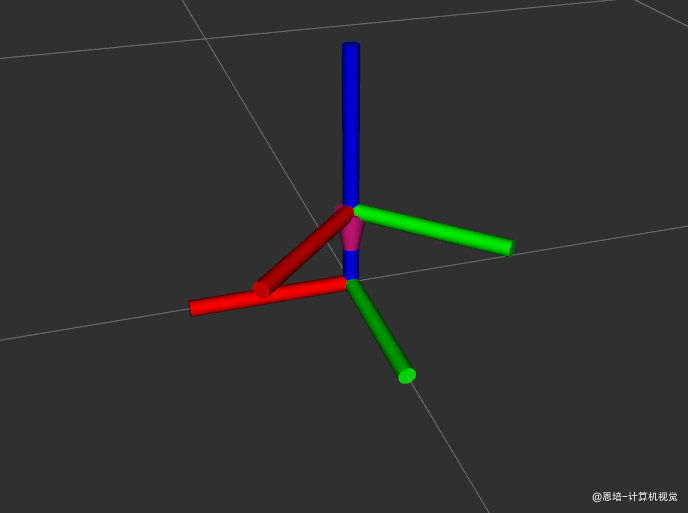
版本 1:添加欧拉角转四元数
改进:使用欧拉角(roll, pitch, yaw)更直观地设置旋转。
#!/usr/bin/env python3
"""
静态坐标变换发布器 - 版本 1
使用欧拉角设置旋转
"""
import math
import rclpy
from rclpy.node import Node
from geometry_msgs.msg import TransformStamped
from tf2_ros.static_transform_broadcaster import StaticTransformBroadcaster
import tf_transformations
class StaticTFPublisherV1(Node):
"""静态坐标变换发布节点 - 支持欧拉角"""
def __init__(self):
super().__init__('static_tf_publisher_v1')
self.tf_broadcaster = StaticTransformBroadcaster(self)
self.publish_static_transform()
self.get_logger().info('静态 TF 发布器 V1 已启动(支持欧拉角)')
def euler_to_quaternion(self, roll, pitch, yaw):
"""
欧拉角转四元数
Args:
roll: 绕 X 轴旋转(弧度)
pitch: 绕 Y 轴旋转(弧度)
yaw: 绕 Z 轴旋转(弧度)
Returns:
(qx, qy, qz, qw): 四元数
"""
# tf_transformations 返回顺序是 (x, y, z, w)
qx, qy, qz, qw = tf_transformations.quaternion_from_euler(roll, pitch, yaw, 'sxyz')
return qx, qy, qz, qw
def publish_static_transform(self):
"""发布 world → base_link 的静态变换(带旋转)"""
t = TransformStamped()
t.header.stamp = self.get_clock().now().to_msg()
t.header.frame_id = 'world'
t.child_frame_id = 'base_link'
# 平移
t.transform.translation.x = 0.0
t.transform.translation.y = 0.0
t.transform.translation.z = 0.1 # 10cm 高度
# 使用欧拉角设置旋转
# 示例:绕 Z 轴旋转 45 度
roll = 0.0 # 绕 X 轴
pitch = 0.0 # 绕 Y 轴
yaw = math.radians(45.0) # 绕 Z 轴,45度转弧度
qx, qy, qz, qw = self.euler_to_quaternion(roll, pitch, yaw)
t.transform.rotation.x = qx
t.transform.rotation.y = qy
t.transform.rotation.z = qz
t.transform.rotation.w = qw
self.tf_broadcaster.sendTransform(t)
self.get_logger().info(
f'已发布静态变换: {t.header.frame_id} → {t.child_frame_id}'
f' (yaw={math.degrees(yaw):.1f}°)')
def main(args=None):
rclpy.init(args=args)
node = StaticTFPublisherV1()
try:
rclpy.spin(node)
except KeyboardInterrupt:
pass
finally:
node.destroy_node()
rclpy.shutdown()
if __name__ == '__main__':
main()
新增知识点:
- 导入
tf_transformations库:sudo apt install ros-jazzy-tf-transformations - 欧拉角转四元数:
quaternion_from_euler(roll, pitch, yaw, 'sxyz')返回(x, y, z, w)顺序 - 欧拉角约定:ROS 使用 RPY(Roll-Pitch-Yaw) 顺序,即先绕 X 轴、再绕 Y 轴、最后绕 Z 轴
- 角度转换:使用
math.radians()将度转换为弧度
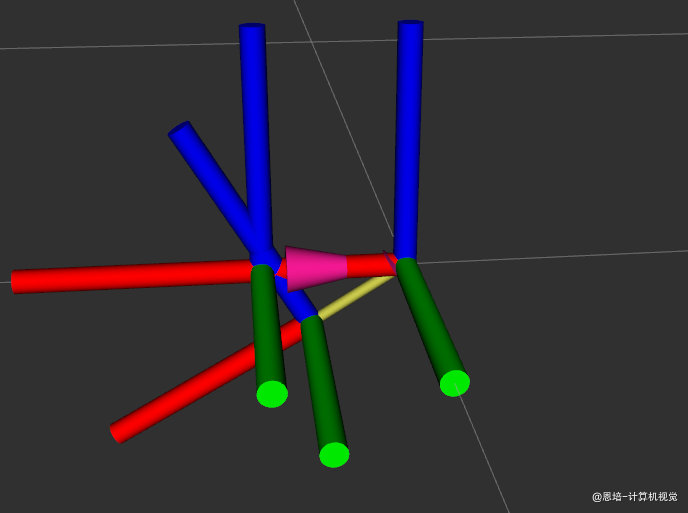
版本 2:同时发布多个静态变换
改进:一个节点发布多个固定关系(世界 → 基座、末端 → 相机)。
#!/usr/bin/env python3
"""
静态坐标变换发布器 - 版本 2
发布多个静态变换:
1. world → base_link(机械臂底座位置)
2. tool0 → camera_link(手眼标定结果)
3. tool0 → gripper_link(夹爪安装位置)
"""
import math
import rclpy
from rclpy.node import Node
from geometry_msgs.msg import TransformStamped
from tf2_ros.static_transform_broadcaster import StaticTransformBroadcaster
import tf_transformations
class StaticTFPublisherV2(Node):
"""静态坐标变换发布节点 - 发布多个变换"""
def __init__(self):
super().__init__('static_tf_publisher_v2')
self.tf_broadcaster = StaticTransformBroadcaster(self)
# 发布所有静态变换
self.publish_all_static_transforms()
self.get_logger().info('静态 TF 发布器 V2 已启动(多变换)')
def euler_to_quaternion(self, roll, pitch, yaw):
"""欧拉角转四元数"""
qx, qy, qz, qw = tf_transformations.quaternion_from_euler(roll, pitch, yaw, 'sxyz')
return qx, qy, qz, qw
def create_transform(self, parent_frame, child_frame,
x, y, z, roll=0.0, pitch=0.0, yaw=0.0):
"""
创建 TransformStamped 消息的辅助函数
Args:
parent_frame: 父坐标系名称
child_frame: 子坐标系名称
x, y, z: 平移(米)
roll, pitch, yaw: 欧拉角(弧度)
Returns:
TransformStamped 消息
"""
t = TransformStamped()
t.header.stamp = self.get_clock().now().to_msg()
t.header.frame_id = parent_frame
t.child_frame_id = child_frame
# 设置平移
t.transform.translation.x = float(x)
t.transform.translation.y = float(y)
t.transform.translation.z = float(z)
# 设置旋转
qx, qy, qz, qw = self.euler_to_quaternion(roll, pitch, yaw)
t.transform.rotation.x = qx
t.transform.rotation.y = qy
t.transform.rotation.z = qz
t.transform.rotation.w = qw
return t
def publish_all_static_transforms(self):
"""发布所有静态变换"""
transforms = []
# 变换 1: world → base_link(机械臂底座在世界坐标原点)
t1 = self.create_transform(
parent_frame='world',
child_frame='base_link',
x=0.0, y=0.0, z=0.1, # 底座高度10cm
roll=0.0, pitch=0.0, yaw=math.radians(45) # 绕Z轴旋转45度
)
transforms.append(t1)
self.get_logger().info('静态变换: world → base_link')
# 变换 2: tool0 → camera_link(相机安装在末端法兰上)
# 假设相机在末端法兰前方 8cm,向下 5cm,向下倾斜 30 度
t2 = self.create_transform(
parent_frame='tool0',
child_frame='camera_link',
x=0.08, y=0.0, z=-0.05, # 前方8cm,下方5cm
roll=0.0, pitch=math.radians(30), yaw=0.0 # 向下倾斜30度
)
transforms.append(t2)
self.get_logger().info('静态变换: tool0 → camera_link')
# 变换 3: tool0 → gripper_link(夹爪安装在末端法兰上)
# 假设夹爪中心在末端法兰前方 12cm
t3 = self.create_transform(
parent_frame='tool0',
child_frame='gripper_link',
x=0.12, y=0.0, z=0.0, # 前方12cm
roll=0.0, pitch=0.0, yaw=0.0 # 无旋转
)
transforms.append(t3)
self.get_logger().info('静态变换: tool0 → gripper_link')
# 一次性发布所有静态变换
self.tf_broadcaster.sendTransform(transforms)
self.get_logger().info(f'已发布 {len(transforms)} 个静态变换')
def main(args=None):
rclpy.init(args=args)
node = StaticTFPublisherV2()
try:
rclpy.spin(node)
except KeyboardInterrupt:
pass
finally:
node.destroy_node()
rclpy.shutdown()
if __name__ == '__main__':
main()
新增知识点:
sendTransform()可以接受列表:sendTransform([t1, t2, t3])- 一次性发布多个静态变换,减少代码重复
- 使用辅助函数
create_transform()简化消息创建
| world | tool0 |
|---|---|
|
 |
3.5 添加依赖
编辑 ~/ros2_ws/src/py_episode/package.xml,添加 TF2 相关依赖:
<!-- TF2 相关依赖 -->
<exec_depend>tf2_ros</exec_depend>
<exec_depend>tf2_geometry_msgs</exec_depend>
<exec_depend>geometry_msgs</exec_depend>
<exec_depend>tf_transformations</exec_depend> <!-- 欧拉角/四元数转换 -->
注意:如果
rosdep install --from-paths src --ignore-src -r -y没有自动安装tf_transformations,可以手动安装:sudo apt install ros-jazzy-tf-transformations
3.6 添加入口点
编辑 ~/ros2_ws/src/py_episode/setup.py,在 entry_points 中添加静态 TF 发布器:
entry_points={
'console_scripts': [
# ... 之前的入口点 ...
'static_tf_pub = py_episode.static_tf_publisher:main', # 静态TF发布器
],
},
3.7 测试与验证
# 编译
cd ~/ros2_ws
colcon build --packages-select py_episode --symlink-install
source install/setup.bash
# 运行静态 TF 发布器
ros2 run py_episode static_tf_pub
# 验证(另一个终端)
ros2 topic echo /tf_static
ros2 run tf2_tools view_frames
ros2 run tf2_ros tf2_echo world base_link
四、动态坐标变换:运动关系
4.1 动态变换 vs 静态变换
| 特性 | 静态变换 | 动态变换 |
|---|---|---|
| 关系是否变化 | 永远固定 | 持续变化 |
| 发布频率 | 一次或低频 | 高频(如 30Hz) |
| 典型场景 | 传感器安装位置 | 关节角度、机器人位置 |
| Python 类 | StaticTransformBroadcaster |
TransformBroadcaster |
| 话题 | /tf_static |
/tf |
4.2 机械臂动态变换的来源
问题:机械臂的关节在运动,各 link 之间的坐标关系怎么计算?
答案:通过 正运动学(Forward Kinematics) 计算。
正运动学简介
输入:关节角度
输出:末端执行器相对于基座的位姿(位置 + 姿态)
计算方法:
- DH 参数法(Denavit-Hartenberg):标准的机器人学方法
- 简化模型:对于教学机械臂,可以用固定偏移 + 旋转矩阵
本章处理方式:
- 使用简化的固定偏移模型,避免陷入复杂的 DH 参数推导
- 重点放在"如何发布 TF"而非"如何计算运动学"
- 详细的正运动学计算可以参考课程《大模型 3D/6D 视觉抓取 6 轴机械臂》 的 八、运动控制:DH 参数建模与正逆运动学
简化模型示例
假设我们的 6 轴机械臂各关节之间的固定偏移如下:
| 关节 | 父坐标系 | 子坐标系 | Z 方向偏移(米) | 旋转轴 |
|---|---|---|---|---|
| 1 | base_link |
link1 |
0.15 | Z 轴(Yaw) |
| 2 | link1 |
link2 |
0.10 | Y 轴(Pitch) |
| 3 | link2 |
link3 |
0.20 | Y 轴(Pitch) |
| 4 | link3 |
link4 |
0.15 | X 轴(Roll) |
| 5 | link4 |
link5 |
0.10 | Y 轴(Pitch) |
| 6 | link5 |
link6 |
0.08 | X 轴(Roll) |
| - | link6 |
tool0 |
0.05 | 固定(无旋转) |
4.3 版本迭代:动态 TF 发布器
版本 0:发布单个关节变换(base_link → link1)
目标:使用周期函数模拟关节角度变化,发布第一个关节的动态坐标变换。
创建文件 ~/ros2_ws/src/py_episode/py_episode/dynamic_tf_publisher.py:
#!/usr/bin/env python3
"""
动态坐标变换发布器 - 版本 0
使用周期函数模拟角度变化,发布 base_link → link1
"""
import math
import time
import rclpy
from rclpy.node import Node
from geometry_msgs.msg import TransformStamped
from tf2_ros import TransformBroadcaster
import tf_transformations
class DynamicTFPublisherV0(Node):
"""动态坐标变换发布器 - 单关节版本"""
def __init__(self):
super().__init__('dynamic_tf_publisher_v0')
# 创建动态变换广播器(注意:不是 StaticTransformBroadcaster)
self.tf_broadcaster = TransformBroadcaster(self)
# 关节1的固定偏移(基座到关节1的Z方向偏移)
self.link1_z_offset = 0.15 # 15cm
# 记录启动时间(用于周期函数)
self.start_time = time.time()
# 创建定时器,30Hz 发布频率
self.timer = self.create_timer(1.0 / 30.0, self.timer_callback)
self.get_logger().info('动态 TF 发布器 V0 已启动(单关节,周期运动)')
def euler_to_quaternion(self, roll, pitch, yaw):
"""欧拉角转四元数"""
qx, qy, qz, qw = tf_transformations.quaternion_from_euler(roll, pitch, yaw, 'sxyz')
return qx, qy, qz, qw
def generate_joint_angle(self):
"""
使用周期函数生成关节角度
正弦函数让关节在 -90° 到 +90° 之间往复运动
周期约 4 秒
"""
elapsed = time.time() - self.start_time
# 正弦函数:振幅 90 度,周期 4 秒
angle = 90.0 * math.sin(2 * math.pi * elapsed / 4.0)
return angle
def timer_callback(self):
"""
定时器回调,周期性发布 TF
这是动态 TF 的核心:高频率持续发布坐标变换
"""
# 生成当前角度
joint1_angle = self.generate_joint_angle()
# 发布 base_link → link1 的变换
self.publish_link1_transform(joint1_angle)
def publish_link1_transform(self, joint1_angle):
"""发布 base_link → link1 的动态变换"""
t = TransformStamped()
# 时间戳:使用当前时间
t.header.stamp = self.get_clock().now().to_msg()
# 父子坐标系
t.header.frame_id = 'base_link'
t.child_frame_id = 'link1'
# 平移:关节1在基座正上方 15cm
t.transform.translation.x = 0.0
t.transform.translation.y = 0.0
t.transform.translation.z = self.link1_z_offset
# 旋转:关节1绕 Z 轴旋转(Yaw)
# 将角度从度转换为弧度
yaw = math.radians(joint1_angle)
qx, qy, qz, qw = self.euler_to_quaternion(0.0, 0.0, yaw)
t.transform.rotation.x = qx
t.transform.rotation.y = qy
t.transform.rotation.z = qz
t.transform.rotation.w = qw
# 发布变换
self.tf_broadcaster.sendTransform(t)
def main(args=None):
rclpy.init(args=args)
node = DynamicTFPublisherV0()
try:
rclpy.spin(node)
except KeyboardInterrupt:
pass
finally:
node.destroy_node()
rclpy.shutdown()
if __name__ == '__main__':
main()
关键知识点:
- 导入
TransformBroadcaster(注意不是 Static):从tf2_ros直接导入 - 使用定时器周期性发布:
create_timer(1.0/30.0, callback)实现 30Hz 发布 - 周期函数生成角度:
90 * sin(2π * t / 4)让关节在 ±90° 之间往复 - 在定时器回调中调用
sendTransform():每次触发就发布新的坐标变换 - 根据关节 1 角度计算旋转(绕 Z 轴,Yaw)
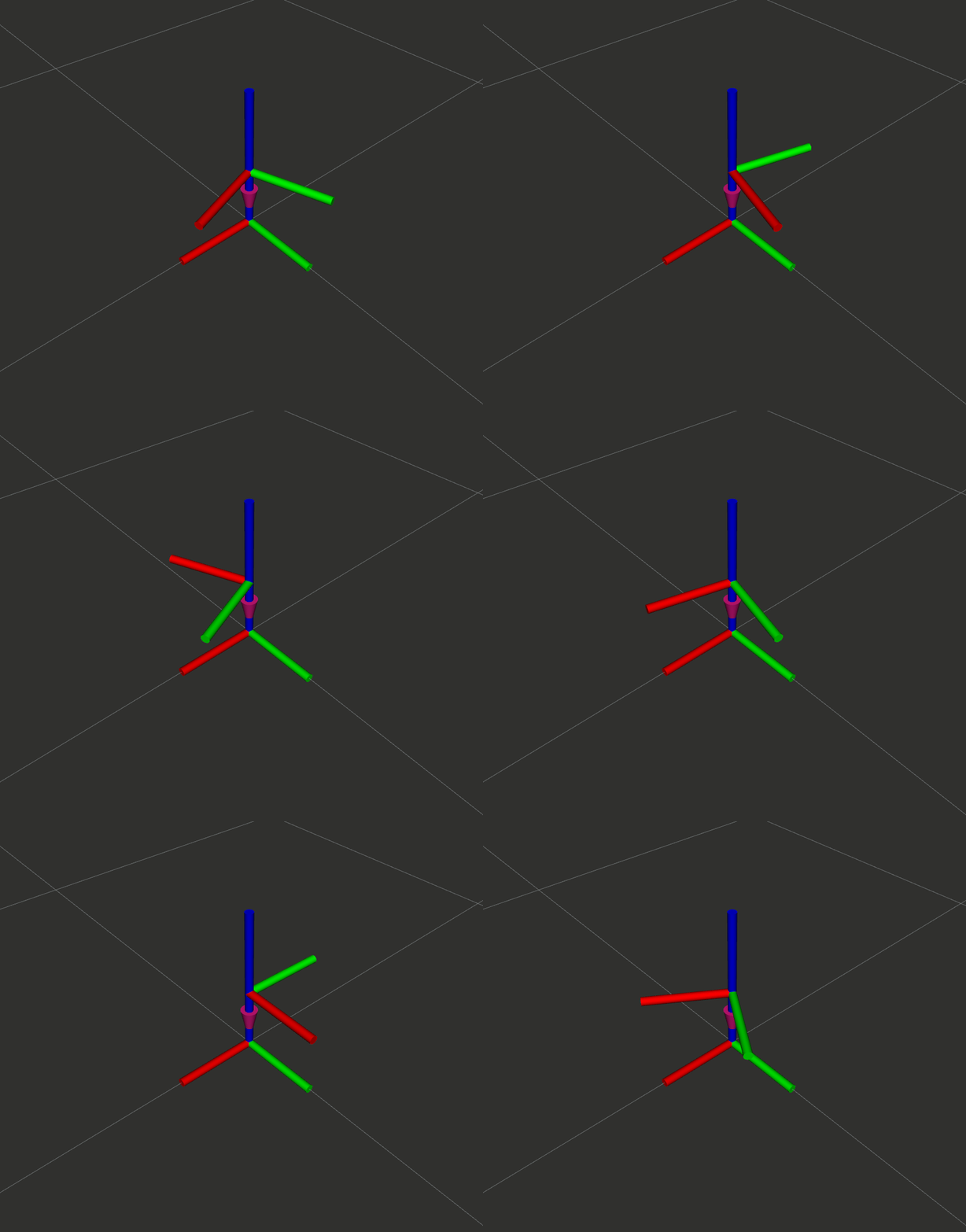
版本 1:发布完整 6 关节链
改进:发布所有 6 个关节的坐标变换,每个关节使用不同频率的周期函数,构建完整的 TF 树。
#!/usr/bin/env python3
"""
动态坐标变换发布器 - 版本 1
发布完整的6关节链:base_link → link1 → ... → link6 → tool0
使用周期函数模拟各关节运动
"""
import math
import time
import rclpy
from rclpy.node import Node
from geometry_msgs.msg import TransformStamped
from tf2_ros import TransformBroadcaster
import tf_transformations
class DynamicTFPublisherV1(Node):
"""动态坐标变换发布器 - 完整6关节链"""
def __init__(self):
super().__init__('dynamic_tf_publisher_v1')
self.tf_broadcaster = TransformBroadcaster(self)
# ============== 机械臂运动学参数(简化模型) ==============
# 各关节之间的固定偏移(单位:米)
# 格式:(parent, child, x, y, z, rotation_axis)
# 旋转轴:'z' = Yaw, 'y' = Pitch, 'x' = Roll
self.joint_params = [
('base_link', 'link1', 0.0, 0.0, 0.15, 'z'), # 关节1: Z轴旋转
('link1', 'link2', 0.0, 0.0, 0.10, 'y'), # 关节2: Y轴旋转
('link2', 'link3', 0.0, 0.0, 0.20, 'y'), # 关节3: Y轴旋转
('link3', 'link4', 0.0, 0.0, 0.15, 'x'), # 关节4: X轴旋转
('link4', 'link5', 0.0, 0.0, 0.10, 'y'), # 关节5: Y轴旋转
('link5', 'link6', 0.0, 0.0, 0.08, 'x'), # 关节6: X轴旋转
('link6', 'tool0', 0.0, 0.0, 0.05, None), # tool0: 固定偏移,无旋转
]
# 各关节的运动参数:(振幅, 周期, 相位偏移)
# 让各关节以不同速度和相位运动,看起来更自然
self.motion_params = [
(60.0, 4.0, 0.0), # 关节1: ±60°, 周期4秒
(45.0, 3.0, 0.5), # 关节2: ±45°, 周期3秒, 相位0.5
(30.0, 2.5, 1.0), # 关节3: ±30°, 周期2.5秒
(90.0, 5.0, 0.2), # 关节4: ±90°, 周期5秒
(45.0, 3.5, 0.8), # 关节5: ±45°, 周期3.5秒
(180.0, 6.0, 0.0), # 关节6: ±180°, 周期6秒
]
# 记录启动时间
self.start_time = time.time()
# 创建定时器,30Hz 发布频率
self.timer = self.create_timer(1.0 / 30.0, self.timer_callback)
self.get_logger().info('动态 TF 发布器 V1 已启动(完整6关节链,周期运动)')
def euler_to_quaternion(self, roll, pitch, yaw):
"""欧拉角转四元数"""
qx, qy, qz, qw = tf_transformations.quaternion_from_euler(roll, pitch, yaw, 'sxyz')
return qx, qy, qz, qw
def generate_joint_angles(self):
"""
使用周期函数生成所有关节角度
每个关节使用不同的振幅、周期和相位,产生自然的运动效果
"""
elapsed = time.time() - self.start_time
angles = []
for amplitude, period, phase in self.motion_params:
# 正弦函数:angle = amplitude * sin(2π * (t + phase) / period)
angle = amplitude * math.sin(2 * math.pi * (elapsed + phase) / period)
angles.append(angle)
return angles
def timer_callback(self):
"""定时器回调,周期性发布所有关节的 TF"""
# 生成当前各关节角度
joint_angles = self.generate_joint_angles()
# 发布所有关节的坐标变换
self.publish_all_transforms(joint_angles)
def publish_all_transforms(self, joint_angles):
"""发布所有关节的动态变换"""
transforms = []
now = self.get_clock().now().to_msg()
for i, (parent, child, x, y, z, rot_axis) in enumerate(self.joint_params):
t = TransformStamped()
t.header.stamp = now
t.header.frame_id = parent
t.child_frame_id = child
# 设置平移
t.transform.translation.x = x
t.transform.translation.y = y
t.transform.translation.z = z
# 设置旋转
if rot_axis is not None and i < 6:
# 获取对应关节的角度,转换为弧度
angle_rad = math.radians(joint_angles[i])
# 根据旋转轴计算四元数
if rot_axis == 'z': # Yaw
qx, qy, qz, qw = self.euler_to_quaternion(0, 0, angle_rad)
elif rot_axis == 'y': # Pitch
qx, qy, qz, qw = self.euler_to_quaternion(0, angle_rad, 0)
elif rot_axis == 'x': # Roll
qx, qy, qz, qw = self.euler_to_quaternion(angle_rad, 0, 0)
else:
qx, qy, qz, qw = 0.0, 0.0, 0.0, 1.0
else:
# 无旋转(tool0)
qx, qy, qz, qw = 0.0, 0.0, 0.0, 1.0
t.transform.rotation.x = qx
t.transform.rotation.y = qy
t.transform.rotation.z = qz
t.transform.rotation.w = qw
transforms.append(t)
# 批量发布所有变换
for t in transforms:
self.tf_broadcaster.sendTransform(t)
def main(args=None):
rclpy.init(args=args)
node = DynamicTFPublisherV1()
try:
rclpy.spin(node)
except KeyboardInterrupt:
pass
finally:
node.destroy_node()
rclpy.shutdown()
if __name__ == '__main__':
main()
新增知识点:
- 多关节周期运动:每个关节使用不同的振幅、周期、相位,产生自然的运动效果
- 链式坐标变换:每个 link 相对于上一个 link,形成链式结构
- 使用循环批量发布变换:遍历
joint_params参数表 - 角度单位转换:
math.radians()将度转换为弧度 - 根据不同关节的旋转轴(X/Y/Z)计算对应的四元数
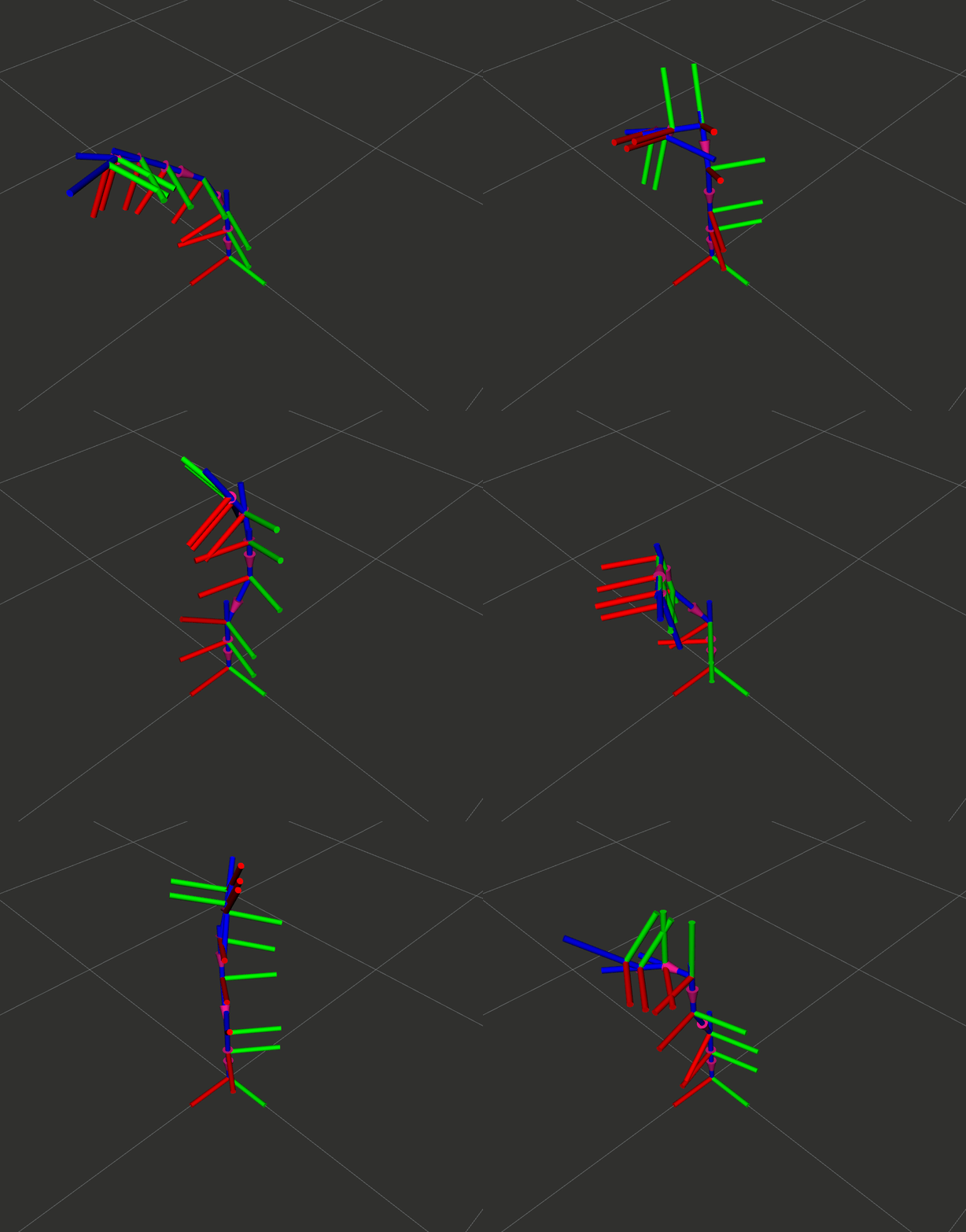
4.4 添加入口点
编辑 ~/ros2_ws/src/py_episode/setup.py,添加动态 TF 发布器入口点:
entry_points={
'console_scripts': [
# ... 之前的入口点 ...
'static_tf_pub = py_episode.static_tf_publisher:main', # 静态TF发布器
'dynamic_tf_pub = py_episode.dynamic_tf_publisher:main', # 动态TF发布器
],
},
4.5 测试与验证
# 编译
cd ~/ros2_ws
colcon build --packages-select py_episode --symlink-install
source install/setup.bash
# 运行动态 TF 发布器
ros2 run py_episode dynamic_tf_pub
# 验证(另一个终端)
ros2 topic echo /tf
ros2 run tf2_tools view_frames
ros2 run tf2_ros tf2_echo base_link tool0
# 在 rviz2 中可视化
rviz2
# 添加 TF 显示,观察各关节的周期运动
版本 2:集成到机械臂接口节点
改进:将 TF 发布功能集成到 RobotInterfaceNode,与 Topic/Service/Action 共存,使用 DH 参数计算正运动学。
核心改动:
- 基于第 7 章的
robot_interface_with_action.py添加 TF2 功能- 使用
cached_motor_angles缓存角度计算正运动学- 使用 Episode 1 的 DH 参数,发布真实的坐标变换
创建文件 ~/ros2_ws/src/py_episode/py_episode/robot_interface_with_tf.py:
#!/usr/bin/env python3
"""
机械臂接口节点 - 集成 TF2
功能:
- Topic: 发布电机角度
- Service: 夹爪控制
- Action: 角度模式运动
- TF2: 发布机械臂坐标树(使用 DH 正运动学)
"""
import math
import time
import numpy as np
import rclpy
from rclpy.node import Node
from rclpy.action import ActionServer, CancelResponse, GoalResponse
from rclpy.callback_groups import ReentrantCallbackGroup
from rclpy.executors import MultiThreadedExecutor
# TF2 相关导入
from geometry_msgs.msg import TransformStamped
from tf2_ros import TransformBroadcaster
from tf2_ros.static_transform_broadcaster import StaticTransformBroadcaster
import tf_transformations
# 自定义接口
from robot_arm_interfaces.msg import MotorAngles
from robot_arm_interfaces.srv import ServoGripper
from robot_arm_interfaces.action import AngleMode
# 电机控制核心库
from episode_controller_core.controller_core import MotorControl
class RobotInterfaceWithTF(Node):
"""机械臂接口节点 - 包含 Topic + Service + Action + TF2"""
def __init__(self):
super().__init__('robot_interface_with_tf')
# ============== 可重入回调组(支持 Action 取消) ==============
self.callback_group = ReentrantCallbackGroup()
# ============== 参数声明 ==============
self.declare_parameter('usb_index', 1)
self.declare_parameter('init_mode', 1)
self.declare_parameter('publish_rate', 30.0)
self.usb_index = self.get_parameter('usb_index').get_parameter_value().integer_value
self.init_mode = self.get_parameter('init_mode').get_parameter_value().integer_value
self.publish_rate = self.get_parameter('publish_rate').get_parameter_value().double_value
self.home_position = [180, 90, 83, 30, 110, 30]
self.calibration_timeout = 120.0
self.cached_motor_angles = [0.0] * 6
# ============== DH 参数(Episode 1 机械臂) ==============
# 单位:毫米 → 转换为米时除以1000
self.a1, self.a2, self.a3 = 55 / 1000, 200 / 1000, 56 / 1000 # 米
self.d1, self.d4, self.d6 = 166 / 1000, 192 / 1000, 55 / 1000 # 米
# ============== 初始化电机控制 ==============
self.motor_control = None
self._initialize_robot()
# ============== 创建 TF 广播器 ==============
self.tf_broadcaster = TransformBroadcaster(self)
self.static_tf_broadcaster = StaticTransformBroadcaster(self)
# 发布静态变换
self.publish_static_transforms()
# ============== 创建 Topic Publisher ==============
self.publisher = self.create_publisher(MotorAngles, 'motor_angles', 10)
self.get_logger().info('Topic 发布器已创建: /motor_angles')
# ============== 创建 Service Server ==============
self.servo_gripper_srv = self.create_service(
ServoGripper, 'servo_gripper', self.servo_gripper_callback,
callback_group=self.callback_group)
self.get_logger().info('Service 服务已创建: /servo_gripper')
# ============== 创建 Action Server ==============
self.angle_mode_action_server = ActionServer(
self, AngleMode, 'angle_mode',
self.angle_mode_callback,
callback_group=self.callback_group,
goal_callback=self.goal_callback,
cancel_callback=self.cancel_callback)
self.get_logger().info('Action 服务已创建: /angle_mode')
# ============== 创建定时器 ==============
timer_period = 1.0 / self.publish_rate
self.timer = self.create_timer(timer_period, self.timer_callback)
self.get_logger().info('=' * 50)
self.get_logger().info('机械臂接口节点已启动(集成 TF2 + DH 正运动学)')
self.get_logger().info(f' - Topic: /motor_angles ({self.publish_rate} Hz)')
self.get_logger().info(f' - Service: /servo_gripper')
self.get_logger().info(f' - Action: /angle_mode')
self.get_logger().info(f' - TF2: base_link → link1-6 → tool0')
self.get_logger().info('=' * 50)
# ==================== 初始化相关方法(同第7章) ====================
def _initialize_robot(self):
"""初始化机械臂"""
mode_name = "回零校准" if self.init_mode == 0 else "从当前位置恢复"
self.get_logger().info(f'开始初始化机械臂,usb_index={self.usb_index}, init_mode={self.init_mode} ({mode_name})')
self.motor_control = MotorControl(self.usb_index)
if not self.motor_control.initialized:
self.get_logger().error('CAN 设备初始化失败')
raise RuntimeError('CAN 设备初始化失败')
self.get_logger().info('CAN 通信初始化成功')
if self.init_mode == 1:
self._recover_from_current()
else:
self._perform_calibration()
def _recover_from_current(self):
"""从当前位置恢复"""
self.get_logger().info('从当前位置恢复中...')
current_angles = self.motor_control.read_motor_angles()
if not current_angles:
raise RuntimeError('无法读取电机角度')
self.motor_control.last_degrees = [
current_angles[i] * self.motor_control.motor_ratios[i]
for i in range(6)
]
self.cached_motor_angles = list(current_angles)
self.get_logger().info(f'成功从当前位置恢复: {current_angles}')
def _perform_calibration(self):
"""执行回零校准"""
self.get_logger().info('开始回零校准流程...')
for joint_index, addr in enumerate(self.motor_control.motor_address):
self.get_logger().info(f'正在校准关节 {joint_index + 1}/6 ...')
self.motor_control.trigger_home(addr, 0x02)
time.sleep(0.05)
start_time = time.perf_counter()
while True:
if self.motor_control.check_home_status(addr):
self.get_logger().info(f'关节 {joint_index + 1} 校准完成')
break
if time.perf_counter() - start_time > self.calibration_timeout:
raise RuntimeError(f'关节 {joint_index + 1} 校准超时')
time.sleep(0.5)
self.get_logger().info(f'校准完成,正在移动到 Home 位置: {self.home_position}')
time.sleep(1.0)
move_time = self.motor_control.execute_motors_degrees_normal(self.home_position)
time.sleep(move_time)
self.cached_motor_angles = list(self.home_position)
self.get_logger().info('机械臂初始化完成')
# ==================== TF2 + 正运动学相关方法 ====================
def convert_to_dh_angles(self, motor_angles):
"""
将电机角度转换为 DH 模型角度
Episode 1 机械臂的角度偏移量:
电机角度 → DH 角度的转换关系
"""
q1 = motor_angles[0] - 180
q2 = 180 - motor_angles[1]
q3 = 83 - motor_angles[2]
q4 = motor_angles[3] - 30
q5 = 110 - motor_angles[4]
q6 = motor_angles[5] - 30
return [q1, q2, q3, q4, q5, q6]
def dh_transform(self, theta, d, a, alpha):
"""
计算单个 DH 变换矩阵
Args:
theta: 关节角度(弧度)
d: 连杆偏移
a: 连杆长度
alpha: 连杆扭转角(弧度)
Returns:
4x4 齐次变换矩阵
"""
ct, st = np.cos(theta), np.sin(theta)
ca, sa = np.cos(alpha), np.sin(alpha)
return np.array([
[ct, -st * ca, st * sa, a * ct],
[st, ct * ca, -ct * sa, a * st],
[0, sa, ca, d ],
[0, 0, 0, 1 ]
])
def compute_forward_kinematics(self, motor_angles):
"""
计算正运动学,返回各关节的齐次变换矩阵
Args:
motor_angles: 6个电机角度(度)
Returns:
列表,包含 T_0_1, T_0_2, ..., T_0_6 共6个变换矩阵
每个矩阵表示该关节相对于基座 (base_link) 的位姿
"""
# 转换为 DH 角度
dh_angles = self.convert_to_dh_angles(motor_angles)
# 转换为弧度
theta = np.deg2rad(dh_angles)
# 计算各关节的单独变换矩阵
T_0_1 = self.dh_transform(theta[0], self.d1, self.a1, np.pi / 2)
T_1_2 = self.dh_transform(theta[1], 0, self.a2, 0)
T_2_3 = self.dh_transform(theta[2], 0, self.a3, np.pi / 2)
T_3_4 = self.dh_transform(theta[3], self.d4, 0, -np.pi / 2)
T_4_5 = self.dh_transform(theta[4], 0, 0, np.pi / 2)
T_5_6 = self.dh_transform(theta[5], self.d6, 0, 0)
# 累积变换:各关节相对于基座的变换
transforms = []
transforms.append(T_0_1) # link1 相对于 base_link
transforms.append(T_0_1 @ T_1_2) # link2 相对于 base_link
transforms.append(T_0_1 @ T_1_2 @ T_2_3) # link3 相对于 base_link
transforms.append(T_0_1 @ T_1_2 @ T_2_3 @ T_3_4) # link4 相对于 base_link
transforms.append(T_0_1 @ T_1_2 @ T_2_3 @ T_3_4 @ T_4_5) # link5 相对于 base_link
transforms.append(T_0_1 @ T_1_2 @ T_2_3 @ T_3_4 @ T_4_5 @ T_5_6) # link6 相对于 base_link
return transforms
def matrix_to_transform_stamped(self, matrix, parent_frame, child_frame, stamp):
"""
将 4x4 齐次变换矩阵转换为 TransformStamped 消息
Args:
matrix: 4x4 numpy 数组
parent_frame: 父坐标系名称
child_frame: 子坐标系名称
stamp: 时间戳
Returns:
TransformStamped 消息
"""
t = TransformStamped()
t.header.stamp = stamp
t.header.frame_id = parent_frame
t.child_frame_id = child_frame
# 提取平移
t.transform.translation.x = float(matrix[0, 3])
t.transform.translation.y = float(matrix[1, 3])
t.transform.translation.z = float(matrix[2, 3])
# 提取旋转(矩阵 → 四元数)
# tf_transformations.quaternion_from_matrix 需要 4x4 矩阵
q = tf_transformations.quaternion_from_matrix(matrix)
t.transform.rotation.x = float(q[0])
t.transform.rotation.y = float(q[1])
t.transform.rotation.z = float(q[2])
t.transform.rotation.w = float(q[3])
return t
def publish_static_transforms(self):
"""发布静态变换"""
transforms = []
now = self.get_clock().now().to_msg()
# world → base_link(机械臂底座在世界原点)
t1 = TransformStamped()
t1.header.stamp = now
t1.header.frame_id = 'world'
t1.child_frame_id = 'base_link'
t1.transform.translation.x = 0.0
t1.transform.translation.y = 0.0
t1.transform.translation.z = 0.0
t1.transform.rotation.w = 1.0
transforms.append(t1)
# link6 → tool0(末端法兰,固定偏移)
t2 = TransformStamped()
t2.header.stamp = now
t2.header.frame_id = 'link6'
t2.child_frame_id = 'tool0'
t2.transform.translation.x = 0.0
t2.transform.translation.y = 0.0
t2.transform.translation.z = 0.02 # 2cm 偏移
t2.transform.rotation.w = 1.0
transforms.append(t2)
# tool0 → camera_link(相机安装位置,手眼标定结果)
t3 = TransformStamped()
t3.header.stamp = now
t3.header.frame_id = 'tool0'
t3.child_frame_id = 'camera_link'
t3.transform.translation.x = 0.08
t3.transform.translation.y = 0.0
t3.transform.translation.z = -0.05
q = tf_transformations.quaternion_from_euler(0, math.radians(30), 0, 'sxyz')
t3.transform.rotation.x = q[0]
t3.transform.rotation.y = q[1]
t3.transform.rotation.z = q[2]
t3.transform.rotation.w = q[3]
transforms.append(t3)
# tool0 → gripper_link(夹爪安装位置)
t4 = TransformStamped()
t4.header.stamp = now
t4.header.frame_id = 'tool0'
t4.child_frame_id = 'gripper_link'
t4.transform.translation.x = 0.12
t4.transform.translation.y = 0.0
t4.transform.translation.z = 0.0
t4.transform.rotation.w = 1.0
transforms.append(t4)
self.static_tf_broadcaster.sendTransform(transforms)
self.get_logger().info('已发布静态变换: world→base_link, link6→tool0, tool0→camera/gripper')
def publish_dynamic_transforms(self):
"""
使用正运动学发布所有关节的动态变换
基于 cached_motor_angles 计算各 link 相对于 base_link 的位姿
"""
now = self.get_clock().now().to_msg()
# 计算正运动学
fk_transforms = self.compute_forward_kinematics(self.cached_motor_angles)
# 发布各关节变换,使得 base_link 是 link1 的父亲,link1 是 link2 的父亲,依此类推
link_names = ['link1', 'link2', 'link3', 'link4', 'link5', 'link6']
parent_names = ['base_link'] + link_names[:-1] # ['base_link', 'link1', 'link2', ...]
for i, (matrix, parent_name, child_name) in enumerate(zip(fk_transforms, parent_names, link_names)):
t = self.matrix_to_transform_stamped(matrix if i == 0 else np.linalg.inv(fk_transforms[i-1]) @ matrix, parent_name, child_name, now)
self.tf_broadcaster.sendTransform(t)
# ==================== 定时器回调(发布角度 + TF) ====================
def timer_callback(self):
"""定时器回调:发布电机角度和 TF"""
if self.motor_control is None:
return
msg = MotorAngles()
msg.timestamp = self.get_clock().now().to_msg()
try:
angles = self.motor_control.read_motor_angles()
if angles and all(angle is not None for angle in angles):
msg.angles = angles
msg.success = True
msg.message = "读取成功"
self.cached_motor_angles = list(angles)
else:
msg.angles = self.cached_motor_angles
msg.success = False
msg.message = "读取失败"
except Exception as e:
msg.angles = self.cached_motor_angles
msg.success = False
msg.message = f"读取异常: {str(e)}"
self.publisher.publish(msg)
# 发布动态 TF(使用正运动学)
self.publish_dynamic_transforms()
# ==================== Service 回调(同第6章) ====================
def servo_gripper_callback(self, request, response):
"""舵机夹爪服务回调函数"""
try:
if self.motor_control is None:
response.success = False
response.message = "电机控制未初始化"
response.actual_angle = 0
return response
target_angle = request.angle
clamped_angle = max(0, min(target_angle, 110))
self.motor_control.servo_gripper(clamped_angle)
response.success = True
response.actual_angle = clamped_angle
response.message = f'夹爪已设置到 {clamped_angle}°'
self.get_logger().info(f'[Service] {response.message}')
except Exception as e:
response.success = False
response.message = f'控制失败: {str(e)}'
response.actual_angle = 0
self.get_logger().error(f'[Service] {response.message}')
return response
# ==================== Action 回调(同第7章) ====================
def goal_callback(self, goal_request):
"""目标接收回调"""
self.get_logger().info('[Action] 收到目标请求')
if len(goal_request.angles) != 6:
self.get_logger().warn(f'[Action] 拒绝目标:角度数量错误')
return GoalResponse.REJECT
return GoalResponse.ACCEPT
def cancel_callback(self, goal_handle):
"""取消回调"""
self.get_logger().info('[Action] 收到取消请求,执行紧急停止')
if self.motor_control is not None:
try:
self.motor_control.set_emergency_stop(active=True)
self.motor_control.last_degrees = [
self.cached_motor_angles[i] * self.motor_control.motor_ratios[i]
for i in range(6)
]
except Exception as e:
self.get_logger().error(f'[Action] 紧急停止失败: {str(e)}')
return CancelResponse.ACCEPT
def angle_mode_callback(self, goal_handle):
"""角度模式 Action 执行回调"""
result = AngleMode.Result()
if self.motor_control is None:
result.success = False
result.message = "电机控制未初始化"
result.execution_time = 0.0
result.final_angles = self.cached_motor_angles
goal_handle.abort()
return result
angles = list(goal_handle.request.angles)
speed_ratio = goal_handle.request.speed_ratio
if not (0.0 < speed_ratio <= 1.0):
speed_ratio = max(0.1, min(speed_ratio, 1.0))
self.get_logger().info(f'[Action] 目标角度: {angles}, 速度: {speed_ratio}')
start_time = time.perf_counter()
try:
execution_time = float(self.motor_control.execute_motors_degrees_normal(angles, speed_ratio))
steps = 10
for i in range(steps + 1):
if goal_handle.is_cancel_requested:
if self.motor_control is not None:
self.motor_control.set_emergency_stop(active=False)
result.success = False
result.message = "任务被取消"
result.execution_time = float(time.perf_counter() - start_time)
result.final_angles = self.cached_motor_angles
goal_handle.canceled()
return result
feedback = AngleMode.Feedback()
feedback.elapsed_time = float(time.perf_counter() - start_time)
feedback.progress = float(i / steps)
feedback.current_angles = self.cached_motor_angles
feedback.status_message = f"运动中... {int(i / steps * 100)}%"
goal_handle.publish_feedback(feedback)
if i < steps:
time.sleep(execution_time / steps)
result.success = True
result.message = "角度模式运动完成"
result.execution_time = float(time.perf_counter() - start_time)
result.final_angles = self.cached_motor_angles
goal_handle.succeed()
return result
except Exception as e:
result.success = False
result.message = f"执行失败: {str(e)}"
result.execution_time = float(time.perf_counter() - start_time)
result.final_angles = self.cached_motor_angles
goal_handle.abort()
return result
def main(args=None):
rclpy.init(args=args)
try:
node = RobotInterfaceWithTF()
executor = MultiThreadedExecutor(num_threads=4)
executor.add_node(node)
try:
executor.spin()
finally:
executor.shutdown()
node.destroy_node()
except RuntimeError as e:
print(f'启动失败: {e}')
except KeyboardInterrupt:
pass
finally:
rclpy.shutdown()
if __name__ == '__main__':
main()
核心改动说明:
| 新增功能 | 说明 |
|---|---|
| DH 参数 | 使用 Episode 1 的 DH 参数:a1=55mm, a2=200mm, a3=56mm, d1=166mm, d4=192mm, d6=55mm |
| 角度转换 | convert_to_dh_angles() 将电机角度转换为 DH 模型角度 |
| 正运动学 | compute_forward_kinematics() 使用 DH 变换矩阵累乘 |
| 矩阵 →TF | matrix_to_transform_stamped() 将齐次矩阵转换为 ROS2 消息 |
| 定时发布 | 在 timer_callback() 中同时发布角度和 TF |
TF 树结构:
world (静态)
└── base_link
├── link1 (动态,正运动学)
├── link2 (动态,正运动学)
├── link3 (动态,正运动学)
├── link4 (动态,正运动学)
├── link5 (动态,正运动学)
└── link6 (动态,正运动学)
└── tool0 (静态)
├── camera_link (静态)
└── gripper_link (静态)
4.6 添加入口点
编辑 ~/ros2_ws/src/py_episode/setup.py:
entry_points={
'console_scripts': [
# ... 之前的入口点 ...
'static_tf_pub = py_episode.static_tf_publisher:main',
'dynamic_tf_pub = py_episode.dynamic_tf_publisher:main',
'robot_interface_tf = py_episode.robot_interface_with_tf:main', # 新增
],
},
4.7 测试与验证
# 编译
cd ~/ros2_ws
colcon build --packages-select py_episode --symlink-install
source install/setup.bash
# 启动机械臂接口节点(带 TF)
ros2 run py_episode robot_interface_tf --ros-args -p usb_index:=1 -p init_mode:=1
# 另一个终端:查看 TF 树
ros2 run tf2_tools view_frames
# 实时查看 base_link 到 link6 的变换
ros2 run tf2_ros tf2_echo base_link link6
# 查看 base_link 到 tool0 的变换
ros2 run tf2_ros tf2_echo base_link tool0
# RViz 可视化
rviz2
预期效果:
- 控制机械臂运动时,RViz 中看到
link1~link6的坐标轴实时更新 tf2_echo输出的位置应与 RoboDK 等仿真软件一致(验证正运动学正确性)
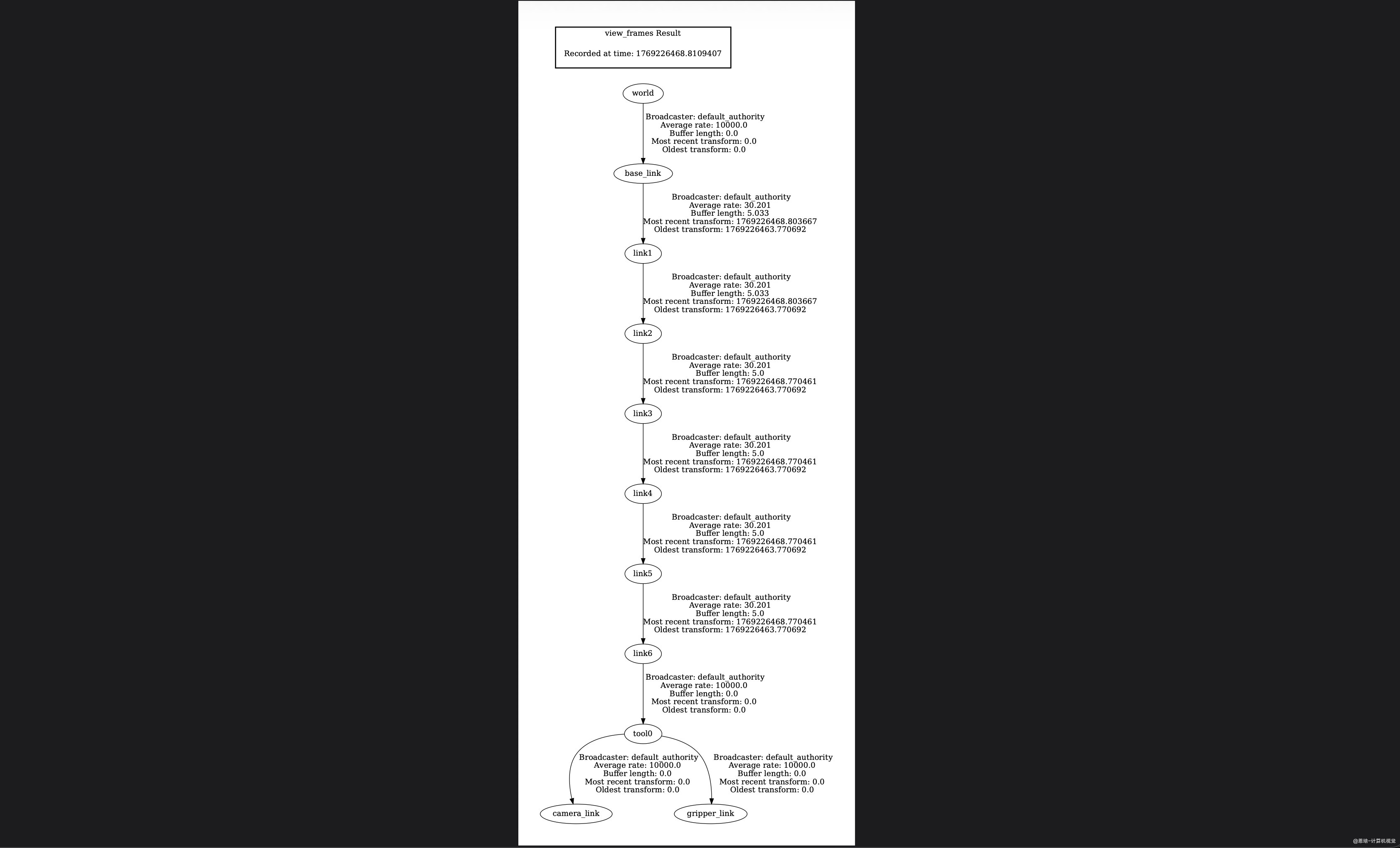
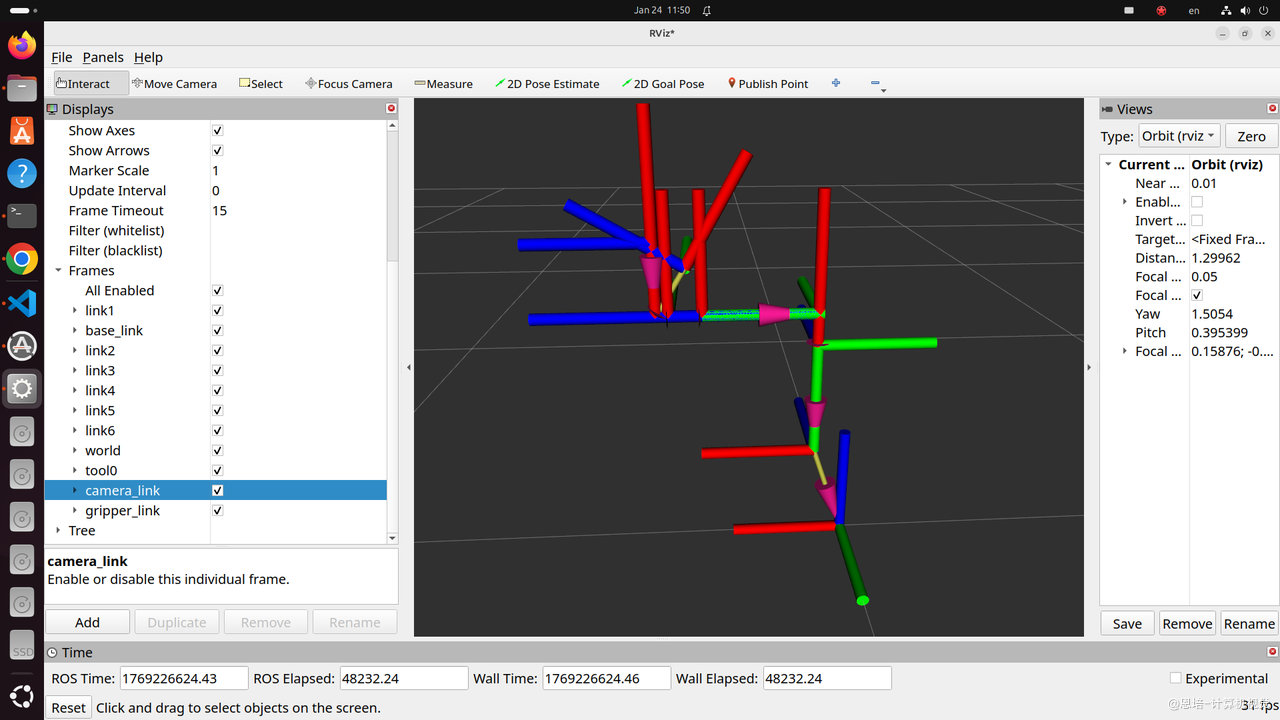
4.8 TF2 坐标系联动机制
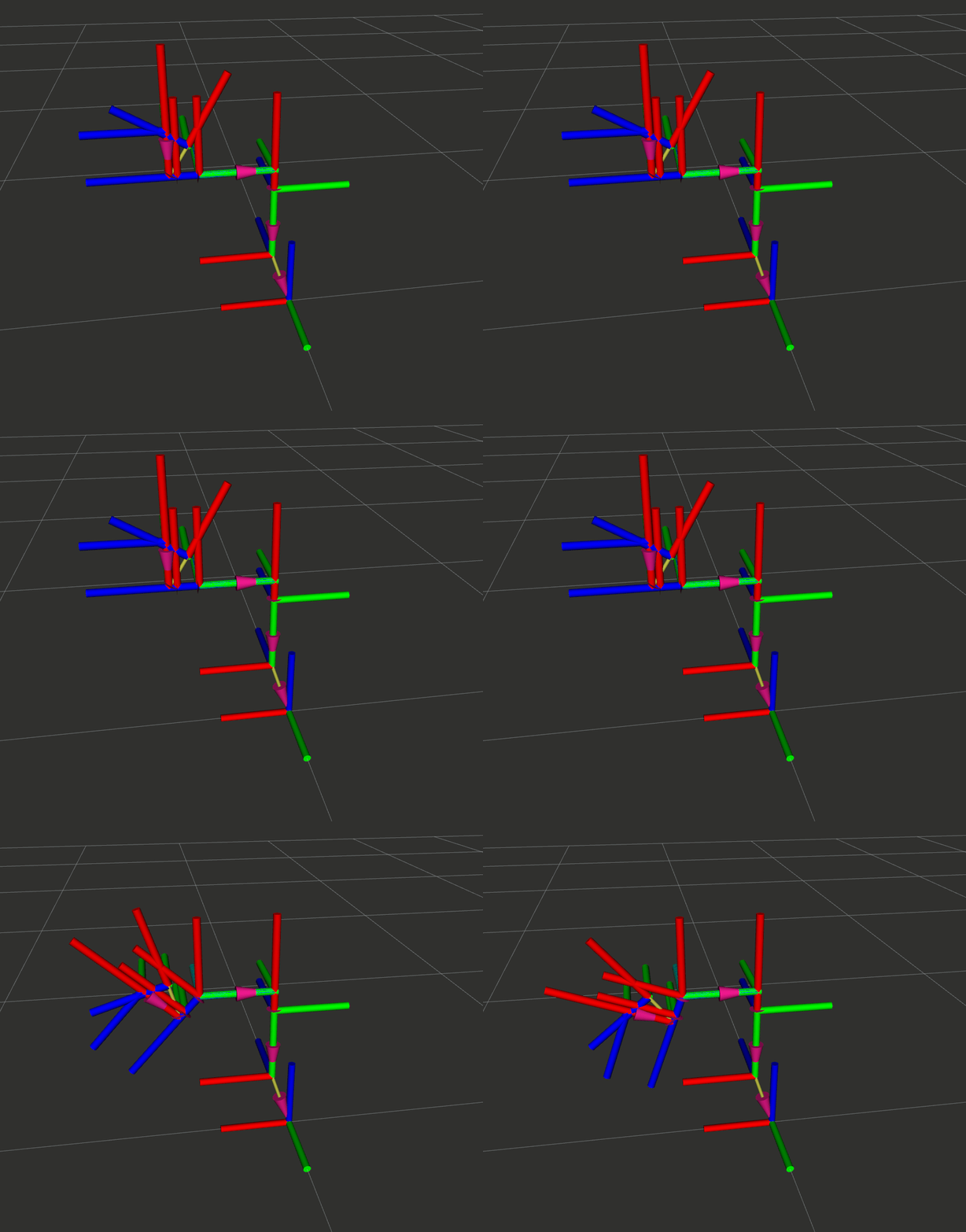
通过观察可以发现,虽然 tool0、camera_link、gripper_link 这三个坐标系是通过静态 TF 发布器发布的,但当它们的父坐标系 link6 发生旋转时,这些子坐标系与父坐标系之间的相对位置关系依然保持不变,同时 TF2 会自动计算并更新它们在全局坐标系中的新姿态。
这正是 TF2 坐标变换系统的强大之处:自动维护整个坐标系树的一致性。无论父坐标系如何运动,子坐标系都能自动跟随并保持相对关系。
你可以通过以下命令让机械臂运动到指定角度,观察坐标系的联动效果:
ros2 run py_episode angle_cli 180.0 90.0 83.0 30.0 110.0 30.0 1.0
五、查询坐标变换:Buffer + Listener
5.1 为什么需要查询变换?
前面我们学习了如何发布变换,但在实际应用中,更常见的是查询变换:
| 场景 | 查询目标 | 说明 |
|---|---|---|
| 视觉抓取 | 物体在相机坐标系中的位置 → 基座坐标系 | 相机看到物体,机械臂需要知道相对自己的位置 |
| 碰撞检测 | 夹爪相对于障碍物的距离 | 实时查询两个坐标系之间的距离 |
| 示教再现 | 当前末端位姿相对于基座的位置 | 记录运动轨迹 |
5.2 查询变换的核心组件
| 组件 | 作用 | 类比 |
|---|---|---|
| Buffer | 缓存最近的变换数据(默认 10 秒) | 数据库 |
| TransformListener | 订阅 /tf 和 /tf_static,自动填充 Buffer |
数据采集器 |
| lookup_transform() | 从 Buffer 中查询两个坐标系之间的变换 | 数据库查询 |
5.3 版本迭代:查询变换
版本 0:查询固定坐标系之间的变换
目标:查询 base_link 到 tool0 的变换。
创建文件 ~/ros2_ws/src/py_episode/py_episode/tf_listener.py:
#!/usr/bin/env python3
"""
坐标变换监听器 - 版本 0
查询 base_link 到 tool0 的变换
"""
import rclpy
from rclpy.node import Node
# TF2 监听器核心组件
from tf2_ros.buffer import Buffer
from tf2_ros.transform_listener import TransformListener
from tf2_ros import TransformException
class TFListenerV0(Node):
"""坐标变换监听器 - 基础版"""
def __init__(self):
super().__init__('tf_listener_v0')
# ============== 创建 Buffer 和 Listener ==============
# Buffer: 缓存最近的变换数据(默认10秒)
self.tf_buffer = Buffer()
# TransformListener: 订阅 /tf 和 /tf_static,自动填充 Buffer
self.tf_listener = TransformListener(self.tf_buffer, self)
# 创建定时器,定时查询变换
self.timer = self.create_timer(1.0, self.timer_callback) # 1Hz
self.get_logger().info('TF 监听器 V0 已启动')
def timer_callback(self):
"""定时查询 base_link 到 tool0 的变换"""
# 定义要查询的坐标系
source_frame = 'base_link' # 源坐标系
target_frame = 'tool0' # 目标坐标系
try:
# 查询变换
# 第三个参数 Time() 表示获取"最新可用"的变换
transform = self.tf_buffer.lookup_transform(
target_frame, # 目标坐标系
source_frame, # 源坐标系
rclpy.time.Time() # 时间(Time() = 最新)
)
# 提取变换数据
trans = transform.transform.translation
rot = transform.transform.rotation
# 计算距离
import math
distance = math.sqrt(trans.x**2 + trans.y**2 + trans.z**2)
self.get_logger().info(
f'变换: {source_frame} → {target_frame}\n'
f' 位置: ({trans.x:.3f}, {trans.y:.3f}, {trans.z:.3f})\n'
f' 旋转: ({rot.x:.3f}, {rot.y:.3f}, {rot.z:.3f}, {rot.w:.3f})\n'
f' 距离: {distance:.3f} m')
except TransformException as ex:
# 查询失败(坐标系不存在、时间戳问题等)
self.get_logger().warn(f'无法查询变换: {ex}')
def main(args=None):
rclpy.init(args=args)
node = TFListenerV0()
try:
rclpy.spin(node)
except KeyboardInterrupt:
pass
finally:
node.destroy_node()
rclpy.shutdown()
if __name__ == '__main__':
main()
关键知识点:
- 导入
Buffer和TransformListener:从tf2_ros.buffer和tf2_ros.transform_listener导入 - 创建 Buffer:
self.tf_buffer = Buffer(),缓存最近 10 秒的变换数据 - 创建 Listener:
self.tf_listener = TransformListener(self.tf_buffer, self),自动订阅 TF 话题 - 查询变换:
self.tf_buffer.lookup_transform(target_frame, source_frame, time) - 时间参数:
rclpy.time.Time()表示"最新可用" - 异常处理:
TransformException捕获查询失败
Buffer + Listener 工作流程:
测试运行:
确保机械臂驱动节点正在运行,然后直接执行脚本:
python3 src/py_episode/py_episode/tf_listener.py
运行结果:
[INFO] [1769243388.818903367] [tf_listener_v0]: TF 监听器 V0 已启动
[INFO] [1769243389.805405969] [tf_listener_v0]: 变换: base_link → tool0
位置: (-0.422, -0.001, -0.321)
旋转: (0.708, 0.001, 0.706, -0.001)
距离: 0.530 m
可以看到,程序成功查询到了从 base_link 到 tool0 的坐标变换关系,包括位置、旋转(四元数)和距离信息。
lookup_transform 参数详解
transform = buffer.lookup_transform(
target_frame, # 目标坐标系
source_frame, # 源坐标系
time, # 时间点
timeout # 超时(可选)
)
| 参数 | 类型 | 说明 | 常用值 |
|---|---|---|---|
target_frame |
str |
目标坐标系(你想要的坐标系) | 'base_link' |
source_frame |
str |
源坐标系(数据原始坐标系) | 'camera_link' |
time |
Time |
查询时间点 | rclpy.time.Time()(最新) |
timeout |
Duration |
等待超时 | Duration(seconds=1.0) |
时间参数的三种用法:
| 用法 | 代码 | 说明 |
|---|---|---|
| 最新变换 | rclpy.time.Time() |
获取最新可用的变换 |
| 当前时刻 | node.get_clock().now() |
查询当前时刻的变换 |
| 指定时刻 | rclpy.time.Time(seconds=123) |
查询历史某时刻的变换 |
版本 1:处理查询失败
改进:添加超时和异常处理,避免程序崩溃。
#!/usr/bin/env python3
"""
坐标变换监听器 - 版本 1
添加超时和异常处理
"""
import rclpy
from rclpy.node import Node
from rclpy.duration import Duration
from tf2_ros.buffer import Buffer
from tf2_ros.transform_listener import TransformListener
from tf2_ros import TransformException
class TFListenerV1(Node):
"""坐标变换监听器 - 带超时和异常处理"""
def __init__(self):
super().__init__('tf_listener_v1')
self.tf_buffer = Buffer()
self.tf_listener = TransformListener(self.tf_buffer, self)
# 参数配置
self.source_frame = 'base_link'
self.target_frame = 'tool0'
self.timeout_sec = 1.0 # 超时时间(秒)
self.timer = self.create_timer(1.0, self.timer_callback)
self.get_logger().info('TF 监听器 V1 已启动(带超时处理)')
def timer_callback(self):
"""带超时的变换查询"""
try:
# 使用超时的查询方式
# 如果变换暂时不可用,会等待最多 timeout 时间
transform = self.tf_buffer.lookup_transform(
self.target_frame,
self.source_frame,
rclpy.time.Time(), # 最新变换
timeout=Duration(seconds=self.timeout_sec) # 超时
)
# 提取数据
trans = transform.transform.translation
rot = transform.transform.rotation
# 计算到原点的距离
import math
distance = math.sqrt(trans.x**2 + trans.y**2 + trans.z**2)
self.get_logger().info(
f'变换: {self.source_frame} → {self.target_frame}\n'
f' 位置: ({trans.x:.3f}, {trans.y:.3f}, {trans.z:.3f})\n'
f' 旋转: ({rot.x:.3f}, {rot.y:.3f}, {rot.z:.3f}, {rot.w:.3f})\n'
f' 距离: {distance:.3f} m')
except TransformException as ex:
# 详细的错误分类处理
error_msg = str(ex)
if 'does not exist' in error_msg:
self.get_logger().error(
f'坐标系不存在: 请检查 "{self.source_frame}" 或 "{self.target_frame}" 是否已发布')
elif 'extrapolation' in error_msg.lower():
self.get_logger().warn(
f'时间戳问题: {error_msg}')
else:
self.get_logger().warn(f'查询失败: {error_msg}')
def main(args=None):
rclpy.init(args=args)
node = TFListenerV1()
try:
rclpy.spin(node)
except KeyboardInterrupt:
pass
finally:
node.destroy_node()
rclpy.shutdown()
if __name__ == '__main__':
main()
新增知识点:
- 设置超时:
Duration(seconds=1.0),从rclpy.duration导入 - 捕获异常:
try-except TransformException - 常见错误分类:坐标系不存在、
extrapolation into the future、超时等
测试运行:
python3 src/py_episode/py_episode/tf_listener_v1.py
正常运行结果:
[INFO] [1769243444.623790936] [tf_listener_v1]: 变换: base_link → tool0
位置: (-0.422, -0.001, -0.321)
旋转: (0.708, 0.001, 0.706, -0.001)
距离: 0.530 m
模拟异常案例:
| 案例 | 修改参数 | 预期错误 |
|---|---|---|
| 目标坐标系不存在 | 将 target_frame = 'tool0' 改为 target_frame = 'link_not_exist' |
坐标系不存在 |
| 源坐标系不存在 | 将 source_frame = 'base_link' 改为 source_frame = 'fake_frame' |
坐标系不存在 |
| TF 未发布 | 停止机械臂驱动节点后运行 | 坐标系不存在 |
关于超时参数:
你可能注意到,即使设置了超时,当坐标系不存在时仍然报"坐标系不存在"而非"超时"错误,这是正常的。超时解决的是时机问题,不是存在问题:
场景 不加超时 加超时 (1 秒) 程序启动,TF 还没收到第一条数据 立即失败 等 1 秒,数据来了就成功 坐标系存在,但网络延迟了 0.5 秒 立即失败 等到数据到达,成功 坐标系根本不存在(从未发布) 立即失败 等 1 秒后仍然失败 简单理解:超时 = "给数据一点时间到达",而不是"让不存在的东西变存在"。
版本 2:实战案例 - 查询物体在基座坐标系中的位置
场景:相机检测到物体在 camera_link 中的位置为 (0.3, 0.2, 0.5),求物体在 base_link 中的位置。
#!/usr/bin/env python3
"""
坐标变换监听器 - 版本 2
将相机坐标转换为基座坐标
对比 do_transform_point 和 numpy 齐次矩阵相乘两种方法
"""
import rclpy
from rclpy.node import Node
from rclpy.duration import Duration
from tf2_ros.buffer import Buffer
from tf2_ros.transform_listener import TransformListener
from tf2_ros import TransformException
# 用于坐标点变换
from geometry_msgs.msg import PointStamped
import tf2_geometry_msgs # 必须导入,提供 do_transform_point
import numpy as np # 用于齐次矩阵运算
def quaternion_to_rotation_matrix(q):
"""四元数转旋转矩阵 (q = [x, y, z, w])"""
x, y, z, w = q
return np.array([
[1 - 2*(y**2 + z**2), 2*(x*y - w*z), 2*(x*z + w*y)],
[ 2*(x*y + w*z), 1 - 2*(x**2 + z**2), 2*(y*z - w*x)],
[ 2*(x*z - w*y), 2*(y*z + w*x), 1 - 2*(x**2 + y**2)]
])
def transform_to_matrix(transform):
"""将 TransformStamped 转换为 4x4 齐次变换矩阵"""
# 提取平移
t = transform.transform.translation
translation = np.array([t.x, t.y, t.z])
# 提取旋转(四元数)
r = transform.transform.rotation
quaternion = [r.x, r.y, r.z, r.w]
rotation = quaternion_to_rotation_matrix(quaternion)
# 构建 4x4 齐次变换矩阵
T = np.eye(4)
T[:3, :3] = rotation
T[:3, 3] = translation
return T
class TFListenerV2(Node):
"""坐标变换监听器 - 坐标点变换版"""
def __init__(self):
super().__init__('tf_listener_v2')
self.tf_buffer = Buffer()
self.tf_listener = TransformListener(self.tf_buffer, self)
# 模拟相机检测到的物体位置(在 camera_link 坐标系中)
self.object_in_camera = PointStamped()
self.object_in_camera.header.frame_id = 'camera_link'
self.object_in_camera.point.x = 0.3 # 相机前方 30cm
self.object_in_camera.point.y = 0.1 # 相机左侧 10cm
self.object_in_camera.point.z = 0.5 # 相机下方 50cm
self.timer = self.create_timer(1.0, self.timer_callback)
self.get_logger().info('TF 监听器 V2 已启动(坐标点变换)')
self.get_logger().info(
f'物体在 camera_link 中的位置: '
f'({self.object_in_camera.point.x:.2f}, '
f'{self.object_in_camera.point.y:.2f}, '
f'{self.object_in_camera.point.z:.2f})')
def timer_callback(self):
"""将物体从 camera_link 转换到 base_link"""
# 更新时间戳
self.object_in_camera.header.stamp = self.get_clock().now().to_msg()
try:
# 查询变换
transform = self.tf_buffer.lookup_transform(
'base_link', # 目标坐标系
'camera_link', # 源坐标系
rclpy.time.Time(),
timeout=Duration(seconds=1.0)
)
# ========== 方法 1:使用 do_transform_point ==========
object_in_base_1 = tf2_geometry_msgs.do_transform_point(
self.object_in_camera,
transform
)
# ========== 方法 2:使用 numpy 齐次矩阵相乘 ==========
# 1. 将变换转为 4x4 齐次矩阵
T = transform_to_matrix(transform)
# 2. 将点转为齐次坐标 [x, y, z, 1]
p_camera = np.array([
self.object_in_camera.point.x,
self.object_in_camera.point.y,
self.object_in_camera.point.z,
1.0 # 齐次坐标
])
# 3. 矩阵相乘:p_base = T @ p_camera
p_base = T @ p_camera
# 输出对比结果
self.get_logger().info(
f'\n========== 坐标转换对比 =========='
f'\n物体在 camera_link: '
f'({self.object_in_camera.point.x:.6f}, '
f'{self.object_in_camera.point.y:.6f}, '
f'{self.object_in_camera.point.z:.6f})'
f'\n'
f'\n方法1 (do_transform_point):'
f'\n 物体在 base_link: '
f'({object_in_base_1.point.x:.6f}, '
f'{object_in_base_1.point.y:.6f}, '
f'{object_in_base_1.point.z:.6f})'
f'\n'
f'\n方法2 (numpy 齐次矩阵 T @ p):'
f'\n 物体在 base_link: '
f'({p_base[0]:.6f}, {p_base[1]:.6f}, {p_base[2]:.6f})'
f'\n'
f'\n差异 (方法1 - 方法2):'
f'\n dx={object_in_base_1.point.x - p_base[0]:.2e}, '
f'dy={object_in_base_1.point.y - p_base[1]:.2e}, '
f'dz={object_in_base_1.point.z - p_base[2]:.2e}'
f'\n===================================')
except TransformException as ex:
self.get_logger().warn(f'坐标转换失败: {ex}')
def main(args=None):
rclpy.init(args=args)
node = TFListenerV2()
try:
rclpy.spin(node)
except KeyboardInterrupt:
pass
finally:
node.destroy_node()
rclpy.shutdown()
if __name__ == '__main__':
main()
测试结果:
========== 坐标转换对比 ==========
物体在 camera_link: (0.300000, 0.100000, 0.500000)
方法1 (do_transform_point):
物体在 base_link: (0.557278, -0.098765, 1.010522)
方法2 (numpy 齐次矩阵 T @ p):
物体在 base_link: (0.557278, -0.098765, 1.010522)
差异 (方法1 - 方法2):
dx=0.00e+00, dy=0.00e+00, dz=0.00e+00
新增知识点:
-
do_transform_point():对点进行坐标变换,需要导入tf2_geometry_msgs -
PointStamped消息:带坐标系信息的点,包含header.frame_id和point# 检查 ros2 interface show geometry_msgs/msg/PointStamped # 输出 # This represents a Point with reference coordinate frame and timestamp std_msgs/Header header builtin_interfaces/Time stamp int32 sec uint32 nanosec string frame_id Point point float64 x float64 y float64 z -
完整流程:相机坐标 → 查询变换 → 应用变换 → 基座坐标
do_transform_point 的本质:
do_transform_point() 本质上就是齐次矩阵相乘。代码中对比了两种方法:
| 方法 | 实现 | 特点 |
|---|---|---|
do_transform_point() |
ROS2 封装好的 API | 简洁,自动处理消息类型 |
T @ p (numpy) |
手动构建齐次矩阵并相乘 | 直观理解原理 |
齐次坐标变换公式:
其中
5.4 添加入口点
编辑 ~/ros2_ws/src/py_episode/setup.py,添加 TF 监听器入口点:
entry_points={
'console_scripts': [
# ... 之前的入口点 ...
'static_tf_pub = py_episode.static_tf_publisher:main',
'dynamic_tf_pub = py_episode.dynamic_tf_publisher:main',
'robot_interface_tf = py_episode.robot_interface_with_tf:main',
'tf_listener = py_episode.tf_listener:main', # 新增
],
},
编译:
cd ~/ros2_ws
colcon build --packages-select py_episode --symlink-install
source install/setup.bash
5.5 测试查询功能
# 终端 1:启动机械臂接口(发布 TF)
ros2 run py_episode robot_interface_tf --ros-args -p usb_index:=1 -p init_mode:=1
# 终端 2:运行 TF 监听器
ros2 run py_episode tf_listener
# 观察输出
六、简化视觉抓取案例
6.1 场景描述
任务:相机检测到一个物体,机械臂需要移动到该位置进行抓取。
坐标转换流程:
相机检测 → 物体在 camera_link 中的位置 (x_c, y_c, z_c)
↓
查询 TF → camera_link 到 base_link 的变换
↓
坐标转换 → 物体在 base_link 中的位置 (x_b, y_b, z_b)
↓
运动规划 → 机械臂移动到 (x_b, y_b, z_b)
6.2 模拟相机检测节点
创建文件 ~/ros2_ws/src/py_episode/py_episode/simple_vision_node.py:
#!/usr/bin/env python3
"""
简化视觉检测节点
模拟相机检测到物体,发布物体在 camera_link 中的位置
"""
import math
import rclpy
from rclpy.node import Node
from geometry_msgs.msg import PointStamped
class SimpleVisionNode(Node):
"""简化视觉检测节点"""
def __init__(self):
super().__init__('simple_vision_node')
# 创建发布器:发布检测到的物体位置
self.publisher = self.create_publisher(
PointStamped,
'/detected_object',
10
)
# 模拟检测结果:物体在 camera_link 中的位置
self.object_x = 0.30 # 相机前方 30cm
self.object_y = 0.10 # 相机左侧 10cm
self.object_z = 0.50 # 相机下方 50cm
# 可选:让物体位置稍微晃动,模拟真实检测
self.enable_noise = True
self.time_counter = 0.0
# 定时发布(20Hz)
self.timer = self.create_timer(0.05, self.timer_callback)
self.get_logger().info('=' * 50)
self.get_logger().info('简化视觉检测节点已启动')
self.get_logger().info(f'发布话题: /detected_object')
self.get_logger().info(f'基准位置: ({self.object_x}, {self.object_y}, {self.object_z})')
self.get_logger().info('=' * 50)
def timer_callback(self):
"""定时发布模拟检测结果"""
msg = PointStamped()
# 设置 header
msg.header.stamp = self.get_clock().now().to_msg()
msg.header.frame_id = 'camera_link' # 关键:指定坐标系
# 设置物体位置
if self.enable_noise:
# 添加小幅晃动,模拟真实检测的器噪声
self.time_counter += 0.2
noise_x = 0.5 * math.sin(self.time_counter * 2)
noise_y = 0.3 * math.cos(self.time_counter * 3)
noise_z = 0.4 * math.sin(self.time_counter * 1.5)
msg.point.x = self.object_x + noise_x
msg.point.y = self.object_y + noise_y
msg.point.z = self.object_z + noise_z
else:
msg.point.x = self.object_x
msg.point.y = self.object_y
msg.point.z = self.object_z
# 发布消息
self.publisher.publish(msg)
self.get_logger().info(
f'检测到物体 @ camera_link: '
f'({msg.point.x:.3f}, {msg.point.y:.3f}, {msg.point.z:.3f})')
def main(args=None):
rclpy.init(args=args)
node = SimpleVisionNode()
try:
rclpy.spin(node)
except KeyboardInterrupt:
pass
finally:
node.destroy_node()
rclpy.shutdown()
if __name__ == '__main__':
main()
功能:
- 定时发布一个模拟的物体位置(带小幅晃动模拟真实检测)
- 发布为
PointStamped消息(包含坐标系信息camera_link) - 话题:
/detected_object
6.3 坐标转换与抓取节点
创建文件 ~/ros2_ws/src/py_episode/py_episode/simple_grasp_node.py:
#!/usr/bin/env python3
"""
简化抓取节点
订阅物体位置,转换坐标,打印机械臂应该去的位置
"""
import rclpy
from rclpy.node import Node
from rclpy.duration import Duration
from geometry_msgs.msg import PointStamped, TransformStamped
from visualization_msgs.msg import Marker
from tf2_ros.buffer import Buffer
from tf2_ros.transform_listener import TransformListener
from tf2_ros import TransformException, TransformBroadcaster
import tf2_geometry_msgs # 提供 do_transform_point
class SimpleGraspNode(Node):
"""简化抓取节点 - 坐标转换演示"""
def __init__(self):
super().__init__('simple_grasp_node')
# ============== TF2 组件 ==============
self.tf_buffer = Buffer()
self.tf_listener = TransformListener(self.tf_buffer, self)
# ============== 控制变量 ==============
self.publish_object_frame = True # 是否发布物体 TF 帧到 RViz
self.publish_object_marker = True # 是否发布物体 Marker 到 RViz
# ============== TF 广播器(用于发布物体帧) ==============
self.tf_broadcaster = TransformBroadcaster(self)
# ============== Marker 发布器 ==============
self.marker_pub = self.create_publisher(Marker, '/detected_object_marker', 10)
# ============== 订阅检测结果 ==============
self.subscription = self.create_subscription(
PointStamped,
'/detected_object',
self.object_callback,
10
)
# 目标坐标系
self.target_frame = 'base_link'
# 计数器(用于限制打印频率)
self.callback_count = 0
self.get_logger().info('=' * 50)
self.get_logger().info('简化抓取节点已启动')
self.get_logger().info(f'订阅话题: /detected_object')
self.get_logger().info(f'目标坐标系: {self.target_frame}')
self.get_logger().info(f'发布物体 TF 帧: {self.publish_object_frame}')
self.get_logger().info(f'发布物体 Marker: {self.publish_object_marker}')
self.get_logger().info('=' * 50)
def object_callback(self, msg: PointStamped):
"""
物体检测回调
1. 接收物体在 camera_link 中的位置
2. 转换到 base_link 坐标系
3. 打印转换后的位置(实际项目中会发送给机械臂)
"""
self.callback_count += 1
# 限制打印频率(每5次打印一次)
if self.callback_count % 5 != 1:
return
source_frame = msg.header.frame_id # camera_link
try:
# 查询 camera_link → base_link 的变换
transform = self.tf_buffer.lookup_transform(
self.target_frame, # 目标坐标系
source_frame, # 源坐标系
rclpy.time.Time(), # 最新变换
timeout=Duration(seconds=1.0)
)
# 使用 do_transform_point 将物体坐标转换到 base_link
object_in_base = tf2_geometry_msgs.do_transform_point(msg, transform)
# 打印结果
self.get_logger().info(
f'\n━━━━━ 坐标转换结果 ━━━━━'
f'\n 物体在 {source_frame}:'
f'\n ({msg.point.x:.3f}, {msg.point.y:.3f}, {msg.point.z:.3f})'
f'\n 物体在 {self.target_frame}:'
f'\n ({object_in_base.point.x:.3f}, '
f'{object_in_base.point.y:.3f}, '
f'{object_in_base.point.z:.3f})'
f'\n━━━━━━━━━━━━━━━━━━━━━'
f'\n → 机械臂应移动到: '
f'({object_in_base.point.x:.3f}, '
f'{object_in_base.point.y:.3f}, '
f'{object_in_base.point.z:.3f})')
# ==============================================
# 在实际项目中,这里会调用 Action Client
# 发送运动指令给机械臂
# 例如:
# self.send_move_command(
# object_in_base.point.x,
# object_in_base.point.y,
# object_in_base.point.z
# )
# ==============================================
# ============== 发布物体 TF 帧到 RViz ==============
if self.publish_object_frame:
self.publish_object_tf(object_in_base)
# ============== 发布物体 Marker 到 RViz ==============
if self.publish_object_marker:
self.publish_marker(object_in_base)
except TransformException as ex:
self.get_logger().warn(
f'坐标转换失败: {ex}\n'
f'请确保 TF 发布器正在运行')
def publish_object_tf(self, point_stamped: PointStamped):
"""发布物体位置作为 TF 帧"""
t = TransformStamped()
t.header.stamp = self.get_clock().now().to_msg()
t.header.frame_id = self.target_frame # base_link
t.child_frame_id = 'detected_object'
t.transform.translation.x = point_stamped.point.x
t.transform.translation.y = point_stamped.point.y
t.transform.translation.z = point_stamped.point.z
t.transform.rotation.w = 1.0 # 无旋转
self.tf_broadcaster.sendTransform(t)
def publish_marker(self, point_stamped: PointStamped):
"""发布物体位置作为可视化 Marker(球体)"""
marker = Marker()
marker.header.frame_id = self.target_frame
marker.header.stamp = self.get_clock().now().to_msg()
marker.ns = 'detected_object'
marker.id = 0
marker.type = Marker.SPHERE
marker.action = Marker.ADD
marker.pose.position.x = point_stamped.point.x
marker.pose.position.y = point_stamped.point.y
marker.pose.position.z = point_stamped.point.z
marker.pose.orientation.w = 1.0
# 球体大小(直径 5cm)
marker.scale.x = 0.1
marker.scale.y = 0.1
marker.scale.z = 0.1
# 颜色(绿色)
marker.color.r = 0.0
marker.color.g = 1.0
marker.color.b = 0.0
marker.color.a = 0.8
# 生命周期(0 表示永久,直到被覆盖)
marker.lifetime.sec = 0
self.marker_pub.publish(marker)
def main(args=None):
rclpy.init(args=args)
node = SimpleGraspNode()
try:
rclpy.spin(node)
except KeyboardInterrupt:
pass
finally:
node.destroy_node()
rclpy.shutdown()
if __name__ == '__main__':
main()
功能:
- 订阅
/detected_object(物体在相机坐标系中的位置) - 使用
lookup_transform()查询camera_link→base_link - 使用
do_transform_point()进行坐标转换 - 打印目标位置(实际项目中会调用 Action Client 发送运动指令)
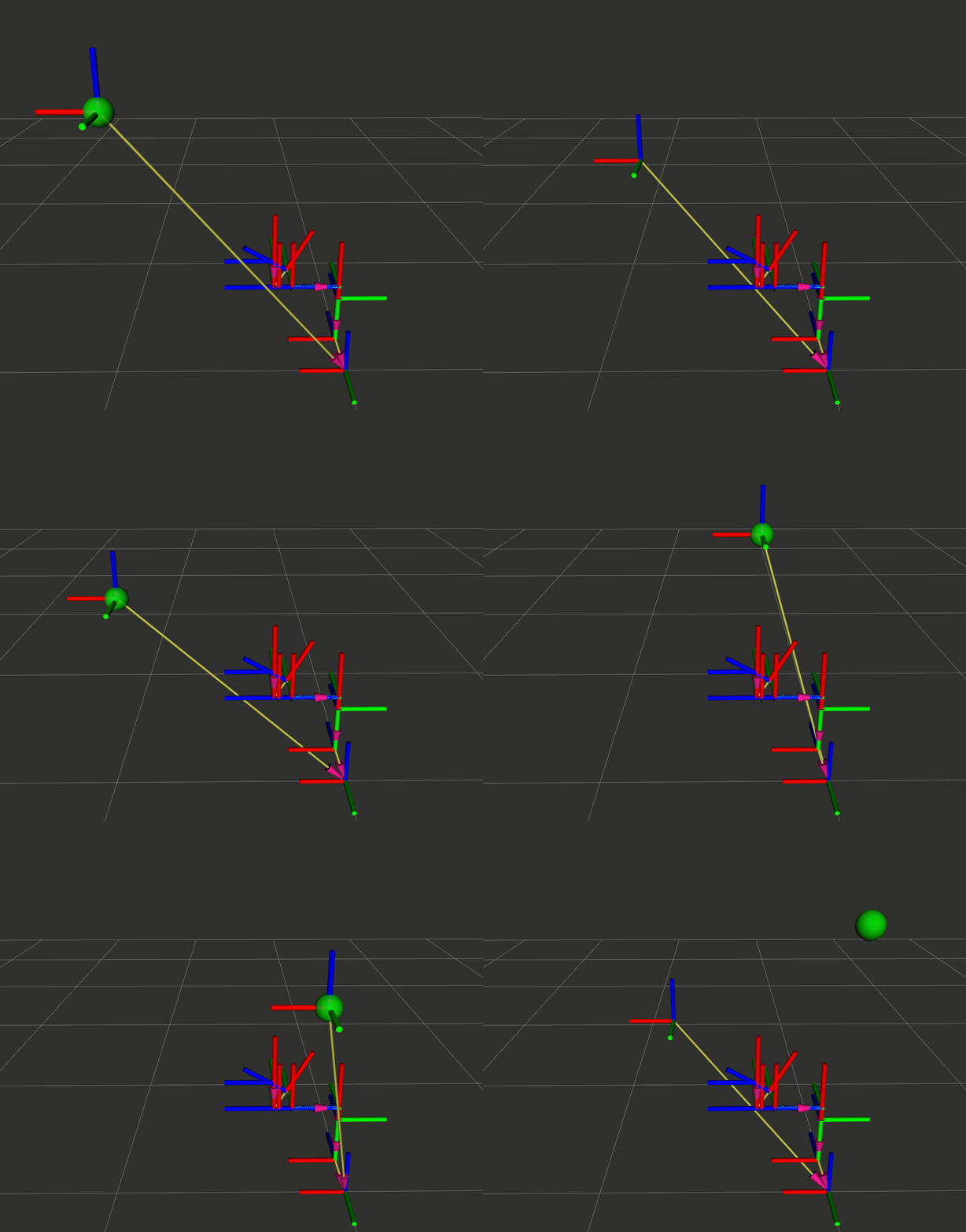
6.4 完整测试流程
# 终端 1:启动机械臂接口(带 TF)
ros2 run py_episode robot_interface_tf --ros-args -p usb_index:=1 -p init_mode:=1
# 终端 2:模拟视觉检测
python3 src/py_episode/py_episode/simple_vision_node.py
# 终端 3:抓取节点(坐标转换 + 运动控制)
python3 src/py_episode/py_episode/simple_grasp_node.py
# 观察输出:
━━━━━━━━━━━━━━━━━━━━━
→ 机械臂应移动到: (0.559, -0.097, 1.015)
[INFO] [1769261192.655663591] [simple_grasp_node]:
━━━━━ 坐标转换结果 ━━━━━
物体在 camera_link:
(0.302, 0.102, 0.498)
物体在 base_link:
(0.555, -0.101, 1.011)
━━━━━━━━━━━━━━━━━━━━━
6.5 真实视觉抓取的改进方向
本章的简化案例不涉及以下内容(留给后续章节):
| 内容 | 本章处理 | 后续完整实现 |
|---|---|---|
| 相机驱动 | 模拟固定位置 | 真实相机节点(RealSense、USB 摄像头) |
| 目标检测 | 固定坐标 | YOLO、深度学习、传统视觉算法 |
| 运动规划 | 打印坐标 | MoveIt、轨迹规划、碰撞检测 |
| 手眼标定 | 假设已知 | 标定算法 |
七、调试技巧
7.1 常见错误及解决方案
| 错误信息 | 原因 | 解决方案 |
|---|---|---|
"xxx" does not exist |
坐标系名称拼写错误或未发布 | 检查坐标系名称,使用 view_frames 查看 |
Extrapolation into the future |
请求的时间晚于最新数据 | 使用 Time() 获取最新变换 |
Lookup would require extrapolation into the past |
Buffer 中没有足够历史数据 | 增加 Buffer 缓存时间或降低查询频率 |
| 变换不更新 | Broadcaster 未持续发布 | 确认发布频率,检查定时器回调 |
7.2 调试工具使用
工具 1:view_frames
# 生成 TF 树 PDF(等待5秒收集数据)
ros2 run tf2_tools view_frames
# 输出文件:frames.pdf
# 包含:所有坐标系、连接关系、发布频率
工具 2:tf2_echo
# 实时显示两个坐标系之间的变换
ros2 run tf2_ros tf2_echo <source_frame> <target_frame>
# 示例
ros2 run tf2_ros tf2_echo base_link tool0
# 输出:
# Translation: [0.450, 0.120, 0.680]
# Rotation: in Quaternion [0.000, 0.000, 0.259, 0.966]
# Rotation: in RPY (radian) [0.000, -0.000, 0.524]
工具 3:tf2_monitor
# 监控 TF 延迟
ros2 run tf2_ros tf2_monitor
# 输出:
# RESULTS: for all
# Frame: link1, published by <unknown>, Average Delay: 0.0028, Max Delay: 0.0050
工具 4:RViz TF 显示
rviz2
# 在 RViz 中:
# 1. 添加 "TF" 显示类型
# 2. 勾选 "Show Names"(显示坐标系名称)
# 3. 勾选 "Show Axes"(显示坐标轴)
# 4. 调整 "Marker Scale"(坐标轴大小)
7.3 系统性调试流程
1. 确认需求
- 要查询哪两个坐标系之间的变换?
↓
2. 检查坐标系是否存在
- 运行 view_frames,查看 frames.pdf
- 确认坐标系名称拼写正确
↓
3. 检查发布频率
- ros2 topic hz /tf
- 确认 Broadcaster 正常运行
↓
4. 检查时间戳
- ros2 run tf2_ros tf2_monitor
- 确认没有异常延迟
↓
5. 检查查询代码
- 使用 Time() 获取最新变换
- 添加超时处理
↓
6. RViz 可视化验证
- 观察坐标轴是否符合预期
八、本章总结
8.1 核心知识点回顾
| 知识点 | 要点 | Python 类/函数 |
|---|---|---|
| Frame | 坐标系,有名称和位置 | - |
| Transform | 两个坐标系之间的关系(平移 + 旋转) | TransformStamped |
| Static Transform | 固定关系(传感器位置) | StaticTransformBroadcaster |
| Dynamic Transform | 运动关系(关节角度) | TransformBroadcaster |
| TF Tree | 树状坐标系结构 | - |
| Buffer | 缓存变换数据 | Buffer() |
| Listener | 订阅 TF 话题 | TransformListener(buffer, node) |
| 查询变换 | 获取两个坐标系之间的变换 | buffer.lookup_transform() |
8.2 机械臂 TF 树完整结构
world
└── base_link ← 静态
└── link1 ← 动态
└── link2 ← 动态
└── link3 ← 动态
└── link4 ← 动态
└── link5 ← 动态
└── link6 ← 动态
└── tool0 ← 动态或静态
├── gripper_link ← 静态
└── camera_link ← 静态
8.3 四种通信方式完整对比
| 通信方式 | 特点 | 典型场景 | 底层实现 |
|---|---|---|---|
| Topic | 单向、持续、异步 | 传感器数据流 | Publisher/Subscriber |
| Service | 双向、一次性、同步 | 配置读写、快速操作 | Server/Client |
| Action | 双向、持续反馈、可取消 | 长时间任务 | ActionServer/ActionClient |
| TF2 | 坐标系管理、查询 | 空间关系、坐标转换 | Topic(/tf + /tf_static) |